
Updates to Alerts in Cradle-8


There have been many updates to alerts in Cradle-8. These include:

There is a new Alerts sidebar which shows a summary of alerts displayed as dials:
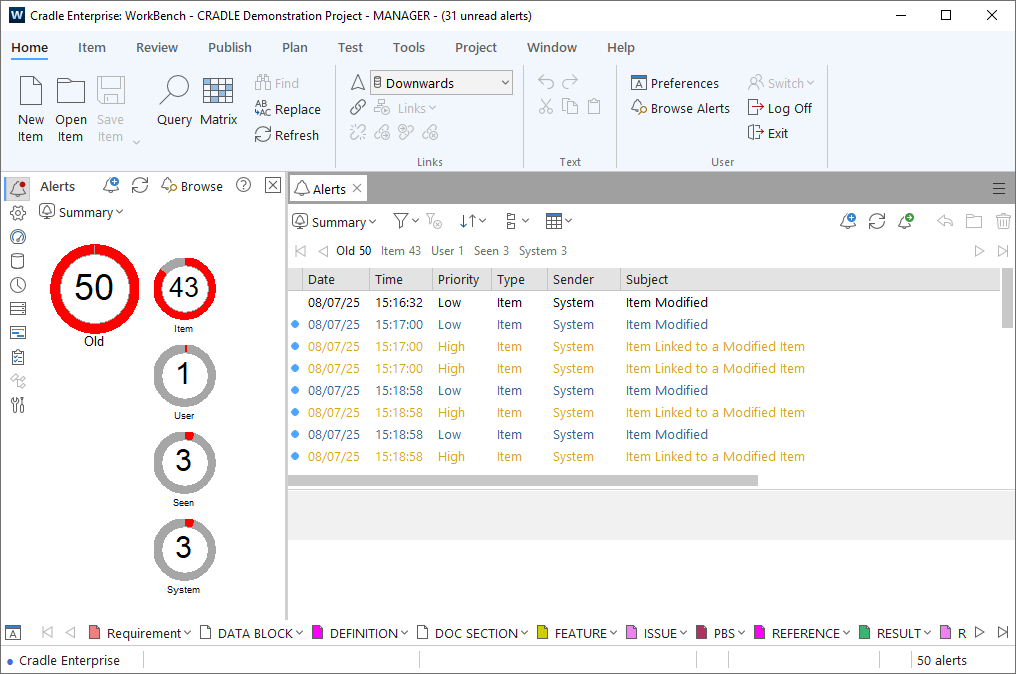
Alerts tab and sidebar

This is accessed by clicking the Alerts sidebar button button.

The Alerts sidebar shows the totals of the alerts with two levels of sub-totalling:

  • The sub-totals of the main sort order are shown as large dials
  • The sub-sub-totals of each sub-sort order for each value of the main sort order are shown as small dials

Clicking on a dial opens the Alerts tab filtered to show the alerts that are represented by the dial.

There are 3 different views to display the alerts:

  • Summary – Summary of all alerts
  • Users – Display of all user alerts
  • Items – Display of all item alerts

Please note you can create three user-defined alerts displays in User Preferences. You can also set a default alerts display for both the Alerts sidebar and the Alerts tab in User Preferences.

User Preferences dialog showing Alerts controls
Alerts section of User Preferences

From the Alerts sidebar you can:

  • Create an alert
  • Refresh the display of alerts
  • Open the Alerts tab

An example of the Alerts sidebar with the Alerts tab open is shown below:

Alerts tab and sidebar

As you can see from the example above there is a red dot on the Alerts sidebar button. This indicates there are unread alerts.

Alerts Tab

From the Alerts sidebar, you can click the Browse Alerts button button which opens the Alerts tab. You can also access the Alerts tab by clicking the Browse Alerts button button on the Home tab.

Alerts Tab Options

At the top of the Alerts tab (above the list of alerts), the following options are available:

  • Alerts display button – There are 3 alert displays; Summary, Users and Items. You can also create an additional three user-defined alert displays in User Preferences
  • Filter button – You can add various filters, e.g. type of alerts, based on item type, date of alert, priority and if the alerts are read/unread. You can choose a filter option from each section in the drop-down. For example you could choose Item, Today, Urgent and Unread. This will display all urgent item alerts from today that have not been read.
  • Clear filter button – Clears the selected filter
  • Sort button – Ability to sort the alerts shown in the display, e.g. by Type, Date, Priority or Status and either Ascending or Descending
  • Alerts grouping button – You can then sub-group the summary value options, e.g. by Type, Date, Priority or Status
  • View button – How to view the alerts as either Summary or Details
  • Create an Alert button – Produces the New Alert dialog
  • Alert refresh button – Refreshes the list of alerts
  • Publish Alerts button – Publishes a report showing the alerts. You can also publish an item alert by selecting an item in a query or the Project sidebar, or an item open in a form and clicking Publish Alerts from the Alerts drop-down on the Item tab or right-clicking and choosing Alerts > Publish Alerts. A report showing the alerts for the selected item(s) is published.
  • Reply button – Produces the New Alert dialog where you can reply to the selected alert
  • Open item button – Opens the item related to the alert
  • Delete button – Deletes the selected alert(s)

Above the display of alerts is a summary bar which shows the sub-totals and sub-sub-totals.

Changing Options

If you make any changes to the filter, sort by, sub-group or view options an asterisk (*) will be placed next to the alerts display name. If you make changes to any user-defined display you then have the option to save these changes by clicking on the Alerts display name and choosing Save. You cannot save any changes to the Summary, Users and Items displays.

Marking Alerts as Read/Unread

Highlighting alerts in the list marks them as read. You also have the option to mark an alert as read or unread by selecting Mark As Unread or Mark As Read from the right-click context menu.

It is now much easier to navigate between the Alerts section of Project Setup to the Alerts Setup dialog for a particular item type when setting up your alerts.

From the Items tab in the Alerts section, if you have the Item Type Specific Alerts option ticked you can either select an item type in the list and click Edit… or you can double-click the item type. This displays the Alerts Setup dialog for the selected item type:

Alerts Setup dialog
Alerts Setup dialog

There is a Select button which allows you to choose whether you want to select All alerts in the list or None.

You can also click the Reset button to reset all data in both the Item and Categories tabs to the defaults.

Sending Alerts

Item alerts can be sent by selecting the item(s) either in a query, a form or from the Project sidebar and then you can either:

  • Click New Item Alert… from the Alerts drop-down on the Item tab
  • Right-click and choose Alerts > New Item Alert…

The New Item Alert dialog is displayed:

Screenshot of the New Item Alert dialog
New Item Alert dialog

Note: Alerts can also be sent to a user list.

Deleting Alerts

There are a number of ways to delete alerts:

  • Alerts tab – Delete the selected alert(s)
  • Project Setup – Delete the current user’s unread and/or read alerts upon logout within a specific time frame
    Delete alert options in Project Setup
    Delete alert options in Project Setup

    Project tab – Delete alerts for all users or the currently logged in user for a specific time frame

    Screenshot showing how to delete alerts
    Delete Alerts dialog

Cradle-8 UI Updates

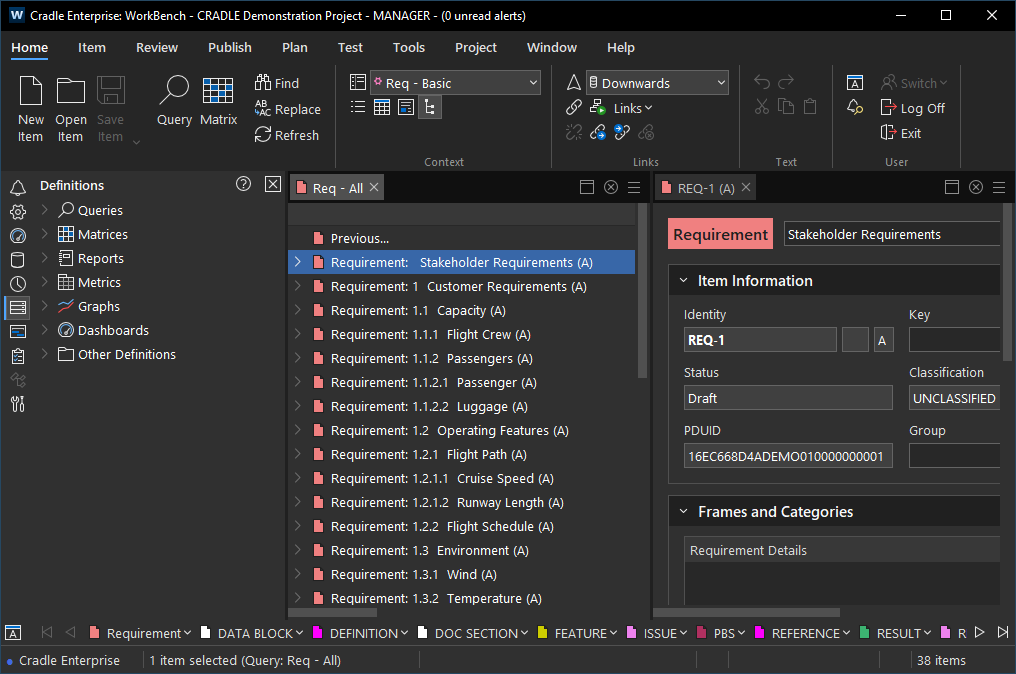
There have been many Cradle-8 UI updates, e.g.:

These are explained below.

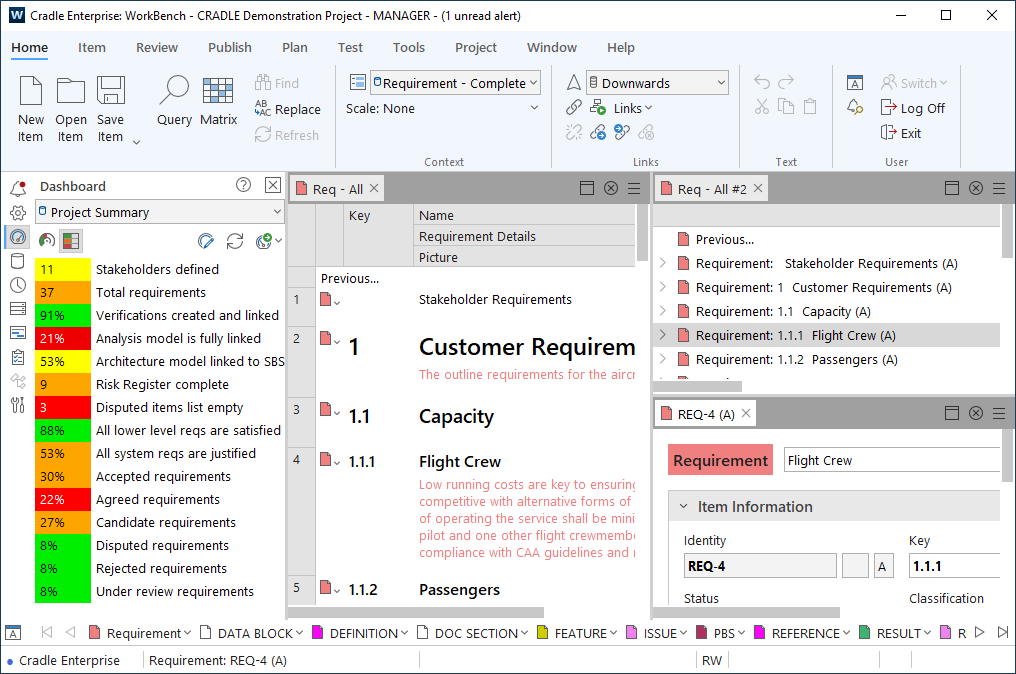
The Cradle-8 user interface has a new modern/updated look. An example of WorkBench is shown below:

Example of WorkBench
Example WorkBench UI using Light theme

Themes

You can now choose a theme (colour scheme) for the WorkBench interface. There are four themes shipped with Cradle:

  • Dark
  • Light (shown in the example above)
  • High Contrast Dark – Similar to the Dark theme but with additional contrast in various ways
  • High Contrast Light – Similar to the Light theme but with additional contrast in various ways

An example of the Dark theme is shown below:

WorkBench Main Screen in Dark mode
Example of WorkBench in Dark Theme

An example of the High Contrast Light theme is shown below:

Example of High Contrast Light Theme
Example of WorkBench in High Contrast Light Theme

An example of the High Contrast Dark theme is shown below:

Example of High Contrast Dark Theme
Example of WorkBench in High Contrast Dark Theme

The theme is set in User Preferences. You also have the option to set the text  and icon sizes (this is explained in the following section):

Sizing options in User Preferences
UI Control in User Preferences

Please note if any of these options are changed you will need to restart the tool for the change to take affect.

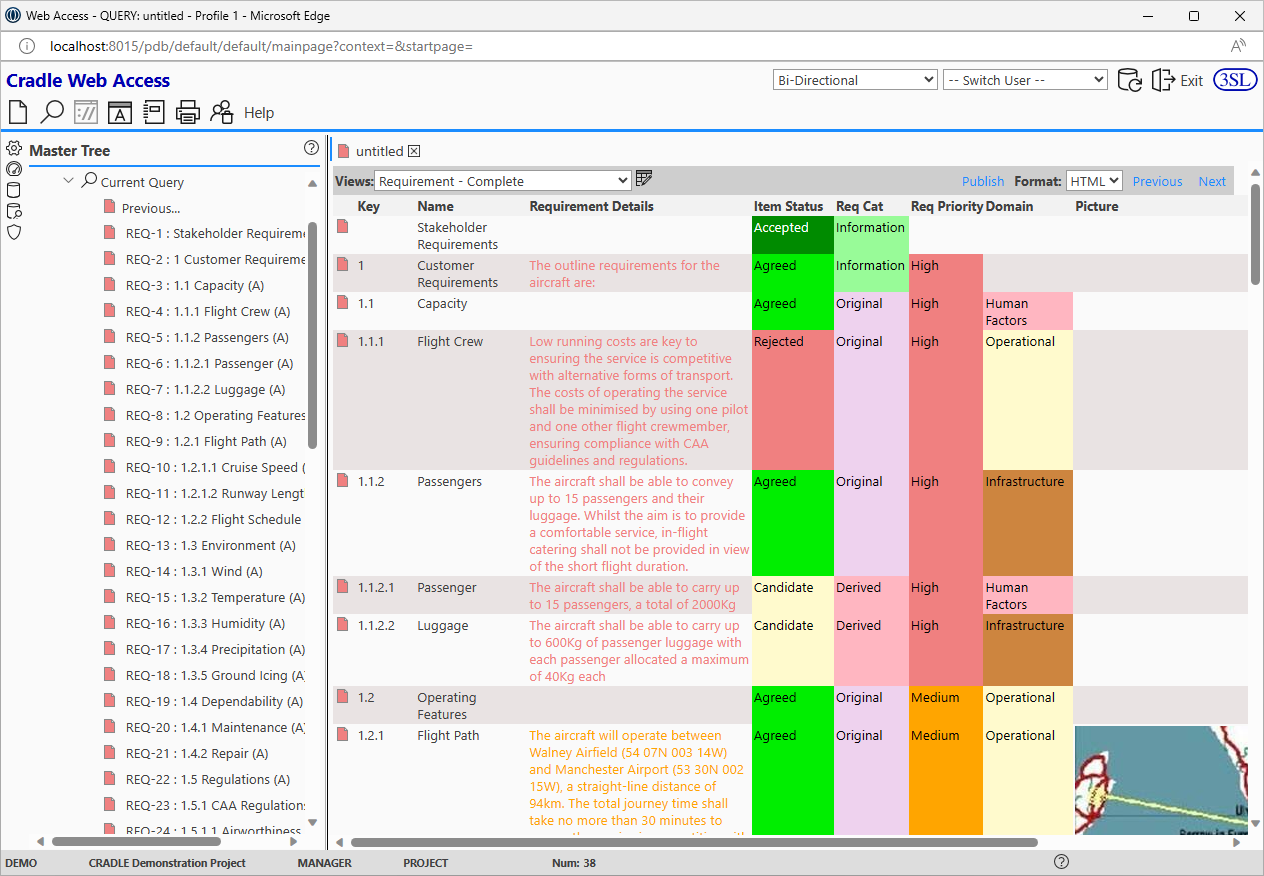
The Web Access interface has also been updated. An example of Web Access is shown below:

Web Access UI Cradle-8
Example of Web Access UI in Cradle-8

An example of the Web Access main screen using the Dark theme is:

Web Access Main Screen in Dark Theme

There are only two themes available for Web Access (Dark or Light). This is set in the cws_config file.

The theme used for the following tools is taken from the Windows default:

Text and Icon Size

You can now choose a size for your UI text and icons in User Preferences.

The text size options are:

  • Smallest – 8pt
  • Small – 9pt
  • Normal – 10pt
  • Large – 11pt
  • Larger – 12pt
  • Largest – 14pt

The icon size options are:

  • Default
  • 1.x
  • 1.5x
  • 2x

Form Styling

For rows, columns and data properties you can now choose a Label Style as one of:

  • Small – 9pt Segoe UI
  • Normal – 10pt Segoe UI
  • Heading 5 – 13px Segoe UI semibold
  • Heading 4 – 11pt Segoe UI semibold
  • Heading 3 – 12pt Segoe UI semibold
  • Heading 2 – 15pt Segoe UI semibold
  • Heading 1 – 18pt Segoe UI semibold

You can also choose a style of bold Bold button, italic Italic button or underline Underline button.

Please note these are fixed styles and cannot be changed.

When you set any of these styling options, you can see a preview of this in the Form Details dialog:

Styling preview in Form Details dialog
Form Details dialog showing Styling

For data properties you can also choose a Value Style as one of:

  • Small – 9pt Segoe UI
  • Normal – 10pt Segoe UI
  • Heading 5 – 13px Segoe UI semibold
  • Heading 4 – 11pt Segoe UI semibold
  • Heading 3 – 12pt Segoe UI semibold
  • Heading 2 – 15pt Segoe UI semibold
  • Heading 1 – 18pt Segoe UI semibold

Again, you can also choose a style of bold Bold button, italic Italic button or underline Underline button. This controls the display of the data value.

These are also fixed styles and cannot be changed by the user.

From the Form Details dialog you can also set a background colour either for the whole form or for individual rows/columns. The example below shows a form with a background colour set:

Form showing background colour
Example form with background colour set

The Background option in the Form Details dialog is shown below:

Form Details dialog showing background colour setting
Background option in Form Details dialog

If a background has been set, you can see this at a glance in the Form Details dialog:

Form Details dialog showing background colours
Form Details dialog showing background

Phase Styling

You can now control the appearance of text in the phase hierarchy nodes as shown below:

Project Setup Phases - Showing Skill
Phase styling settings

The options are:

  • Text Style – Choose the style of the text as one of:
    • Small – 9pt Segoe UI
    • Normal – 10pt Segoe UI
    • Heading 5 – 13px Segoe UI semibold
    • Heading 4 – 11pt Segoe UI semibold
    • Heading 3 – 12pt Segoe UI semibold
    • Heading 2 – 15pt Segoe UI semibold
    • Heading 1 – 18pt Segoe UI semibold
  • Bold button – Make the text bold
  • Italic button – Make the text italic
  • Underline button – Underline the text
  • Foreground – Set a foreground colour
  • Background – Set a background colour

Any changes made to the appearance can be seen in the following places:

  • Phase tree within the Phases section of Project Setup
  • Phase sidebar in WorkBench
  • Phase sidebar in Web Access

Heading styles are automatically bold so you cannot change the bold setting for these.

An example is shown below:

Updated appearance of Phase sidebar
Example styling of the Phase hierarchy

Text Frame Colour Usage

A new user preference has been added which determines how a text frame displays the colour from it’s associated category (if any). The options are:

  • None – Do not display the colour
  • Foreground – The text will be coloured
  • Background – The text area will be coloured and the text will be black or white
  • Bar – A coloured bar is shown alongside the text area (this is the default)

An example text frame using the Foreground user preference is:

Example text frame using Foreground colour usage
Text frame using Foreground colour usage

The same text frame using the Background user preference is:

Example text frame using Background colour usage
Text frame using Background colour usage

The same text frame using the Bar user preference is:

Example text frame using Bar colour usage
Text frame using Bar colour usage

Web Publisher

New icons have been added to Web Publisher and the fonts have also been updated in the Web Publisher templates:

View List of Items
Example Web Publisher template

Please note some Web Publisher themes have also been removed.

Cradle Public Training Courses 2027

Training Course Dates for 2027

3SL are offering a number of Cradle public training courses in 2027.

Cradle Online Training
Online Cradle Training

Public courses are ideal for companies:

  • With a small number of candidates
  • Starting to use Cradle but not needing an industry tailored course
  • Using more advanced features

These courses are an alternative to the tailored, industry/implementation specific consultancy and training offered by 3SL. This makes for a cost effective solution, where you’ll benefit from all the normal learning, with the advantage that a public course will have the chance to network and share with other virtual attendees from other industries.

Following feedback our online courses have been split into smaller part day sections (a two day course is now delivered over four ½ days and a one day course is now delivered over two ½ days ). This will allow candidates a longer break from training screens and more of an opportunity to put in practice some of the topics covered. When returning to the following session any questions can then be resolved.

This calendar is subject to change. Courses may be added removed or altered depending on demand. Booking will become available through the website shop for credit/debit card transactions prior to each course. For purchase orders and transfer payments please contact 3SL.

Please note that all courses are presented in the latest Cradle release.

Details:


DateSubjectVenueCostDetails
January – 19th to 20thIntroductionOnline learning tutored course.
2 * ½ days.
£375+VATintroduction-course-january-2027
February – 15th to 18thRequirements ManagementOnline learning tutored course.
4 * ½ days.
£700+VATrequirements-management-february-2027
March – 15th to 18thDocument PublisherOnline learning tutored course.
4 * ½ days.
£700+VATdocument-publisher-march-2027
April – 13th to 14thRisk ManagementOnline learning tutored course.
2 * ½ days.
£375+VATrisk-management-april-2027
May – 25th to 26thTest ExecutionOnline learning tutored course.
2 * ½ days.
£375+VATtest-execution-may-2027
June- 15th to 16thConfiguration ManagementOnline learning tutored course.
2 * ½ days.
£375+VATconfiguration-management-june-2027
July- 13th to 14thProject AdministrationOnline learning tutored course.
2 * ½ days.
£375+VATproject-administration-july-2027
July- 20th to 21stIntroductionOnline learning tutored course.
2 * ½ days.
£375+VATintroduction-course-july-2027
August – 16th to 19thRequirements ManagementOnline learning tutored course.
4 * ½ days.
£700+VATrequirements-management-august-2027
September – 13th to 16thDocument PublisherOnline learning tutored course.
4 * ½ days.
£700+VATdocument-publisher-september-2027
October- 19th to 20thRisk ManagementOnline learning tutored course.
2 * ½ days.
£375+VATrisk-management-october-2027
November – 16th to 17thTest ExecutionOnline learning tutored course.
2 * ½ days.
£375+VATtest-execution-november-2027
December – 7th to 8thConfiguration ManagementOnline learning tutored course.
2 * ½ days.
£375+VATconfiguration-management-december-2027

If you would like to be kept in touch with the details for Cradle public training courses 2027, please send an email to salesdetails@threesl.com.

Buy Now

All courses are available for direct purchase online. Buy Now!

Continue reading “Cradle Public Training Courses 2027”

Public Online Training Course – Test Execution May 2027

Test Execution May 25th to 26th 2027

The first test training this year is – Test Execution course May 2027.

“A great opportunity for small teams, or a couple of new team members to get started with automated test execution and Cradle”

Cradle Online Course based on Photo by Andrew Neel from Pexels
Online Course

Businesses that are introducing Cradle and full Requirements Management processes into their operations, can book training for all aspects of the roll-out, from the basics through to specialist administration courses.

Public Test Execution May 25th to 26th 2027

If, however, you have one or two people new to a project or only have a very small team, this may not be a viable solution. With 3SL’s public online courses, you’ll benefit from all the normal learning, but will have the chance to network and share with other virtual attendees from other industries. This can be a cost effective solution to get you up to speed with Cradle and Requirements Management. This course is ideal for getting a team up and running.

Details:

DateSubjectVenueCostPre-RequisitesProvision
May 25th to 26th 2027Test ExecutionOnline learning tutored course.
2 * ½ days.
£375+VATPC/Laptop – internet browser & Cradle installed **Soft copy course materials, and printed certificate

If you would like to be kept in touch with the details for this Training Course – Test Execution May 2027 please send an email to salesdetails@threesl.com.

Buy Now

All courses are available for direct purchase online. Buy Now!

Continue reading “Public Online Training Course – Test Execution May 2027”

Public Online Training Course – Risk Management April 2027

Risk Management 13th-14th April 2027

The first scheduled Risk Management course of 2027. Learn how to identify, analyse, evaluate, treat and monitor the risks associated with activities or events within your business with this year’s – Risk Management course April 2027.

“A great opportunity for managers to understand and mitigate risks”

Cradle Online Course based on Photo by Andrew Neel from Pexels
Online Course

Businesses that have selected Cradle for their Risk Management process can benefit from an in depth understanding on how Cradle can manage your risk process.

Risk Management Course 13th to 14th April 2027

The Risk Management course is designed for project team leaders or managers who administer and manage risks.

The Cradle Risk Management course focuses on providing an introduction to Risk Management in Cradle. We will start by setting up the schema for a small example and use this to manage the risks and provide some example reports. In the final module, we provide a worked example.

However, if you have a larger team or wish to cover multiple topics, courses can be tailored and held at your premises / virtually depending on restrictions and requirements or online at a date and time to suit.

Details:

DateSubjectVenueCostPre-RequisitesProvision
April 13th – 14th 2027Risk ManagementOnline learning tutored course.
2 * ½ days.
£375+VATPC/Laptop – internet browser & Cradle installed **Soft copy course materials, and printed certificate

If you would like to be kept in touch with the details for this Training Course – Risk Management April 13th – 14th 2027 please send an email to salesdetails@threesl.com.

Buy Now

All courses are available for direct purchase online. Buy Now!

Continue reading “Public Online Training Course – Risk Management April 2027”

Public Online Training Course – Configuration Management June 2027

Configuration Management June 15th to 16th 2027

The first CM training this year is – Configuration Management course June 2027.

“A great opportunity for small teams, or a couple of new team members to get started with Configuration Management and Cradle”

Cradle Online Course based on Photo by Andrew Neel from Pexels
Online Course

Businesses that are introducing Cradle and full Requirements Management processes into their operations, can book training for all aspects of the roll-out, from the basics through to specialist administration courses.

Public Configuration Management June 15th to 16th 2027

If, however, you have one or two people new to a project or only have a very small team, this may not be a viable solution. With 3SL’s public online courses, you’ll benefit from all the normal learning, but will have the chance to network and share with other virtual attendees from other industries. This can be a cost effective solution to get you up to speed with Cradle and Requirements Management. This course is ideal for getting a team up and running.

Details:

DateSubjectVenueCostPre-RequisitesProvision
June  15th to 16th 2027Configuration ManagementOnline learning tutored course.
2 * ½ days.
£375+VATPC/Laptop – internet browser & Cradle installed **Soft copy course materials, and printed certificate

If you would like to be kept in touch with the details for this Training Course – Configuration Management June 2027 please send an email to salesdetails@threesl.com.

Buy Now

All courses are available for direct purchase online. Buy Now!

Continue reading “Public Online Training Course – Configuration Management June 2027”

Public Online Training Course – Requirements Management February 2027

Requirements Management February 15th to 18th 2027

The first RM training this year is – Requirements Management course February 2027.

“A great opportunity for small teams, or a couple of new team members to get started with RM and Cradle”

Cradle Online Course based on Photo by Andrew Neel from Pexels
Online Course

Businesses that are introducing Cradle and full Requirements Management processes into their operations, can book training for all aspects of the roll-out, from the basics through to specialist administration courses.

Public Requirements Management February 15th to 18th 2027

If, however, you have one or two people new to a project or only have a very small team, this may not be a viable solution. With 3SL’s public online courses, you’ll benefit from all the normal learning, but will have the chance to network and share with other virtual attendees from other industries. This can be a cost effective solution to get you up to speed with Cradle and Requirements Management. This course is ideal for getting a team up and running.

Details:

DateSubjectVenueCostPre-RequisitesProvision
February 15th to 18th 2027Requirements ManagementOnline learning tutored course.
4 * ½ days.
£700+VATPC/Laptop – internet browser & Cradle installed **Soft copy course materials, and printed certificate

If you would like to be kept in touch with the details for this Training Course – Requirements Management February 2027 please send an email to salesdetails@threesl.com.

Buy Now

All courses are available for direct purchase online. Buy Now!

Continue reading “Public Online Training Course – Requirements Management February 2027”

Public Online Training Course – Requirements Management August 2027

Requirements Management August 16th to 19th 2027

The second RM training this year is – Requirements Management course August 2027.

“A great opportunity for small teams, or a couple of new team members to get started with RM and Cradle”

Cradle Online Course based on Photo by Andrew Neel from Pexels
Online Course

Businesses that are introducing Cradle and full Requirements Management processes into their operations, can book training for all aspects of the roll-out, from the basics through to specialist administration courses.

Public Requirements Management August 16th to 19th 2027

If, however, you have one or two people new to a project or only have a very small team, this may not be a viable solution. With 3SL’s public online courses, you’ll benefit from all the normal learning, but will have the chance to network and share with other virtual attendees from other industries. This can be a cost effective solution to get you up to speed with Cradle and Requirements Management. This course is ideal for getting a team up and running.

Details:

DateSubjectVenueCostPre-RequisitesProvision
August  16th to 19th 2027Requirements ManagementOnline learning tutored course.
4 * ½ days.
£700+VATPC/Laptop – internet browser & Cradle installed **Soft copy course materials, and printed certificate

If you would like to be kept in touch with the details for this Training Course – Requirements Management August 2027 please send an email to salesdetails@threesl.com.

Buy Now

All courses are available for direct purchase online. Buy Now!

Continue reading “Public Online Training Course – Requirements Management August 2027”

Public Online Training Course – Configuration Management December 2027

Configuration Management December 7th to 8th 2027

The second CM training this year is – Configuration Management course December 2027.

“A great opportunity for small teams, or a couple of new team members to get started with Configuration Management and Cradle”

Cradle Online Course based on Photo by Andrew Neel from Pexels
Online Course

Businesses that are introducing Cradle and full Requirements Management processes into their operations, can book training for all aspects of the roll-out, from the basics through to specialist administration courses.

Public Configuration Management December 7th to 8th 2027

If, however, you have one or two people new to a project or only have a very small team, this may not be a viable solution. With 3SL’s public online courses, you’ll benefit from all the normal learning, but will have the chance to network and share with other virtual attendees from other industries. This can be a cost effective solution to get you up to speed with Cradle and Requirements Management. This course is ideal for getting a team up and running.

Details:

DateSubjectVenueCostPre-RequisitesProvision
December  7th to 8th 2027Configuration ManagementOnline learning tutored course.
2 * ½ days.
£375+VATPC/Laptop – internet browser & Cradle installed **Soft copy course materials, and printed certificate

If you would like to be kept in touch with the details for this Training Course – Configuration Management December 2027 please send an email to salesdetails@threesl.com

Buy Now

All courses are available for direct purchase online. Buy Now!

Continue reading “Public Online Training Course – Configuration Management December 2027”