Recently, we have received reports from some customers who have been installing Cradle-7.1, or upgrading to Cradle-7.1, and have seen messages saying that the file:
api-ms-win-crt-stdio-l1-1-0.dll
is missing or is not available.
These messages have been seen in installations on Windows 7 and Windows Server 2012, but could potentially affect other versions of Windows. The messages have only been seen in a small number of Cradle installations. If you want to see more detail, please search for this filename in your favourite search engine, such as DuckDuckGo, Yandex, Baidu, Bing, Yahoo or Google.
In all cases, the solution to these problems is to install Windows updates. Sometimes, you may have to do this more than once, since installing Windows updates may install a pre-requisite for a later Windows update. So, please repeatedly install Windows updates and reboot and keep doing this until there are no more updates to install.
When you have installed the Windows updates, uninstall the Cradle-7.1 that you were trying to install and install it again.
Everything will then be OK.
We apologise for any inconvenience that this may cause.
The structure of each Cradle database is defined by it’s schema. This contains many parts, but the most fundamental are the ‘item types‘ for the types of information that Cradle will manage and the category and frame attributes of these item types.
Item Types, Categories and Frames
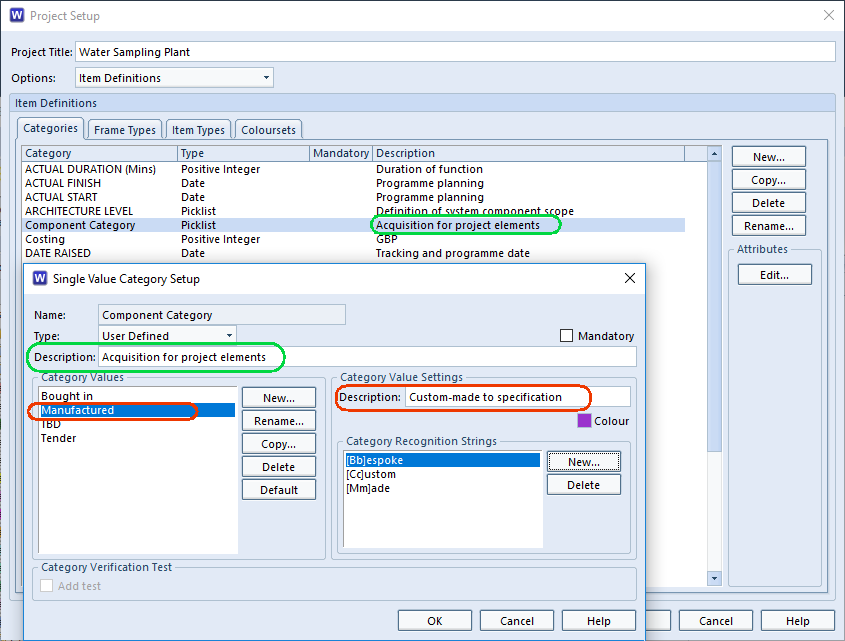
When you define the schema, you can specify a ‘description‘ for all of these parts, including:
Item types
Category codes
Each value in a category code that is a pick-list of value(s)
All frames
Schema Descriptions
Setting Schema Descriptions
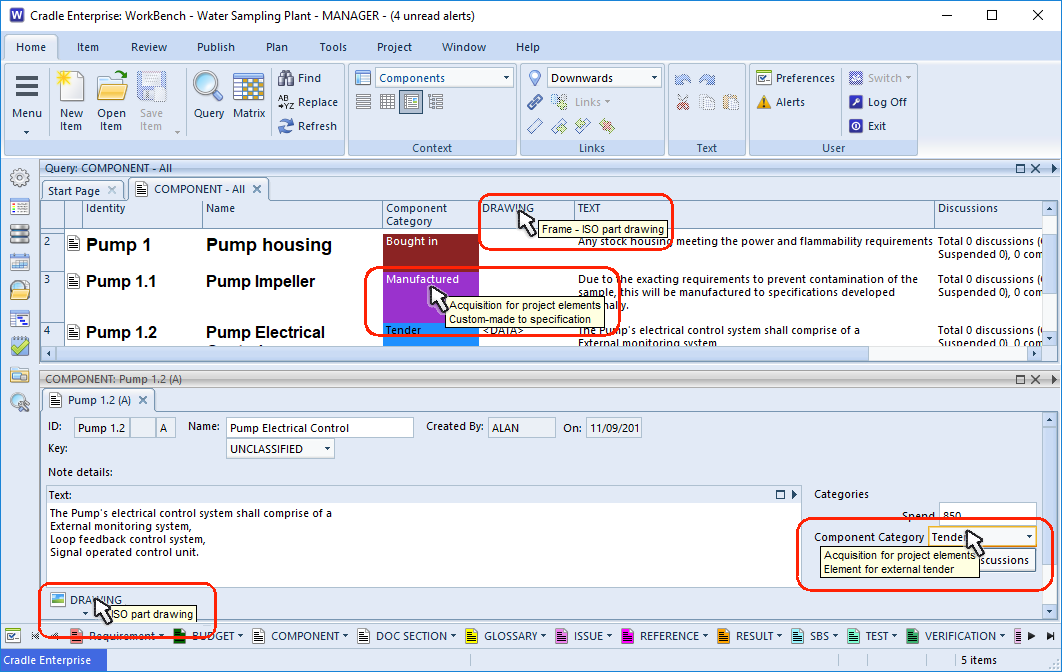
These descriptions are very useful to end users, because Cradle will display them as tooltips in the UI (User Interface). For example, when the user moves to set a category value, Cradle will display:
Category and Frame Tooltips
The description of the category
The description of the current category value
When a user moves into the heading for a frame, the UI will display the description of that frame as a tooltip.
Link Rules
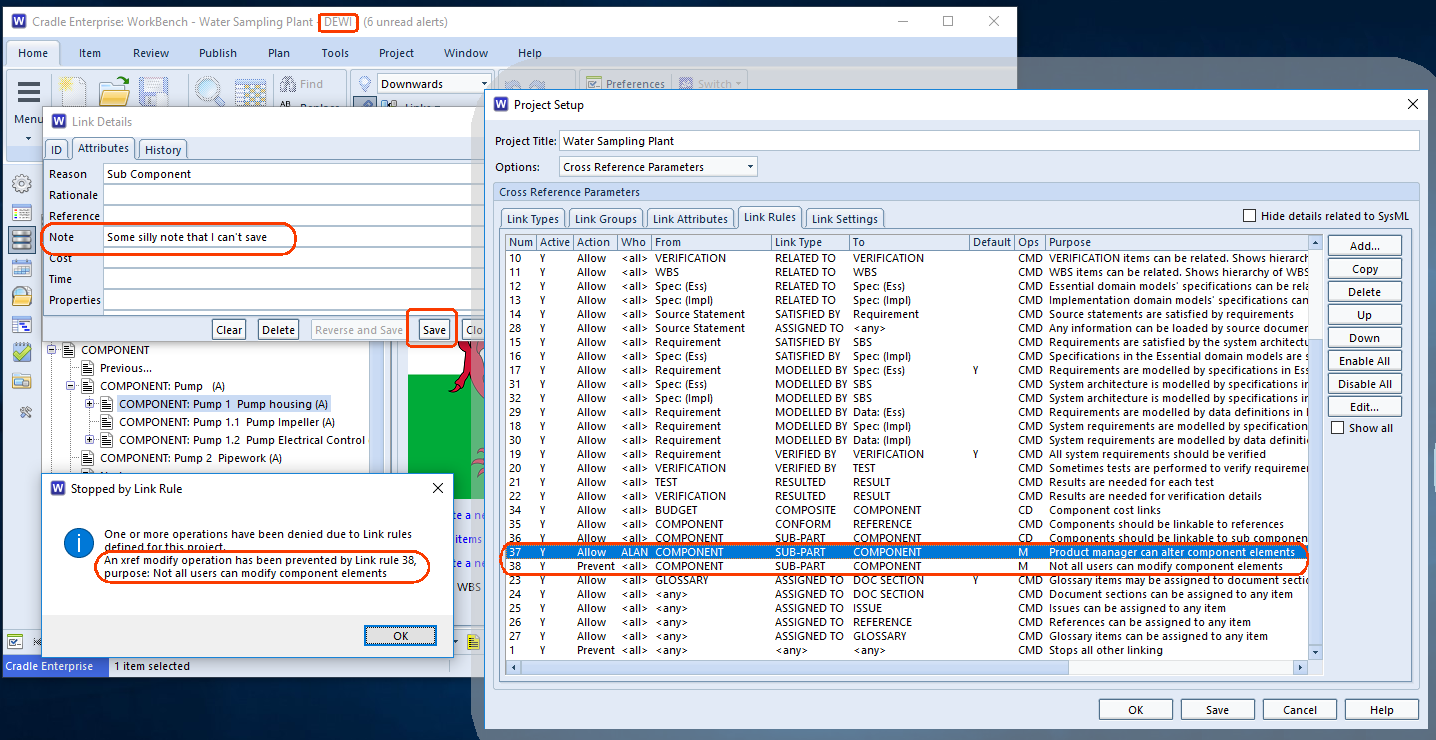
A comment as to the purpose of the link rule can be added to the schema. This is a useful aide-mémoire to those editing the rules. However, if a certain action is prohibited by the rules, then the user is shown why.
In this example two rules have been set up, one to allow user Alan to modify sub-part to component links and another to prevent all users modifying the same link. Because of the top-down sequence of rule matching this has the effect of allowing only Alan to modify cross references of this type. The example shows Dewi trying to modify the link attributes between the Pump parent component and the Pump housing linked as a sub-component. The warning shows why this alteration was prevented. The text from the schema is shown in the dialog.
Link Rule Documentation
Groups
Within Cradle item types can have a number of different categories. Some item types may share the same categories, others may use unique values.
The Group field is available across the whole project. When the schema contains a number of entries for the Group field, these can be applied to any item type. If the project defines values for the Group, selection is only from the defined list. If no pick-list is defined, it is simply a free-form text field, to use as the user wishes.
Group Descriptions
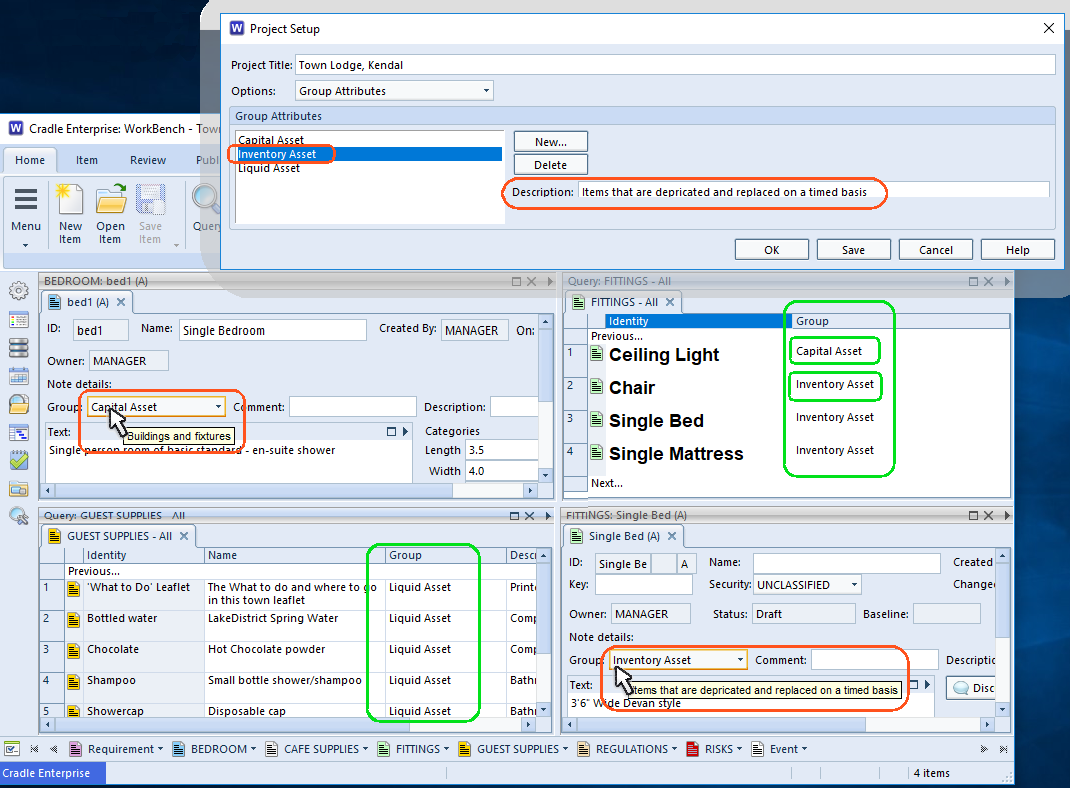
This example shows three types of assets, Capital, Inventory and Liquid. Some item types may only fall into one group, in this example a physical bedroom is going to be a capital asset, the guest supplies are liquid assets. However, when it comes to fittings, the light is being grouped with the Capital assets and the bed and so on in the Inventory group.
However you choose to use this cross item categorisation, the descriptions given to the group show as tooltips when hovering over the group field in a form.
Need to restrict what a user can set in a category?
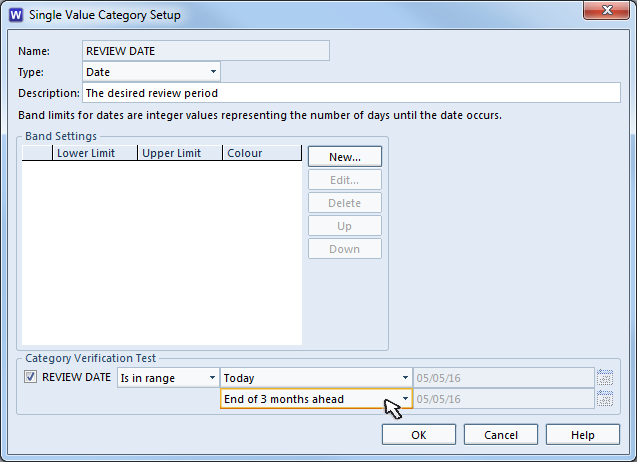
All categories are set up in the Project Schema. Adding a verification test can be used to ensure only sensible values are added. The types of test that can be set are controlled by the type of data being represented in the category. For example, a date can be tested to be within range, a text category may have a Regex test.
We are pleased to release a new presentation that discusses the need and role for requirements management (RM) and systems engineering (SE) tools and the need for a change in paradigm from document-based processes to data-based processes.
We are pleased to announce the second in our a new series of white papers that will discuss the role of different types of information in systems engineering processes, and how to deploy each of them in Cradle.
The second white paper in this series discusses user requirements. It is available here:
We are pleased to announce a new series of white papers that will discuss the role of different types of information in systems engineering processes, and how to deploy each of them in Cradle.
The first white paper in this series discusses needs. It is available here:
3SL attended the SEC 2016 conference in Washington at the end of last month. We presented a tutorial on how SysML can be used in a MBSE process that is integrated into the rest of the systems lifecycle, including initial needs and requirements capture and following with links to test and delivery.
That presentation can be downloaded from our website here:
3SL attended the SEDC 2016 conference and presented a view of SysML and MBSE in the systems context, for executives. The essence of this presentation is that MBSE is good, SysML is one form of model and associated notations for MBSE, but these cannot be useful unless they are part of an overall process for the complete lifecycle.
which announces the release of Cradle-7.1 that integrates SysML into the systems lifecycle!
If you have an active maintenance agreement with 3SL, you are welcome to upgrade to Cradle-7.1 at any time, but please remember that you will need a new Security Code from 3SL to use Cradle-7.1!
If you frequently run the same item commands, or you want to guide users to use a particular subset of commands, add them to the Cradle ‘View’. These are termed “View commands”.
When defining a Cradle Views, you can add commands to appear at the ‘Item icon’. When the view is run this enables different users to be guided to commands for their role in the project. Combined with a phase and they can, run the appropriate query and they can get straight into creating children, linked items, updating link details, or whatever is appropriate for their role. Spending a little while now, arranging the process steps for your users can give a significant gain in productivity.