
Thesaurus Day 2018

Thesaurus Day Celebrate Variety

Happy #ThesaurusDay or Should that be “Convivial greetings to all celebrating alternative onomasticon listings day” ?

In pure terms a list of equivalent words or synonyms helps enrich our language. The thesaurus may list a number of alternatives that are subtly different.

Requirements ambiguity

When writing a requirement we have to be careful that we are unambiguous in both our language and meaning.

Language Construct

“The value displayed shall be the total time expended for each activity of a particular type divided by the count of all activities of each type”.  Could be interpreted as

A1 2mins, A2 1min, A3 4mins = 7 mins for type A
B1 3mins, B2 4mins, B3 8mins, B4 1min = 16 mins for type B

Value to display for A = (7 mins / 7 )  = 7
Value to display for B = (16 mins / 7) = 2.3

or as intended

Value to display for A = (7 mins / 3 )  = 2.3
Value to display for B = (16 mins / 4) = 4

In this case we could have removed the ambiguity by using an equation as a synonym for the language.

ValA = sum{typeA.duration} / count{type A}
ValB = sum{typeB.duration} / count{type B}

Meanings

Choices in language can mean different things to different people. This is especially true where suppliers and customers work in different fields. The Customer’s Requirement is their end goal, for the supplier it is the starting point. The Customer asks that the “After the office upgrade and IT installation users should have a clear desk”. Maybe unhindered or unobstructed would have served better?

ambiguity over a meaning
Clear Desk – What was envisaged & what was delivered

Stay SMART(U)

So to celebrate thesaurus day 2018 : Do your best to keep your requirements Specific, Measurable, Attainable, Relevant and Time-bound. Oh and of course Unambiguous, but rich with language.

January 2018 Newsletter

Happy New Year

Welcome one and all to 2018!

New Year Fireworks 3SL - (based on images from pexels.com)
Happy New Year

Have you got used to writing that on a cheque yet? Oh dear, showing my age, can anyone remember when they last wrote a cheque? Come to think of it, when was the last time you actually WROTE the date, rather than just clicking a calendar icon on an app……. Answers on a postcard to 3SL at the usual address.…. or
social-handwritten_dates@threesl.com for a chance to get a mention in next month’s newsletter.

With regard to cheques and all things banking just another reminder to check you’ve updated 3SL banking details, in accordance with the changes brought into UK banks through the ring fencing process, posted here.

New Year’s Resolution

We all make promises to ourselves, many we find hard to keep. Yet another sucker falls for the gym membership sign up and then decides binge watching that box-set is easier/more enjoyable/cheaper. It does really seem like the worst time of year to be making decisions to be getting out and about exercising. (Apologies, again, to our customers on the other side of the globe – read this again in 6 months !).

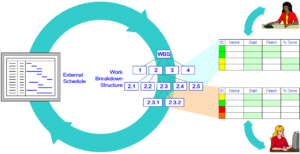
illustration of data exchange between Microsoft Project and Cradle WBS
Data Exchange Microsoft® Project / Cradle

One resolution that should be easier to keep is to start afresh with plans for current and new projects. We’ve had time to allow our heads to clear over the Christmas break and should be facing work with a new vigour.  Planning is the key to ensuring schedules and expectations are met.  This may seem like a very un-Cradle® plug, what’s planning got to do with modelling and requirements? The answer is in fact quite a lot. Without a project management plan and schedule how would the capture, design, review and test be achieved in the right order? A Work Breakdown Structure can be used to segment activities, and component parts of a project into manageable chunks. The ability to link a plan from Microsoft® Project brings together the planning and implementation elements of your project. For more information see the Cradle Help on Project Capture

GDPR

padlock over computer based on images from negativespace.co pixabay.com on pexels.com
GDPR

If you missed our initial update on the new general data protection regulations, you may like to look in December’s Newsletter. Please don’t forget to look out for requests to opt into communication updates from 3SL.

Social Media

Twitter

We pondered whether anyone could model the human gut / brain interface with System Engineering techniques.

We looked at how meeting today’s energy requirements are changing through solar train power and floating solar cells.

Hints of the Month

Last month’s blog articles included:

Outputting a tree’s leaf nodes through Document Publisher

How the holistic view is incorporated in  a model.

0,1,1,2,3,5,8,13,21,34,55,89,144 – It was Fibonacci Day and we marked it looking at some Cradle calculations.

You can read Hints & Tips in the 3SL Blog

Controlling Your Initial View

Query with a View

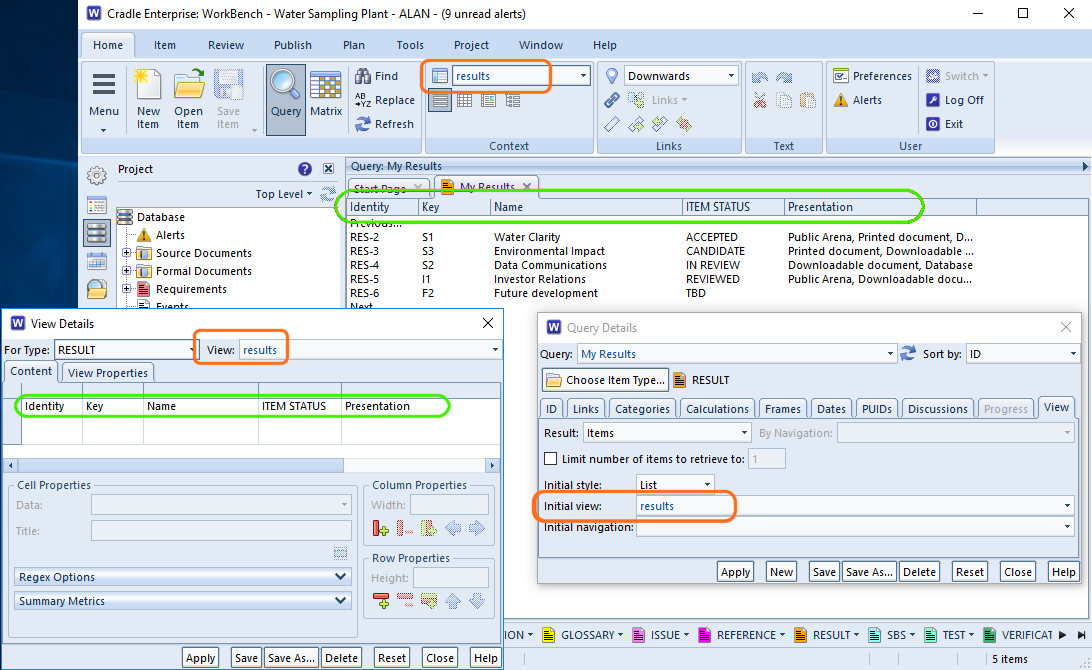
Each query can have an initial View associated with it. Each time this query is run, it will apply the view. This is the best way of controlling your initial view for a particular query.

Shown in the screen shot below the project view ‘results‘ has been set in the query ‘My Results‘ each time this query is run the columns specified in the View Details are shown. There’s nothing to stop a user selecting a different view in the ribbon later.

showing the query, view setup and results
Initial View Settings

Remember that View

WorkBench is designed to remember the last view you used for a particular item type.  It’s likely that next time you run a query for the same item type, you’ll want the same view. Even if you close all your tabs, within the same session you are controlling your initial view of each query by the last choice you selected.

Initial Influence

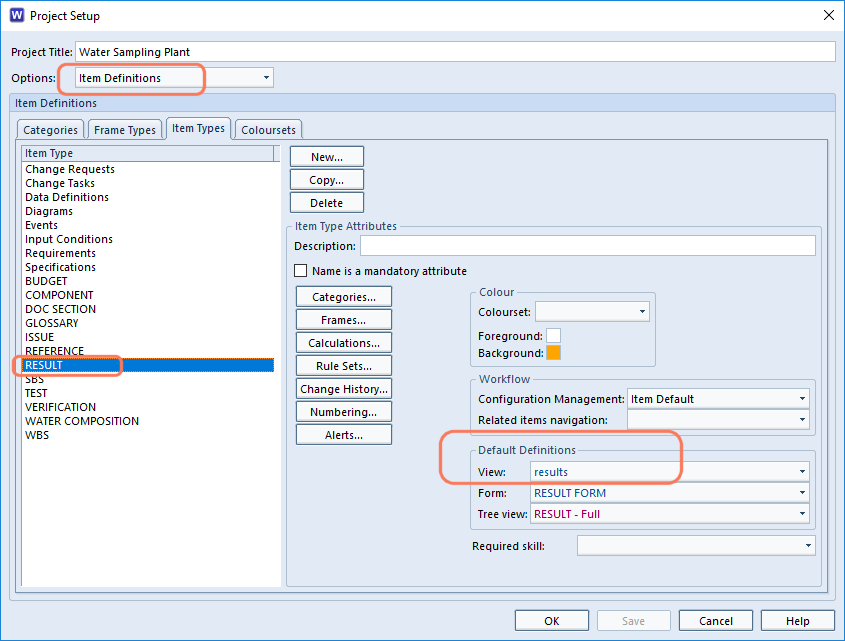
You can control the initial view selected for a query in a project by associating a view with an item type in the project’s schema. Open Project Setup and select the item type and an appropriate view. When starting Cradle, this will be the view selected for this item type, the first time it it is queried. Thereafter, WorkBench will switch to  “Remember that View”.

setting an initial view in the schema
Initial View – Schema

QAB Queries and Views

The Quick Access Bar at the bottom of WorkBench as some auto generated queries and auto generated views for speed. If one of these is selected then the the view that is ‘remembered’ will be the last one of the Automatic views.

What’s a dangling cross reference?

Dangling Cross Reference

These are cross references in the Cradle database where one or both items at the end of the reference are missing.

It goes without saying that if you have item A linked to item B and then delete item B, the link between A and B should disappear. In usual operations this is true and this is what Cradle will do.

However, it is possible to create a dangling cross reference when importing partial data from other projects or backups. Say for example you have exported all your Definition items (one of which is item A) and separately all your cross references.  (including the one to item type Constraints one of which is item B). Into a new project you import all the cross references and then the Definition items. You plan to create new constraints. If one is not created called B there will be a dangling cross reference in the new project.

Finding and Rectifying Cross Reference Problems.

Cross Reference Integrity Checker

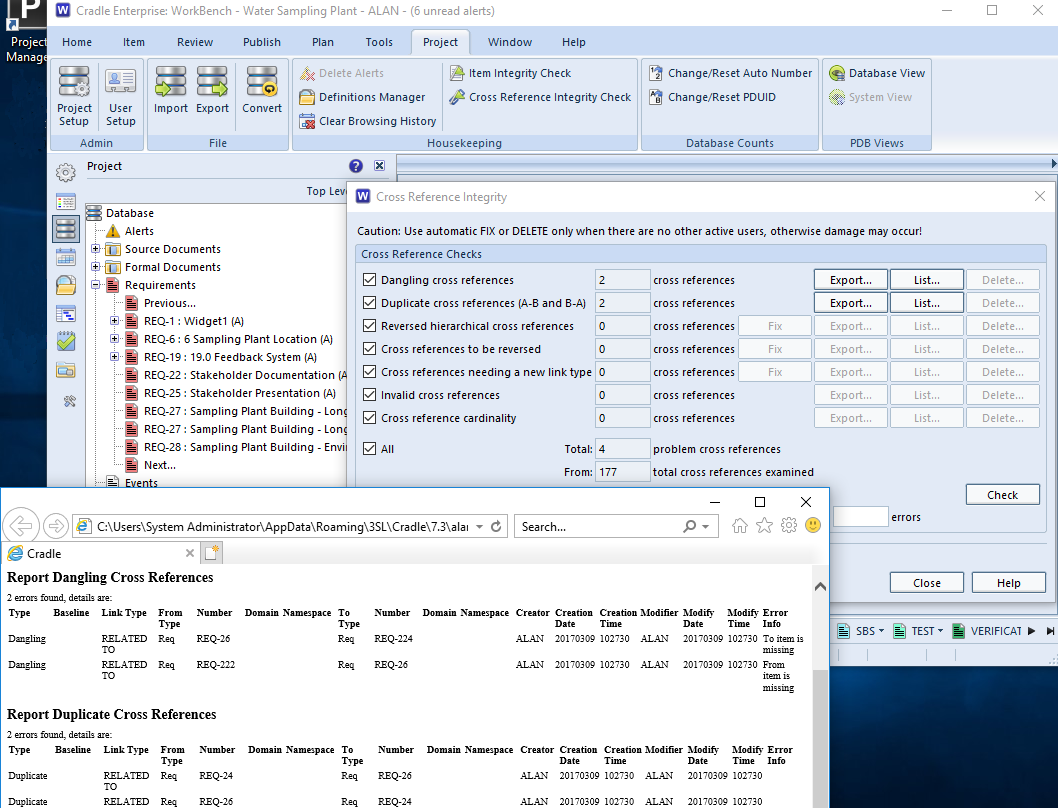
Dangling cross references are just one of the  anomalies that can be detected using the cross reference integrity checker. This is run from the Project ribbon.

There are a number of tests which can be selected and these are shown below.

Once a problem has been identified, it can be fixed, deleted or exported for editing as appropriate. The availability of these will depend on both the problem and the current user’s privileges.

The cross reference integrity checker and report
Cross Reference Integrity


CheckDescription
Dangling cross referencesDetects cross references whose from or to item do not exist.
Duplicate cross references (A-B and B-A)Cross references are considered to be duplicates if a cross reference exists from item A to item B and another exists from item B to item A and they both share the same link type.
Reversed hierarchical cross referencesDetects cross references that are between items where the from item has an identity that suggests it to be the child of the to item.
Cross references to be reversedDetects cross references that are invalid according to the current link rules but which, if reversed, become valid.
Cross references needing a new link typeDetects cross references that are invalid according to the current link rules but which become valid if their link type is changed and where there is only one link type that is valid for the cross reference.
Invalid cross referencesDetects cross references that are invalid according to the current link rules.
Cross reference cardinalityDetects cross references whose cardinality does not match the current link rules.
AllWill perform all the above integrity checks.

Performance

Dangling xrefs can cause issues with performance when items have been deleted. If item A was linked to item B, then item B got deleted. There would be a dangling xref which isn’t linking any items, creating extra data. If another item B was then created. It would then be linked back with item A. Which could potentially cause problems?

For full information on the settings see the help on Cross Reference Integrity

Article Updated 04/02/2019 – Added performance section

Special characters in regexes and how to escape them

Regex – Regular Expression

Cradle provides support for regular expressions, regular expressions are a means to find variable text in places such as:

  • Queries
  • Find dialogs
  • Category recognition strings
  • Category value validations

For instance, regular expressions (regexes) can be used in queries to find all items in which any frame, or a specific frame, or any of a list of frames, contains text matching the regular expression that you are searching for. For example, if you wanted to find all items containing sequences of capital letters followed by numbers, then the regular expression would be:

[A-Z]+[0-9]+


Whilst you are here, take a look at Why is Requirements Management Essential for your Business?


Special Characters

Some characters have special meanings within regexes these characters are:

CharDescriptionMeaning
\BackslashUsed to escape a special character
^CaretBeginning of a string
$Dollar signEnd of a string
.Period or dotMatches any single character
|Vertical bar or pipe symbolMatches previous OR next character/group
?Question markMatch zero or one of the previous
*Asterisk or starMatch zero, one or more of the previous
+Plus signMatch one or more of the previous
( )Opening and closing parenthesisGroup characters
[ ]Opening and closing square bracketMatches a range of characters
{ }Opening and closing curly braceMatches a specified number of occurrences of the previous

Examples

Finished\? matches “Finished?”
^http matches strings that begin with http
[^0-9] matches any character not 0-9
ing$ matches “exciting” but not “ingenious”
gr.y matches “gray“, “grey”
Red|Yellow matches “Red” or “Yellow”
colou?r matches colour and color
Ah? matches “Al” or “Ah”
Ah* matches “Ahhhhh” or “A”
Ah+ matches “Ah” or “Ahhh” but not “A”
[cbf]ar matches “car“, “bar“, or “far”
[a-zA-Z] matches ascii letters a-z (uppercase and lower case)

Using Special Characters as Literal Characters

If you want to use any of these as literal characters you can escape special characters with \ to give them their literal character meaning.

Example

If you want to match 1+2=3, you need to use a backslash (\) to escape the + as this character has a special meaning (Match one or more of the previous).
To match the 1+2=3 as one string you would need to use the regex 1\+2=3

For further information on using regexes in Cradle see our online help.


Season’s Greetings 2017

Season’s greetings from 3SL

3SL Season's Greetings
Season’s Greetings

Saudações da temporada, Feliz Natal,节日祝福, Prettige Feestdagen, Joyeuses Fêtes, Frohe Festtage, 계절의 인사, С Новым годом и Рождеством, Cyfarchion y Tymor

However you celebrate the end of 2017, 3SL would like to wish all its customers, potential customers, distributors, partners and staff,  Season’s Greetings, a Happy Christmas and peaceful family times over the festive season. We’ll see you again in the new year.

The UK offices will be closed from close of business on Friday 22nd December to 2nd January 2018. There will be no one manning the phones. You can send support enquiries to support@threesl.com and we’ll deal with them as soon as we can.

What’s a cradle.ini or .cradlerc file?

Preferences and Settings

The cradle.ini file on Windows® or .cradlerc file on Linux® is a configuration file holding the settings for Cradle.
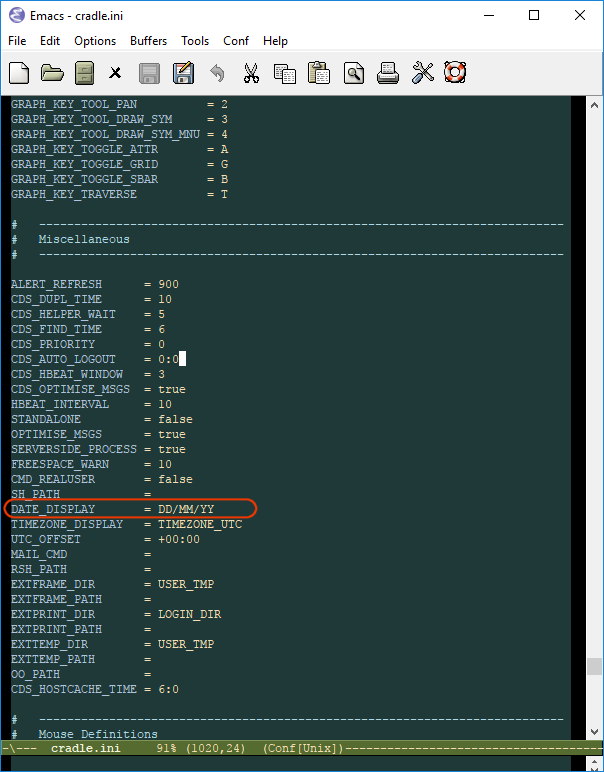
The top half of the file contains all the default settings (commented out) so you can always see the values ‘as shipped’. It isn’t a file for the every day user, but is something the system administrator may delve into to control users’ experience.

The values are per installation so the file is located in the %CRADLEHOME%\bin\exe\windows or $CRADLEHOME/bin/exe/[linux-ia32|linux-x86_64] directory. The settings will apply to all the clients that connect. So if you set your date display preference to DD/MM/YY all users will see this.

image of cradle.ini file with date setting highlighted
The cradle.ini / .cradlerc file

Further details on cradle.ini or .cradlerc are shown in the Cradle help on the startup file.

Local Settings

Users can override most of these default settings through their preferences. These are stored on a per user basis. This means that a user located in, say the USA can choose to show their date as MM.DD.YY. This will be their preference regardless of their Cradle username or project. They don’t have to change their files manually. Users can alter their settings via the Preferences button on the Home ribbon. However should admin need to get at them, their files are located in %CRADLEHOME%/admin/definitions/personal/NETWORK_USERNAME. These files are either non existent (if a user has never overridden a preference), or are just a delta of the differences between theirs and the default file. Therefore, don’t worry when there is not much in them.

Trouble shooting

If a user can’t see a new setting that’s been applied by the system administrator, it may be that they already had an override in their personal settings and this will continue to apply until they either set their personal value to match the global, or their personal copy of the cradle.ini or .cradlerc file is deleted.

Preserve Your Settings

We would recommend backing up your system cradle.ini or .cradlerc file.

December 2017 Newsletter

Happy Birthday to ya, Happy Bir—-th—-day…

Ok we didn’t manage to get Stevie Wonder on board, but we’re all still singing away at our desks!

30th Birthday Cake
Happy 30th

Thank you to all our loyal customers and friends past and present. We’re proud to have been of assistance in your projects. Thank you too to all the staff who over the years have changed Cradle into the multi module full lifecycle suite it is today. Keep an eye on our Birthday page for events and offers through our Birthday year.

Opportunities

Opportunities with 3SL producers of Cradle

Over Christmas is the last chance to get your applications in as we’ll be sifting through the applications in January See here for more details.

Banking Changes

Updated ring fence information and dealing with 3SL’s banking details. With budgets run annually make sure you follow these changes into the new financial year to ensure continued maintenance is paid into the right accounts, posted here.

GDPR

padlock over computer based on images from negativespace.co pixabay.com on pexels.com
GDPR

As most people are aware, those doing business with any European country will have to abide by some stricter data protection guidelines. There’s a lot of hype and scaremongering going on at the moment as people try to come to grips with the extent of the changes. 3SL are undertaking their data audits to ensure we only hold personal data necessary to run 3SL and to support our Customer’s contracts. 3SL hold very little personally identifiable information on our customers, but even your name/email address/company need to be protected. We don’t sell or trade or provide information we hold with third parties, unless it is either a legal requirement to do so, or necessary to complete a contract such as with our Bank or Credit Card processor. We’ll be publishing our policies either on our website or to be made available on request. We hope you agree that we don’t send unnecessary communications to you, for example these newsletters are the way we communicate important changes, release information and articles that may assist in your use of Cradle. However, if we decide to classify any communications or interactions as extras, we may ask you to specifically opt in to receive them. We hope you’ll agree to continue to receive them and you will of course have the option to opt out at any time. If you have any questions at present, please send them to support@threesl.com . A brief initial steps guide can be downloaded from the ico

 Social Media

Twitter

Find out what DIAT is an acronym for!! (OK we invented that one!) Celebrating scientific discoveries on X-Ray day When I’m Calling You... contacting 3SL and what’s blocked if you send us an email.

Hints of the Month

Last month’s blog articles included a lot about cross references: How to load Cross References en masse. did you know you can load a cross reference from a CSV file? Mapping cross references for input from Document Loader The power of cross references when working out aggregate values . Other topics included defining a report for later use, no need to remember the settings you can save them and run later. You can read Hints & Tips in the 3SL Blog

A Holistic View – The Context Diagram

Context Diagram – the world around our project

A context diagram aids visualisation of where a project sits in relation to its external interactions. We don’t want to model those external systems, but we do want to know how they interact with our system.

Automatic wipers for a car don’t need to know how the weather works, but they do need to sense the presence of water on the windscreen. The context would, therefore, include the weather as an external influence with ‘rain’ or ‘rain present’ being signalled to our system. If our company only produces the wiper element the actual car is outside our scope. However, this is where we get our power from and it’s where we will install them so the car is part of our context. The interactions with the car such as ’12v supply’ and ‘user control signal’ are likely to show a part of the holistic context.

Data Flow Diagram (DFD)

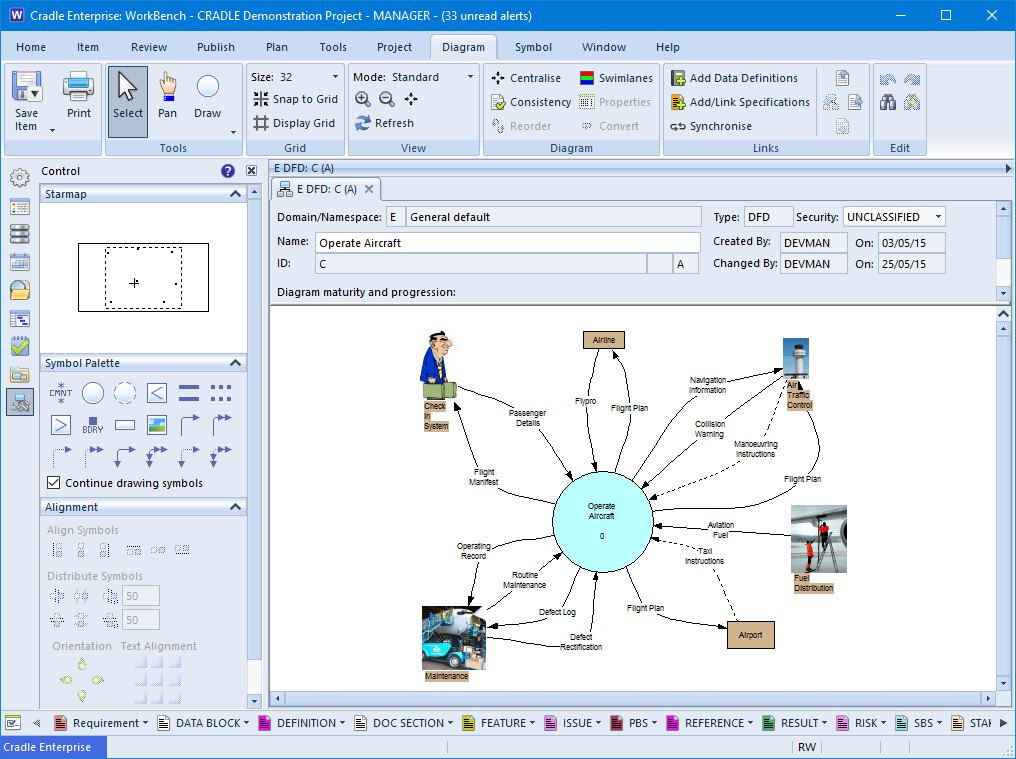
In terms of functional analysis and design the DFD shows the external elements with which our main system interacts on the context diagram. This usually has only one process on it, and that is our system of interest.

an example context diagram
Context Diagram – DFD

Taken from the Cradle demonstration project this diagram shows our system of interest is operating the aircraft. The externals that we interact with form the context within which the project operates. This includes the booking system, the fuel suppliers, the control tower and so on.

When the design and analysis are broken down at lower levels, the passenger details or navigation information will have to be handled by parts of the target system. If there is anything that does not balance at the lower levels, then a function must be missing. It implies that we have an input stimulus or an expected output and have nothing to handle or provide it.

Block Definition Diagram (bdd)

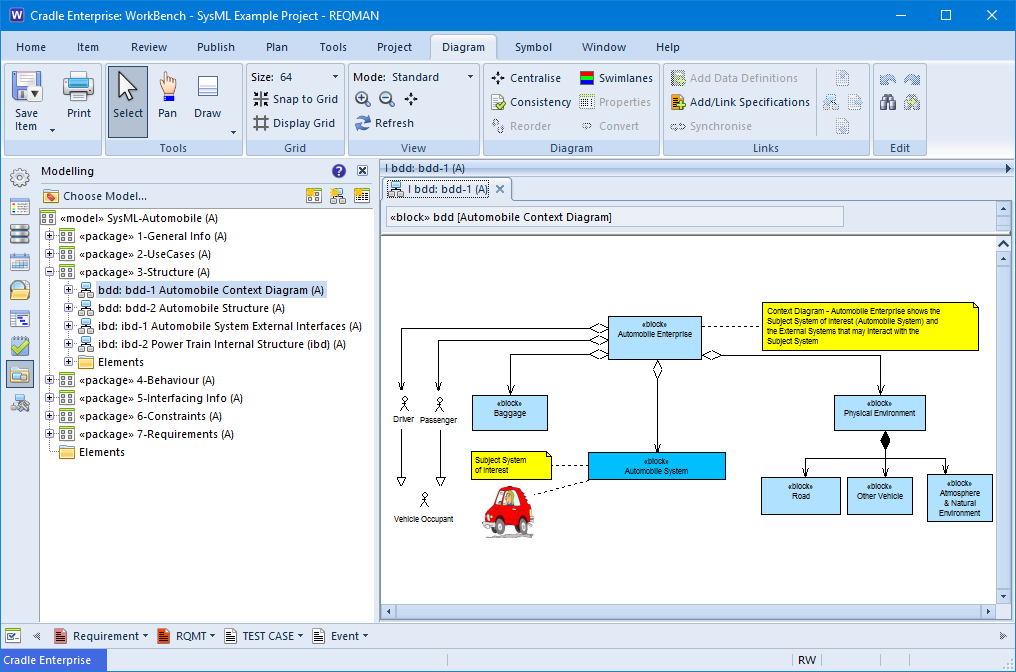
Context diagram notations are not restricted to Yourdon, a SysML bdd is also used to describe the context. Information gathered from the use cases and operational scenarios can be used to build a holistic view.

Context diagram shown on a bdd
Context Diagram – bdd

Visual

Whilst not necessary, adding images to your context can aid communication to your stakeholders and customers. They don’t really have to understand the notation to visualise the ‘Passenger’ as a person interacting with the flight. In Cradle, images can be added to the diagram as standalone images, or can actually replace the symbol on the diagram. (The image in the latter will follow all the rules and have the underlying specification of the real diagram element).