3SL (Structured Software Systems Limited) are pleased to announce a new dedicated ‘fibre to the premises’ (FTTP) link to 3SL Headquarters, here in the UK.
We now have a 100 MBits/sec bi-directional connection to the ether, some five times faster than the previous contract fibre! Go on – give it a go, download one of our white papers, or the latest version of Cradle.
Faster Fibre
We’re happy to say our ISP services are still provided by Zen Internet, it’s just the new transport mechanism installed by BT can support better transfer rates. So wherever you are in the world, you can reach us here in Barrow-in-Furness at the edge of the English Lake District in Cumbria.
The art of a carefully crafted sentence with beautiful ink on a crisp page is becoming a rarity. Handwriting day serves to remind us of that skill.
These days we can even create ‘handwriting’ in our electronic documents with cursive fonts. We can Digitally sign documents using a pass-phrase. However, there is still room for a quick hand written posty note, a card or a signature on a document as a stamp of authority.
Storing Handwriting in Cradle
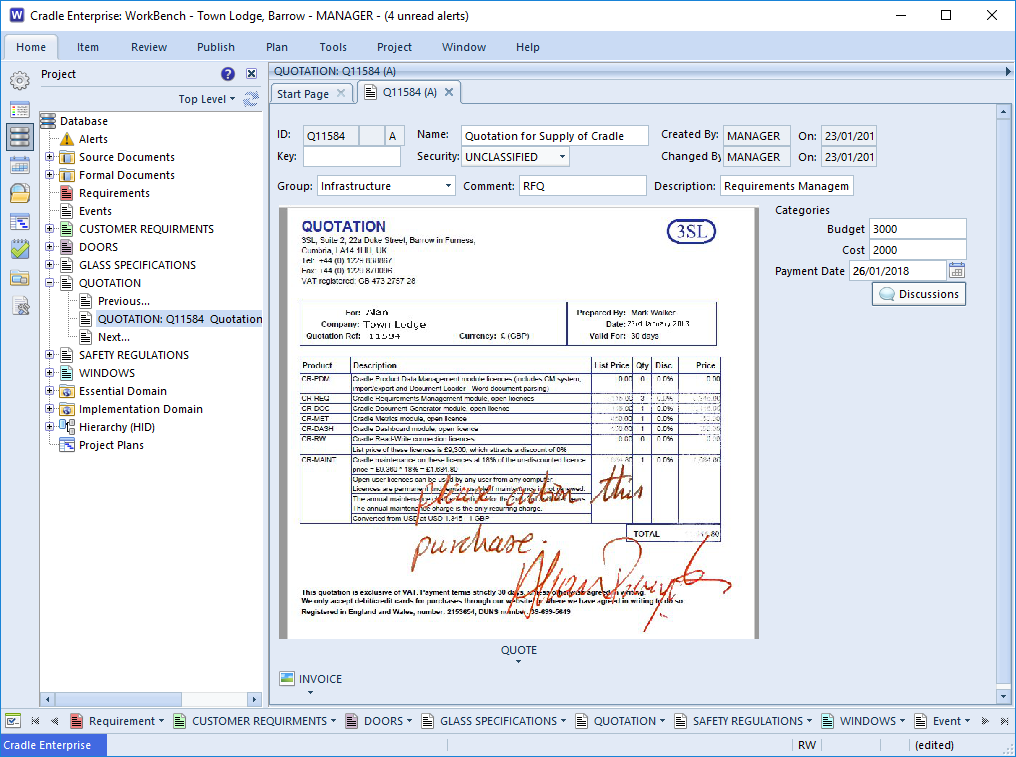
There are a few ways that you could store hand written information in Cradle.
Whether it is a handwritten requirement / letter / alteration from your customer or an authorisation signature, you can store them in Cradle. As part of Change Management you may wish to record a picture of a whiteboard discussion, a snapshot of the back of that envelope or even a scan of the letter sent by a customer.
In this month’s newsletter we asked you to email us when you last “hand wrote a date”. There’s still time to drop us a line and get a mention next month. Or if you really want to practice your writing for handwriting day 2018, drop us a letter.
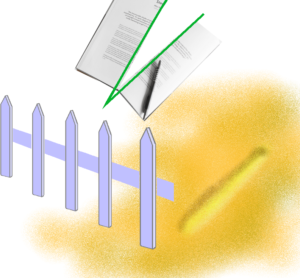
When you have a complex problem, it is always good to ‘set some bounds’1, ‘divide and conquer’2 and ‘place a line in the sand’3. That’s 3 so far on the cliché count, but they are all true reflections of baselines and configuration management processes.
Baselines and Configuration Management. No real life project is static, it never has all the answers available up front and even the most basic of tasks is likely to have a change to its requirements. Changes can range from an alteration of delivery date or change of colour, to a whole change in direction caused by a change in circumstances, finance or regulation. If we’re not careful, project managing this changing landscape4 the ever changing goal posts5 puts project completion at risk.
We need to be clear that the proposed system requirements matched up to the user requirements at a particular point in time. Recording a baseline is that proverbial ‘line in the sand’. A baseline records the conditions at a point in time. The initial user requirements right at the beginning of the project would make an ideal baseline. It gives us a foundation to work from6. From there we can record, measure and control how the project develops. Far from being the ‘End’ of a project lifecycle, a baseline is a really good beginning.
Point of Decision
Now that we have our foundation, we can decide whether it is solid enough to build on. At present it may be more akin to a trench with some hardcore in the bottom, and nothing ready for a wall. However, we can now discuss these baselined requirements/or characteristics before moving on.
Foundations“Is the wall definitely in the right direction?”, “Is the wall to terminate at the end of the garden and no further?” (Setting the bounds) “Are you happy for us to quote for the full wall on this basis, or do we need to set a half-way house7 at the first course and then re-evaluate?” (Divided and hopefully conquered).
If all is well we can specify the system requirements and get the concrete poured. This firming up of the foundations8 would be another good baseline point.
Managing Change
“The neighbours have complained, the wall is too short to keep the dog in”. Back to the drawing board? Not quite, we can go back to the baseline and check what the agreed characteristics of the foundations were. We can’t build the wall higher in solid blocks as the foundations were not laid with sufficient margin for the extra weight. However, building the top part of the wall in decorative open block-work will meet the changed requirement and satisfy the user. Costs adjusted, new quantities calculated and time to take a new baseline.
Whilst ideally the project would have been planned from start to finish, before the first components were laid, this is not always possible or practical in real life. Recording when and why changes were made will help us make decisions based on firm ground9, rather than walking on sinking sand10.
Garden Wall
Far from being end points, baselines should be seen as stepping stones to your goal11. However, they should not be seen as a linear path. There may be more than one path across the river12, and not all routes will lead successfully to the other side. Assume the neighbour decides to move and takes their dog with them. We can rewind to the baseline taken at the foundation stage and progress down the original planned height in solid bricks as we have the record that this was a possible solution at that point in time12.
Baselines and Configuration Management (CM)
CM is a process that aims to establish and maintain the quality and consistency of a system’s performance, functional, and physical attributes throughout its life. It is tightly linked to the Quality Management System (QMS) and Requirements Management System (RM/REQM) employed on a project. Deciding when and whether items should be baselined, would generally be subject to review (QMS). Providing traceability through the project’s lifecycle also a QMS function. Gathering, eliciting, and decomposing requirements is an RM function. Dealing with change, would need elements of all three. Whilst it may be fun playing cliché bingo, it really is time to place a stake in the ground13 and record milestones in your project14. Don’t delay baseline TODAY!
Happy #ThesaurusDay or Should that be “Convivial greetings to all celebrating alternative onomasticon listings day” ?
In pure terms a list of equivalent words or synonyms helps enrich our language. The thesaurus may list a number of alternatives that are subtly different.
Requirements ambiguity
When writing a requirement we have to be careful that we are unambiguous in both our language and meaning.
Language Construct
“The value displayed shall be the total time expended for each activity of a particular type divided by the count of all activities of each type”. Could be interpreted as A1 2mins, A2 1min, A3 4mins = 7 mins for type A B1 3mins, B2 4mins, B3 8mins, B4 1min = 16 mins for type B
Value to display for A = (7 mins / 7 ) = 7 Value to display for B = (16 mins / 7) = 2.3
or as intended
Value to display for A = (7 mins / 3 ) = 2.3 Value to display for B = (16 mins / 4) = 4
In this case we could have removed the ambiguity by using an equation as a synonym for the language.
Choices in language can mean different things to different people. This is especially true where suppliers and customers work in different fields. The Customer’s Requirement is their end goal, for the supplier it is the starting point. The Customer asks that the “After the office upgrade and IT installation users should have a clear desk”. Maybe unhindered or unobstructed would have served better?
Clear Desk – What was envisaged & what was delivered
Stay SMART(U)
So to celebrate thesaurus day 2018 : Do your best to keep your requirements Specific, Measurable, Attainable, Relevant and Time-bound. Oh and of course Unambiguous, but rich with language.
Have you got used to writing that on a cheque yet? Oh dear, showing my age, can anyone remember when they last wrote a cheque? Come to think of it, when was the last time you actually WROTE the date, rather than just clicking a calendar icon on an app……. Answers on a postcard to 3SL at the usual address.…. or social-handwritten_dates@threesl.com for a chance to get a mention in next month’s newsletter.
With regard to cheques and all things banking just another reminder to check you’ve updated 3SL banking details, in accordance with the changes brought into UK banks through the ring fencing process, posted here.
New Year’s Resolution
We all make promises to ourselves, many we find hard to keep. Yet another sucker falls for the gym membership sign up and then decides binge watching that box-set is easier/more enjoyable/cheaper. It does really seem like the worst time of year to be making decisions to be getting out and about exercising. (Apologies, again, to our customers on the other side of the globe – read this again in 6 months !).
Data Exchange Microsoft® Project / Cradle
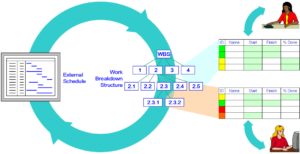
One resolution that should be easier to keep is to start afresh with plans for current and new projects. We’ve had time to allow our heads to clear over the Christmas break and should be facing work with a new vigour. Planning is the key to ensuring schedules and expectations are met. This may seem like a very un-Cradle® plug, what’s planning got to do with modelling and requirements? The answer is in fact quite a lot. Without a project management plan and schedule how would the capture, design, review and test be achieved in the right order? A Work Breakdown Structure can be used to segment activities, and component parts of a project into manageable chunks. The ability to link a plan from Microsoft® Project brings together the planning and implementation elements of your project. For more information see the Cradle Help on Project Capture
GDPR
GDPR
If you missed our initial update on the new general data protection regulations, you may like to look in December’s Newsletter. Please don’t forget to look out for requests to opt into communication updates from 3SL.
Social Media
Twitter
We pondered whether anyone could model the human gut / brain interface with System Engineering techniques.
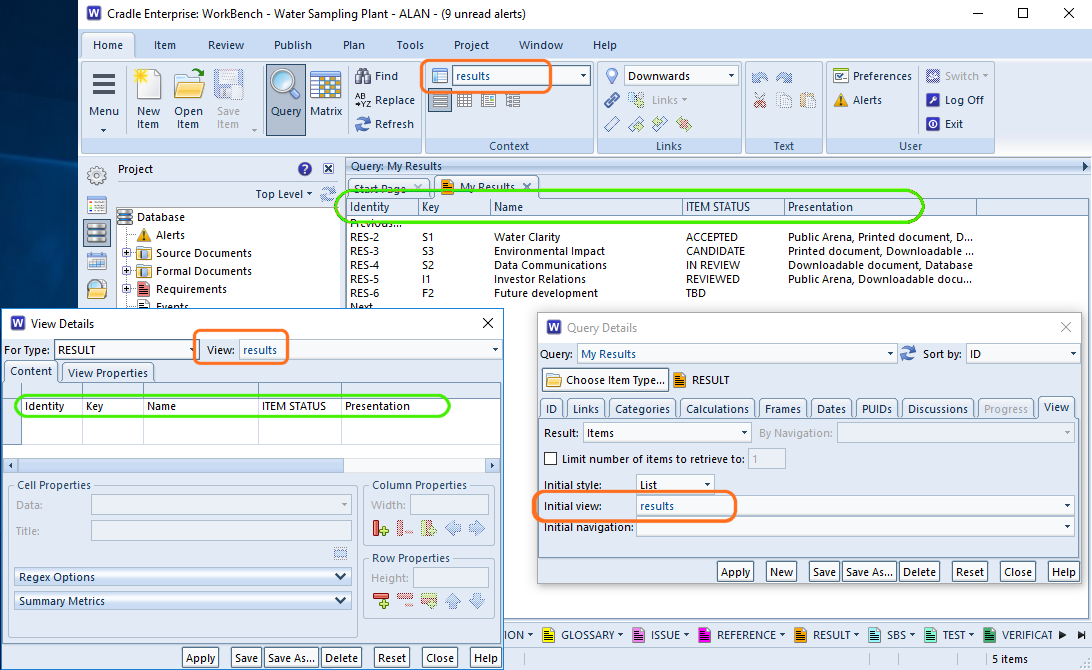
Each query can have an initial View associated with it. Each time this query is run, it will apply the view. This is the best way of controlling your initial view for a particular query.
Shown in the screen shot below the project view ‘results‘ has been set in the query ‘My Results‘ each time this query is run the columns specified in the View Details are shown. There’s nothing to stop a user selecting a different view in the ribbon later.
Initial View Settings
Remember that View
WorkBench is designed to remember the last view you used for a particular item type. It’s likely that next time you run a query for the same item type, you’ll want the same view. Even if you close all your tabs, within the same session you are controlling your initial view of each query by the last choice you selected.
Initial Influence
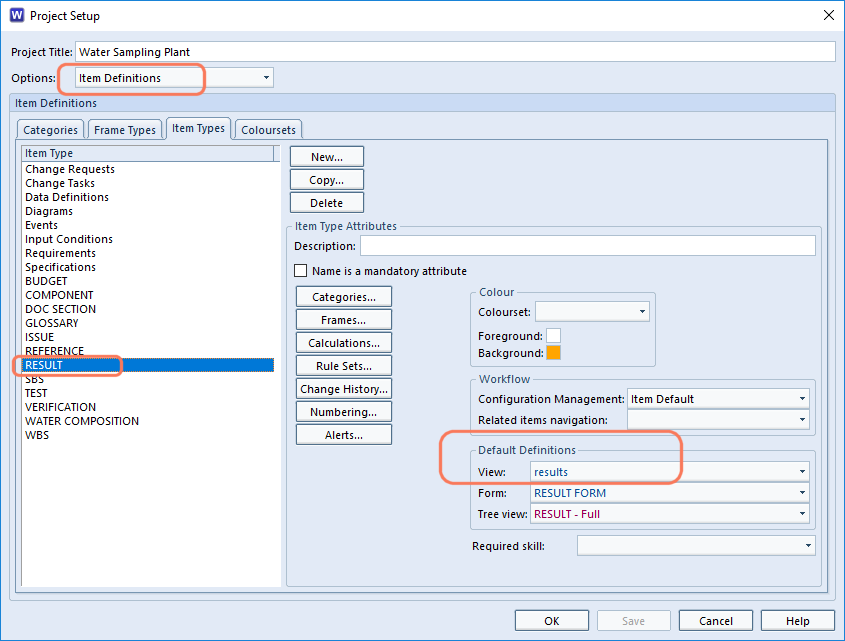
You can control the initial view selected for a query in a project by associating a view with an item type in the project’s schema. Open Project Setup and select the item type and an appropriate view. When starting Cradle, this will be the view selected for this item type, the first time it it is queried. Thereafter, WorkBench will switch to “Remember that View”.
Initial View – Schema
QAB Queries and Views
The Quick Access Bar at the bottom of WorkBench as some auto generated queries and auto generated views for speed. If one of these is selected then the the view that is ‘remembered’ will be the last one of the Automatic views.
These are cross references in the Cradle database where one or both items at the end of the reference are missing.
It goes without saying that if you have item A linked to item B and then delete item B, the link between A and B should disappear. In usual operations this is true and this is what Cradle will do.
However, it is possible to create a dangling cross reference when importing partial data from other projects or backups. Say for example you have exported all your Definition items (one of which is item A) and separately all your cross references. (including the one to item type Constraints one of which is item B). Into a new project you import all the cross references and then the Definition items. You plan to create new constraints. If one is not created called B there will be a dangling cross reference in the new project.
Finding and Rectifying Cross Reference Problems.
Cross Reference Integrity Checker
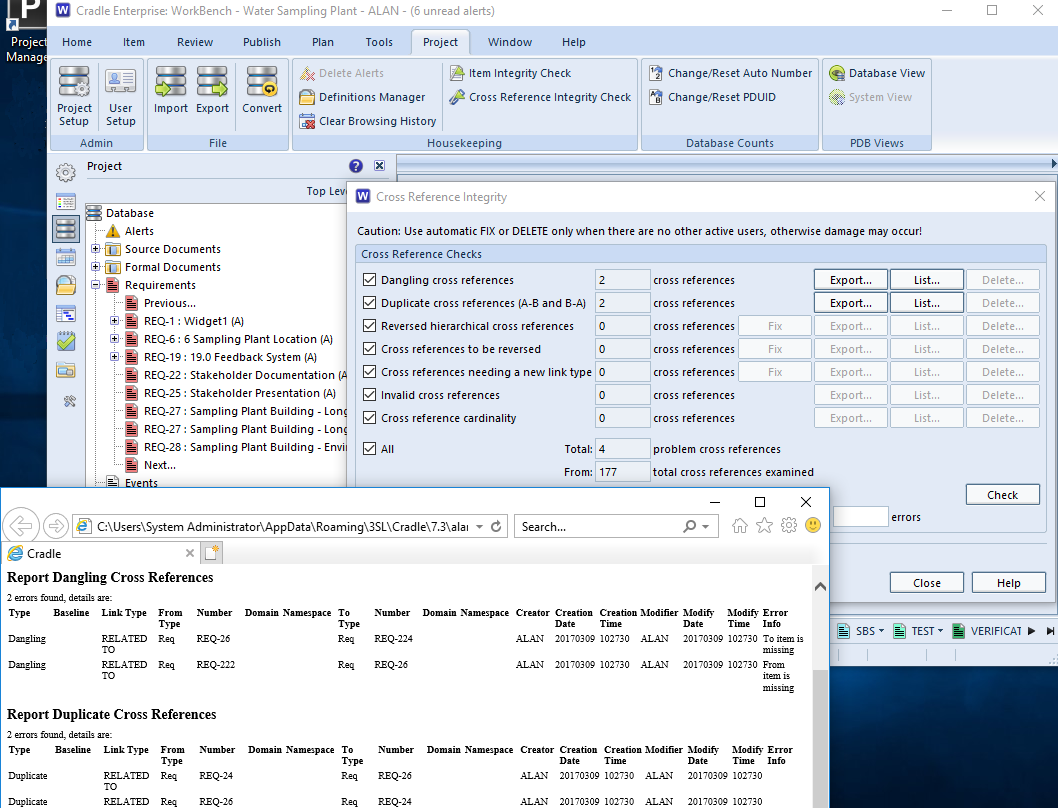
Dangling cross references are just one of the anomalies that can be detected using the cross reference integrity checker. This is run from the Project ribbon.
There are a number of tests which can be selected and these are shown below.
Once a problem has been identified, it can be fixed, deleted or exported for editing as appropriate. The availability of these will depend on both the problem and the current user’s privileges.
Cross Reference Integrity
Check
Description
Dangling cross references
Detects cross references whose from or to item do not exist.
Duplicate cross references (A-B and B-A)
Cross references are considered to be duplicates if a cross reference exists from item A to item B and another exists from item B to item A and they both share the same link type.
Reversed hierarchical cross references
Detects cross references that are between items where the from item has an identity that suggests it to be the child of the to item.
Cross references to be reversed
Detects cross references that are invalid according to the current link rules but which, if reversed, become valid.
Cross references needing a new link type
Detects cross references that are invalid according to the current link rules but which become valid if their link type is changed and where there is only one link type that is valid for the cross reference.
Invalid cross references
Detects cross references that are invalid according to the current link rules.
Cross reference cardinality
Detects cross references whose cardinality does not match the current link rules.
All
Will perform all the above integrity checks.
Performance
Dangling xrefs can cause issues with performance when items have been deleted. If item A was linked to item B, then item B got deleted. There would be a dangling xref which isn’t linking any items, creating extra data. If another item B was then created. It would then be linked back with item A. Which could potentially cause problems?
Cradle provides support for regular expressions, regular expressions are a means to find variable text in places such as:
Queries
Find dialogs
Category recognition strings
Category value validations
For instance, regular expressions (regexes) can be used in queries to find all items in which any frame, or a specific frame, or any of a list of frames, contains text matching the regular expression that you are searching for. For example, if you wanted to find all items containing sequences of capital letters followed by numbers, then the regular expression would be:
Some characters have special meanings within regexes these characters are:
Char
Description
Meaning
\
Backslash
Used to escape a special character
^
Caret
Beginning of a string
$
Dollar sign
End of a string
.
Period or dot
Matches any single character
|
Vertical bar or pipe symbol
Matches previous OR next character/group
?
Question mark
Match zero or one of the previous
*
Asterisk or star
Match zero, one or more of the previous
+
Plus sign
Match one or more of the previous
( )
Opening and closing parenthesis
Group characters
[ ]
Opening and closing square bracket
Matches a range of characters
{ }
Opening and closing curly brace
Matches a specified number of occurrences of the previous
Examples
Finished\? matches “Finished?” ^http matches strings that begin with http [^0-9] matches any character not 0-9 ing$ matches “exciting” but not “ingenious” gr.y matches “gray“, “grey” Red|Yellow matches “Red” or “Yellow” colou?r matches colour and color Ah? matches “Al” or “Ah” Ah* matches “Ahhhhh” or “A” Ah+ matches “Ah” or “Ahhh” but not “A” [cbf]ar matches “car“, “bar“, or “far” [a-zA-Z] matches ascii letters a-z (uppercase and lower case)
Using Special Characters as Literal Characters
If you want to use any of these as literal characters you can escape special characters with \ to give them their literal character meaning.
Example
If you want to match 1+2=3, you need to use a backslash (\) to escape the + as this character has a special meaning (Match one or more of the previous). To match the 1+2=3 as one string you would need to use the regex1\+2=3
For further information on using regexes in Cradle see our online help.
Saudações da temporada, Feliz Natal,节日祝福, Prettige Feestdagen, Joyeuses Fêtes, Frohe Festtage, 계절의 인사, С Новым годом и Рождеством, Cyfarchion y Tymor
However you celebrate the end of 2017, 3SL would like to wish all its customers, potential customers, distributors, partners and staff, Season’s Greetings, a Happy Christmas and peaceful family times over the festive season. We’ll see you again in the new year.
The UK offices will be closed from close of business on Friday 22nd December to 2nd January 2018. There will be no one manning the phones. You can send support enquiries to support@threesl.com and we’ll deal with them as soon as we can.



![A Trench excavation at Winterbrook Oxfordshire - Bill Nicholls [CC BY-SA 2.0 (https://creativecommons.org/licenses/by-sa/2.0)], via Wikimedia Commons](https://www.threesl.com/blog/wp-content/uploads/2017/11/Trench_excavation_at_Winterbrook_Oxfordshire-1-300x239.jpg)