
Cradle-7.1 Beta Period Has Ended

It is time to announce the end of the Beta test period for Cradle-7.1, our release that introduces SysML into the set of notations that are supported by Cradle’s modelling tools.

We would like to express our thanks to all of the people who provided their time to study Cradle-7.1, and we would also like to thank their organisations for agreeing to this use of their time.

We have received much valuable feedback from the Beta testing and we have included as much of this feedback as possible into the Cradle-7.1 release.

We expect to make an announcement about the release of Cradle-7.1 very soon!

As has been the case with all previous releases of Cradle:

– Security Codes for previous versions of Cradle will not work with Cradle-7.1
– New Security Codes for Cradle-7.1 will be provided, on request, to anyone who has an active maintenance agreement with 3SL

Once again, to all Beta testers, thank you very much!
Document Publisher Templates Reference Word Templates

We have recently seen cases where a Document Publisher template – which is an ordinary Word document – contains references to other Word templates that have been created by an organisation.

Generally, this is OK, everything works correctly as you would expect.

However, if the Word templates (.dot or .dotx files) are not available, or are corrupted, then problems can occur because Word (running inside Document Publisher) may display error messages and prompt you to re-try access to the template, or repeat an attempt to save changes back to it, and so on.

You can either accept that these messages will occur over and over again, or you can disconnect your Document Publisher template (the Word document) from the Word templates.

It is difficult for us to offer general advice as every organisation is different, but our inclination would be to sever connections to these Word templates if you ever seen any warning or error dialogs from Word.

Some notes on this topic can be found here:

https://support.office.com/en-us/article/Load-or-unload-a-template-or-add-in-program-2479FE53-F849-4394-88BB-2A6E2A39479D

We hope that this is helpful!

Editing Dates in Cradle – A Tip

Editing dates in Cradle can be useful. You may want to change the default date format, or it could be you need to bring a review date forward for selected items. In this article I will explain how you can do this, including tips which may help.

Attributes

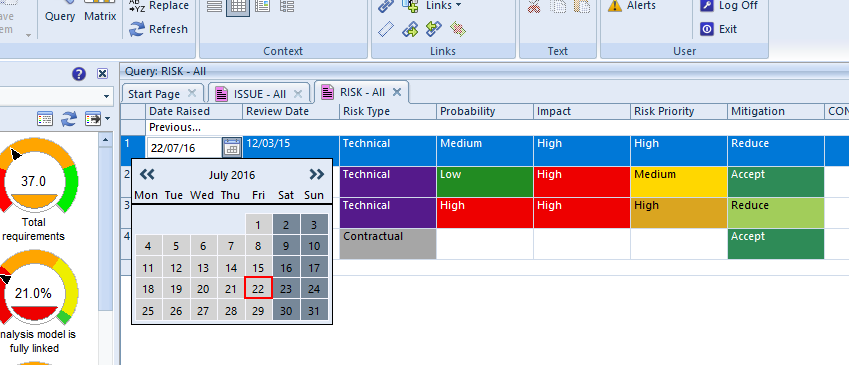
Cradle allows attributes to be defined as dates. These dates are stored by default using the format yyyy/mm/dd in the database.  However, you can control how dates are displayed, for example as: dd/mm/yy or as mm/dd/yy. Date fields are displayed with a ‘date chooser‘ that displays a calendar that you can use to change months and select days.

If you enter a date before 2000, such as: 23/09/95 then you cannot enter a year number such as: 07 to mean 2007. Similarly, if you enter a date with a year such as 16, then this will be interpreted to be 2016 and you cannot manually enter a year such as 99 to mean 1999.

Editing Tips

Date picker in Cradle
Date Picker
  • When you select a date field, the day, month and year components of a date can be selected individually
  • The cursor up and cursor down fields can be used to change a day, month or year by one, moving forwards and backwards, and you can move through 1998, 1999, 2000, 2001
  • TAB can be used to move forward through the components of a date field
  • You can press CTRL-TAB to move backwards through the components of a date field
  • You can also use the ‘date chooser’ at any time

The ability to use the cursor keys and TAB and CTRL-TAB may be helpful.

Display Preferences

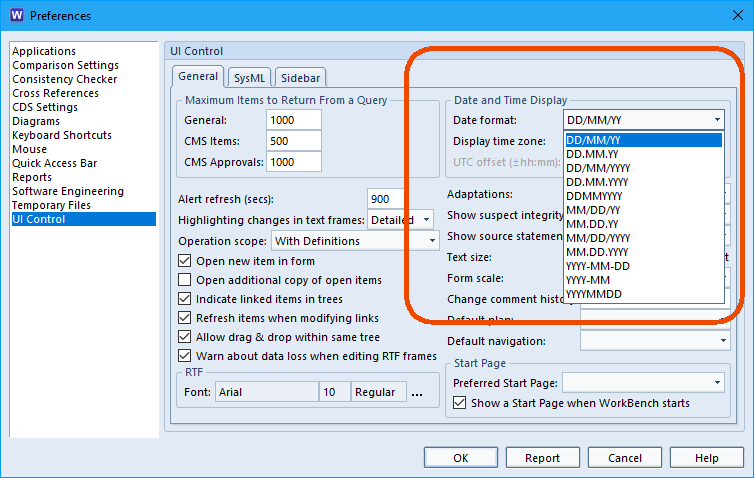
To set your choice of date display, open the User Preferences -> UI Control  and select in Date and Time Display.

How to select the date display preferences
Date Preferences

The Preferences dialog lets you control settings that are used to customise your WorkBench environment and set default options. For more information you can take a look at this cradle help article.

Article updated 17/09/2018 – Added introduction

Cradle-7.1 Beta Test Progressing Well

The Beta testing of Cradle-7.1 has been underway for a little while.

The testing is going very well, with useful feedback from the Beta testers about the new SysML capability and the other enhancements in this latest Cradle release.

We expect to make an announcement about Cradle-7.1 at the end of this month.

We would like to express our thanks to those who have been able to get involved, your help is very much appreciated!

With best regards

Disabling Old Cradle Add-In from Excel

If you have upgraded from Cradle-6.8 – when we had an add-in for Excel – to Cradle-7.0, then you will have seen the new, and consierably more capable, capture utility. This new capture utility is shown in a Cradle tab in the Excel ribbon.

If the old Add-Ins tab is still visible, then you can remove it. This may be part of your personal Excel setup and so is in your Windows profile and hence is not something that our installer can change.

To remove the Add-Ins tab from Excel (if you see it):

1. Start Excel
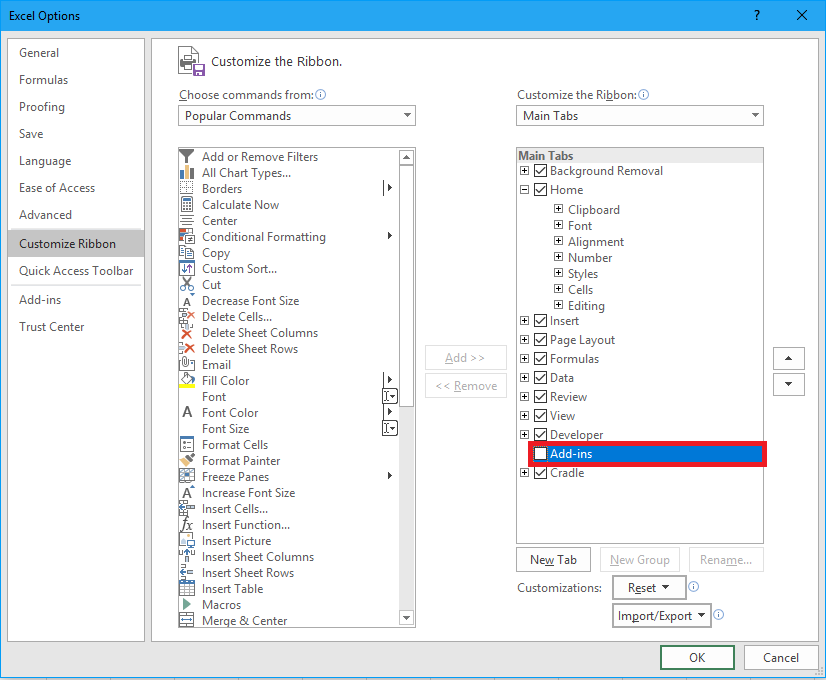
2. Right click anywhere in the ribbon and choose ‘customise ribbon’
3. On the right hand side of the dialog, de-select the ‘Add-Ins’ tab (you can check that it is empty!)
4. Click OK

Image showing the cusomize ribbon window in excel
Customize ribbon dialog

We hope that this helps!

Article updated 13/09/2018 – Added image

New Whitepaper – Regulation Compliance

We are pleased to announce that we have a new white paper available for download from our website. This paper discusses some key issues for compliance with regulations affecting product definition, design and development.

You can access it from our website here:

https://www.threesl.com/downloads/white-papers.php

and directly with this link:

https://www.threesl.com/downloads/download.php?version=v7.1&section=whitepapers&filename=rc07701-Regulation_Compliance.pdf

To get the paper, login to our website and download it. If you don’t have a login account please register and then download it!

With best wishes to everyone

February 2016 Newsletter is Available!

We are pleased to advise that the February 2016 newsletter is now available. You can view it here:

https://www.threesl.com/pages/news/webletter-February16/index.php

We have sent several thousand e-mails announcing this newsletter. If you did not receive one, and would like to be added to our distribution list, please send your e-mail address to me at: mark.walker@threesl.com

Force Directed Graphs

We are curious to know what people think of using force directed graphs as a way to display the relationships between items in Hierarchy Diagrams (HIDs).

At the moment, HIDs are drawn using a fixed algorithm, in which you can control:

  • The orientation (vertical or horizontal)
  • If the HID will pivot (change orientation) and if so, the level at which it pivots.

Force directed graphs are an alternative way to arrange the same boxes (items) and lines (cross references) in a HID.

What do you think?

ARTICLE UPDATED 13/09/2018 – CHANGED CATEGORY AND FIXED READABILTY

Cradle-7.1 Platforms Announced!

We are pleased to announce that the following platforms will be supported by Cradle-7.1:

– Linux. Any variant with a version 2.6.32 or later kernel

– Windows:
– Windows 7 (SP1, 32-bit and 64-bit)
– Windows 8 (32-bit and 64-bit)
– Windows 8.1 (32-bit and 64-bit)
– Windows 10 (32-bit and 64-bit)
– Windows Server 2008 (SP2, 32-bit and 64-bit)
– Windows Server 2008 R2 (SP1, 32-bit and 64-bit)
– Windows Server 2012 (64-bit)
– Windows Server 2012 R2 (64-bit)

– Office:
– 2007 (SP3, 32-bit)
– 2010 (SP2, 32-bit and 64-bit)
– 2013 (SP1, 32-bit and 64-bit)
– 2016 (32-bit and 64-bit)
– Office 365

The changes from Cradle-7.0 are that we have dropped support for Windows Vista and added support for Windows 10, Office 365 and Office 2016. In fact, Cradle-7.0 already runs on Windows 10 and Office 365, but they were not officially supporting by Cradle-7.0. The Cradle-7.1 release adds formal support for these products, and introduces support for Office 2016.

We hope that this is helpful as you plan your migration to Cradle-7.1 and as you consider how Cradle’s platform support fits into the overall Linux/Windows/Office strategy in your organisation.

3SL Presenting at SEDC 2016

We are pleased to announce that we will be presenting a paper at the forthcoming SEDC 2016 conference, either:

– “Executives Will Want to use MBSE”, or
– “Learn a Simple MBSE Process by Connecting the Dots Using SysML Tutorial”

Details of the SEDC conference can be found here:

http://www.sedcconference.org/

We look forward to meeting you there!