

LDAP Connection Problems/Unknown User Issues?
Work through the following checklist as setting up the ldap_config file to match your LDAP settings can be difficult:
- Enable the trace log by setting the LDAP_TRACE attribute to TRUE in the ldap_config file. The ldap_trace.log file is written to a file in the logs/user directory this can be used to diagnose your problem.
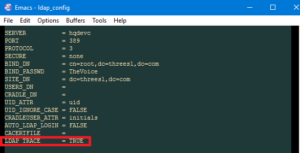

Enabling tracing in the ldap_config file - If you are using Windows® Active Directory, run the Active Directory Users and Computers browser from the Windows Domain Controller and check what the DN (Distinguished Name) is for the domain. From this browser you can also find out where the users are stored.
- On other LDAP servers, use the setup tool for the LDAP server to find out the correct DN and user areas.
- Check the correct Protocol is being used.
- Check that the correct level in the LDAP directory structure is being used as the BIND_DN and also that the correct BIND_PASSWD is being used.
- If the LDAP server is running securely, is the ldap_config file setup correctly?
- To test that you are connecting to the LDAP server correctly without checking the user authentication, set AUTO_LDAP_LOGIN from TRUE to FALSE. This would help to show where the problem is, i.e. either an issue with the connection to the LDAP server or whether there is a problem searching the correct user location on the LDAP server.
- LDAP verification will not succeed if the user’s LDAP structure contains multiple UIDs, e.g. if you have UID=manager and UID=yourname.
- If you are failing to login and you receive an LDAP message confirming the password or username could be incorrect but the LDAP response message is blank then it is likely you have a case match issue with the entered username and the username returned from LDAP, and Cradle is rejecting the entered username. To resolve this issue you can set the UID_IGNORE_CASE to true.
For further information on LDAP see our previous blog entry or for more on Cradle integration with LDAP please refer to our online help.