The mix of staff that make #3SL tick is quite diverse. Every team member is important to the success of the company. Today we recognise the women on the team that include our financial controller, one of the software developers, one of the support engineers and our domestic operative.
A bit of #MondayMotivation, this light heated day is celebrated on the first Monday of March. Have a ponder to think where you came from, what lineage came before you. Despite #FunFactsAboutNamesDay sounding like something Sheldon Cooper(Nerd Alert: Big Bang reference) may present it is a real ‘day’. So while you’re having your first cuppa (Good British drink of the day) or at the ‘water cooler’ (Is that really a thing??). Challenge a colleague to a Fun Facts About Names!
Meanings
Some are fairly obvious “Smith” and “Cartwright” working in a smithy or making carts. Some a little more tricky “Chalker” one who applies white wash. Then there are the more obscure, lost meanings in time, “Lister”, a dyer of cloth. (Maybe someone should tell DaveNerd Alert: Red Dwarf reference)
3SL
So where did we come from? Structured Software Systems Limited ⇒ SSSL ⇒ 3SL that simple really!
There are a number of different storage types in Cradle. These relate to where the data is held and how it is accessed. This article outlines the different storage in Cradle and explains when and where you may consider using it. Whilst there are some compelling reasons to hold certain data in certain ways, others can be a matter of choice.
For example if you want to add a URL to your item, there is no point trying to store the data inside Cradle this is, by its very nature, an As Reference storage type. On the other hand a binary word processor document could easily be stored inside the Cradle Database or as a reference to an external file on the rest of the company’s network. In this case it could depend whether the file needed to be accessed from outside Cradle or whether it was shared by multiple Cradle projects
Frames
Within an item data is either held in the main indexed database fields, such as ID, name, key or a category, or in associated frames. These frames are defined as part of the project’s schema to hold different types of data. There are a large number of predefined types and the ability to define your own.
Base Types
These are the fundamental type of data we expect to see in the frame. They may be presented in different ways to the user. For example a plain text based frame can be shown in Forms and Views and read directly on the screen. The same is true for basic images. However, a word processor document is held as a binary frame and viewed within whichever application your company uses. A CAD sketch would not be directly visible in Cradle, but could still be stored in the item and viewed with an external program.
These are the fundamental and abstract data types offered in Cradle
Text
Binary
Image
URL
Category Picklist
Category Multiple Picklist
RTF
Date
Time
Integer
Positive Integer
Real
Storage Types
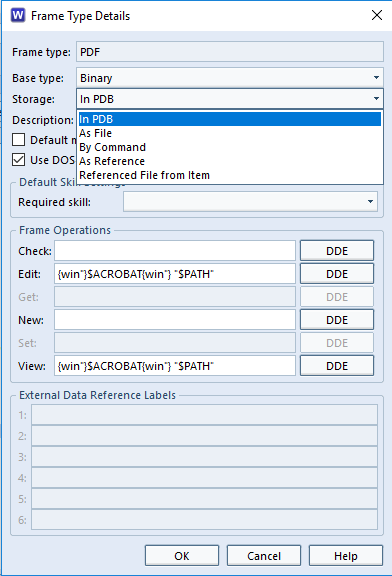
Each of the above types can be stored in Cradle in one or more ways. Some storage in Cradle, such as a date, make no real sense to store in more than one manner, the URL as mentioned or a date would not make sense to be stored in a file!
In PDB
As File
By Command
As Reference
Referenced File from Item
Frame Type Details dialog
Storage Matrix
This shows the combinations of base type and storage in Cradle that are possible. More information in Cradle help.
In PDB
As File
By Command
As Reference
Referenced File from Item
Text
✓
Binary
✓
✓
✓
✓
✓
Image
✓
✓
✓
✓
✓
URL
✓
Category Picklist
✓
Category Multiple Picklist
✓
RTF
✓
✓
✓
✓
✓
Date/Time/Integer/Positive Integer/Real
✓
Benefits and Usage
In PDB (Project DataBase)
✔ Frame data stored in the database is inherently linked to the database item that owns it. It is controlled in the same way as all the other fields of data (name, category, group, description, etc.). This means it can be imported and exported as part of the item. Text frames can form part of a query. Images, text and RTF can be displayed in-line. They move through the CM (configuration management) system with the item. Different revisions of the frame form part of the item’s history, and can be rewound. ✗Not ideal for very large data, e.g. video. Not externally accessible.
As File
✔ Frame data stored in a file is loosely linked to the item that owns it. Date and access times are remembered by Cradle so changes to the file can be highlighted. Great for large files. Other users can access the information externally to Cradle if they have access to a common file directory. Can be accessed through Cradle and item is locked while file is being edited as if it were part of the item. ✗Not directly controlled within Cradle, nothing to prevent the external file being removed or deleted. Can’t be rewound.
By Command
✔ Frame data is held in an external environment under an identity, the item stores this identity, and uses Get and Set commands to move the data between the environment and a temporary file where it can be operated on. ✗Not directly controlled within Cradle, nothing to prevent the external file being removed or deleted. Can’t be rewound.
As Reference
✔ Frame data stored anywhere and only loosely linked to the database item. Ideal for large resources such as Intranet pages. Ideal for information that is expected to change outside Cradle and be accessed by others. Cradle does not wait when viewing or editing. ✗ This is not considered storage in Cradle so there is no CM or rewind available. No control over alterations.
Referenced File from Item
✔ Frame data is held in a frame of a different item whose identity (PDUID and frame name) is stored in the current item. When the frame is accessed via a View the user is editing the common shared data held by the referenced item. This provides a method of reuse, allowing multiple items to directly access a data component of a different item. The ‘host’ item and the frame data follow normal CM operations. ✗Not ideal storage in Cradle for very large data, e.g. video. Not externally accessible.
Setting Up a Frame Storage in Cradle
In this example of storage in Cradle, a frame will be set up to hold a word processor document, internally (in pdb), in a file (as file), and in another item (referenced file from item).
Frame Setup
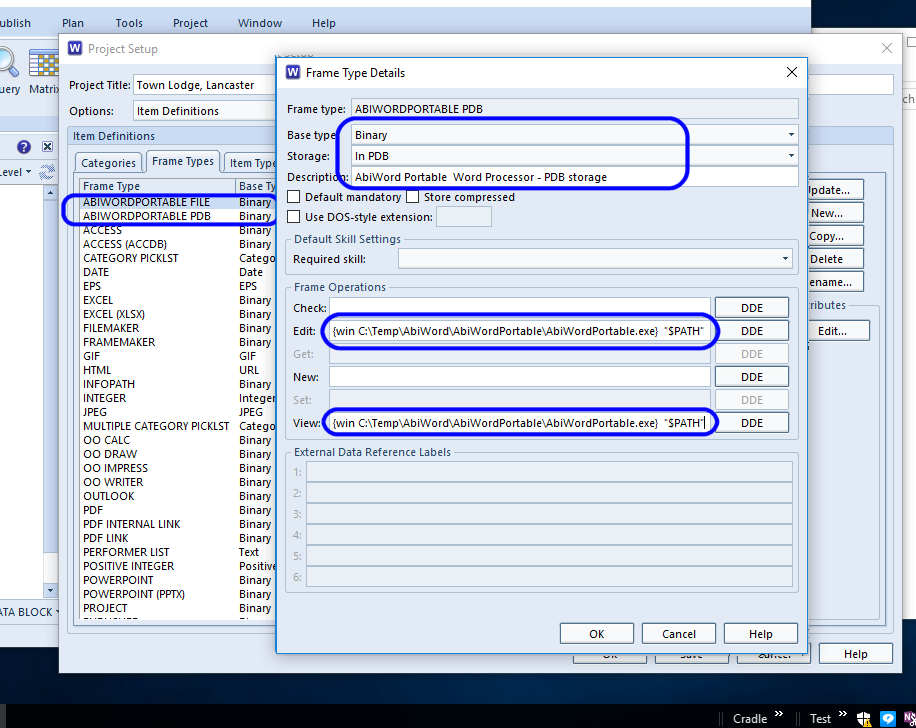
Storage Frame Setup
First set up a set of frames for each storage type and set commands on how to view and edit the file.
Frame Assignments
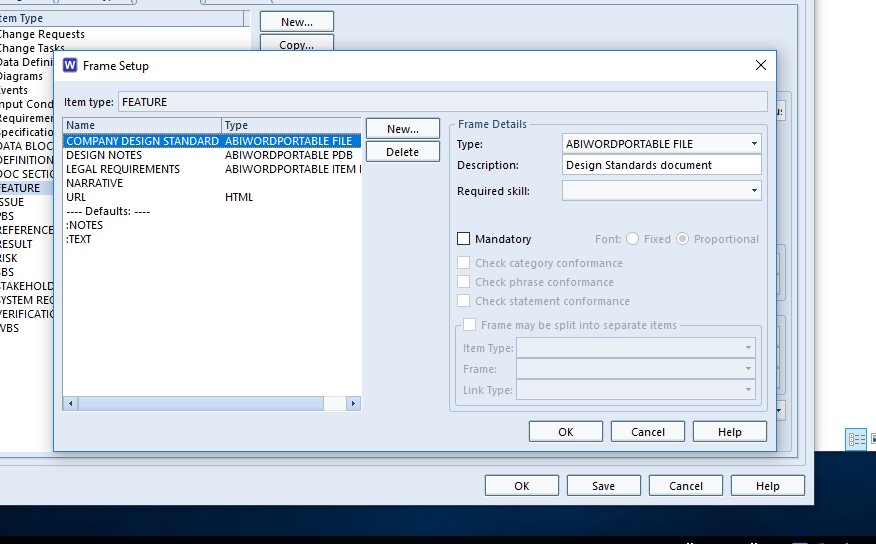
Ensure the items you want have these frames assigned. In this example the Feature has all three types and the Reference item has just the stored in pdb.
Frame Assignments
Usage
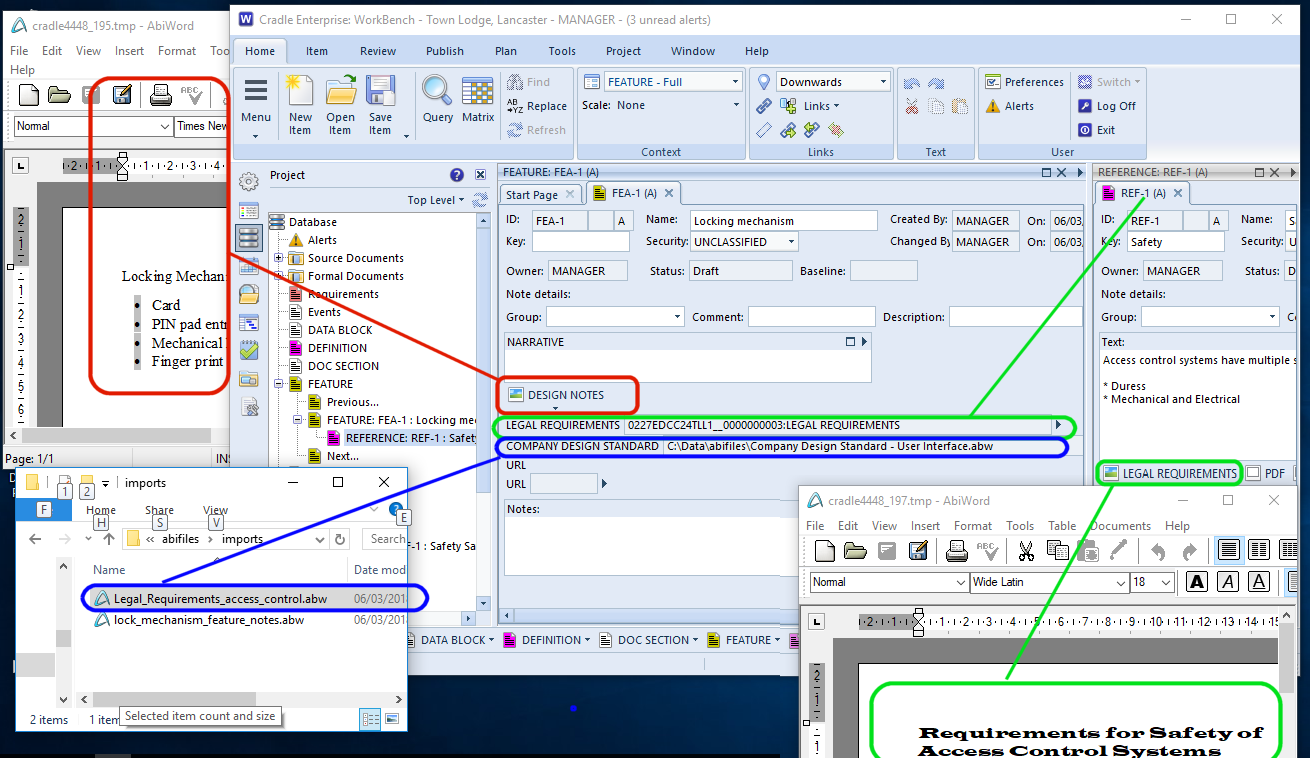
When the file types are set up the data can be imported into the item using the frame button and import Content… this brings the document into the item and it can be stored in the database. It can then be viewed and edited from the same button. In this illustration the Design Notes and Legal Requirements and have been stored in in this way.
The Company Design Standards are held in one directory for every project to access. The illustration links to this as file from where it can be viewed or edited.
Finally the Reference item holds the Legal Requirements document so that it is under formal control. However, other linked items can access this file directly, without having to open the holding item. Their frame is an alias for the data held by the other item.
Frames contain arbitrary information within an item. They can be set to hold anything from plain text, to a URL, a date or a word processor document . Access to these items is controlled based on the user’s privileges, team and the item’s status. Finer granularity of control can be achieved with skill based frame access. This ensures that users must hold a particular skill in order to see or edit the data within the frame.
Setting-up Skill Based Frame Access
Frame Assignment
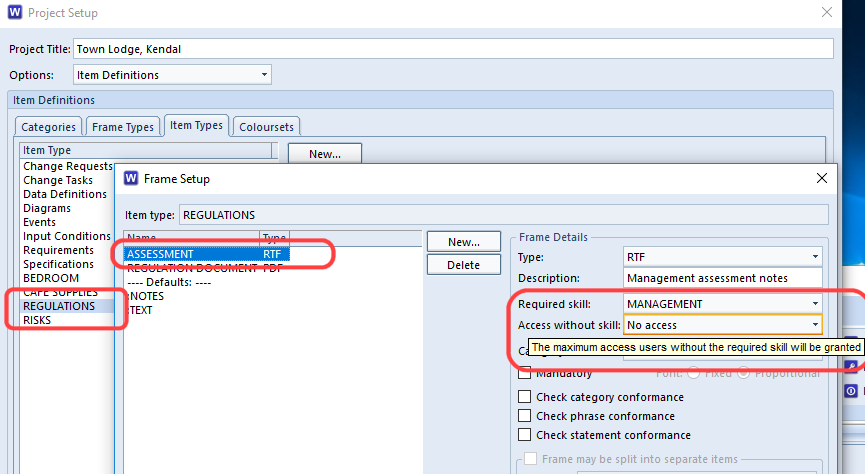
Each item type can have frames assigned to it. Within project setup choose the item type, and add the frame type required. In this example a MANAGEMENT skill is being assigned to the Assessment Frame for the Regulations item type.
Skill Based Frame Access
User Skill Assignment
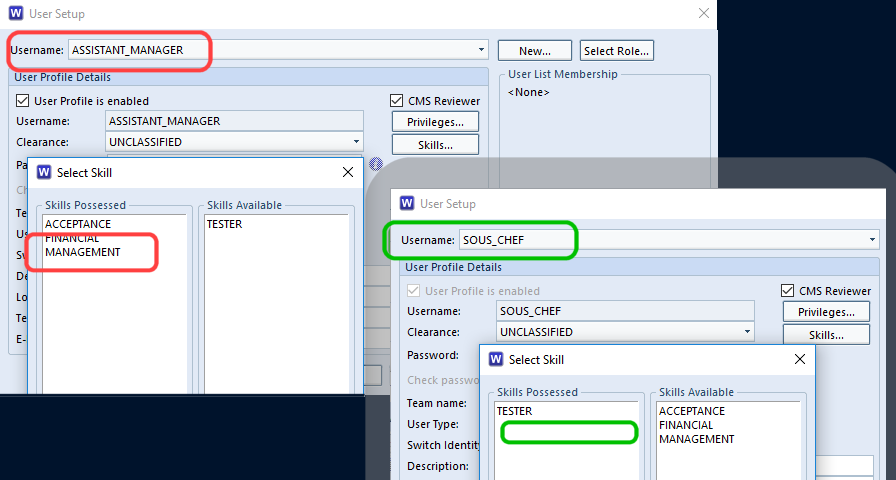
For each user that should be able to see the frame, assign the chosen skill to them. Here we are assigning the MANAGEMENT skill to the user ASSISTANT_MANAGER but not to the SOUS_CHEF
User Skill Assignment
Visibility in the User Interface
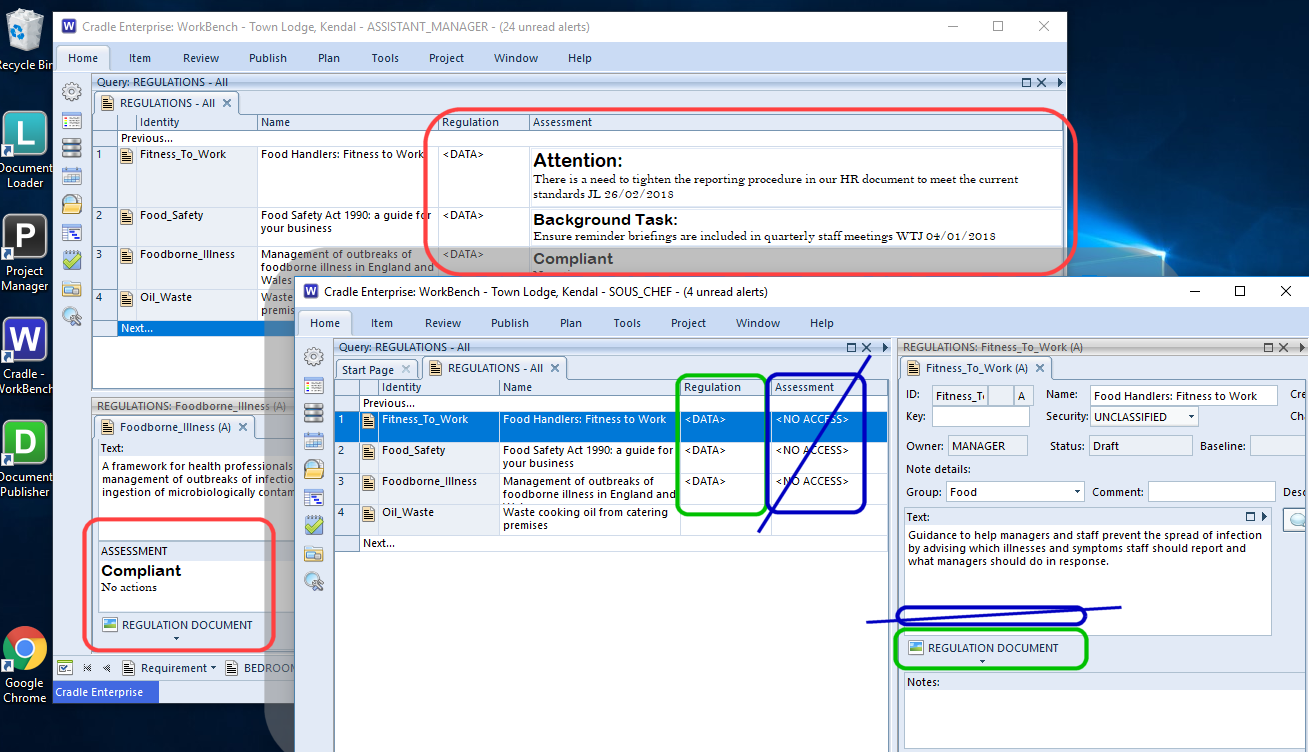
When the user accesses an item containing frames, whether they get to see the information or not, is controlled by the skills they possess. In this example both the ASSISTANT_MANAGER and SOUS_CHEF have logged into Cradle’s WorkBench and are querying the Regulatory Requirements for the establishment being planned. The ASSISTANT_MANAGER is allowed to see both the regulation document (stored as a pdf) and the management notes about their current compliance level. The SOUS_CHEF can see the Regulatory Requirements, so that they can aid implementation in roll-out, but is not privy to the management’s comments.
Skill Based Frame Access – Results
Application in Your Industry
The illustration above is deliberately simple and fairly generic. It should, however, be easy to see how projects, whatever topic they cover, can be set to allow certain users access to certain parts of the data but no others. Access may be restricted to NO_ACCESS or to READ_ONLY. The project may be quite happy for all engineers to see a financial budget frame for every component, but not so keen on having it changed by the implementer! The help section covers more on frame access.
Occasionally 3SL support may ask you for a sanitised export of your data to help diagnose a problem. What exactly does this mean and how do you sanitise your data?
Sanitised Data
In Cradle sanitised data an export of your data, where all the sensitive data is sanitised or removed.
To sanitise the data we convert characters to x so for example the line:
Cradle® is our requirements management and systems engineering software tool that integrates your entire project lifecycle in one, massively scalable, integrated, multi-user product.
In a sanitised export the following attributes will be sanitised using the method described above:
All item names (except for data definition names – data definitions in models)
The comment and description attributes
All text frames contents
Every symbol name
All change history contents
Additionally:
All binary frames (such as embedded Word documents) do not appear in the export file at all (as they cannot be sanitised they are simple removed)
Sanitisation option essentially allows a customer to produce a sanitised export file that can be sent to another organisation (3SL). This allows the recipient to reproduce the sender’s Cradle database in ALL respects EXCEPT for the critical (and therefore sensitive) data content. Sanitising your data via an export only effect the contents of the export file and DOES NOT effect your live project.
How do I export my data from Cradle so it is sanitised?
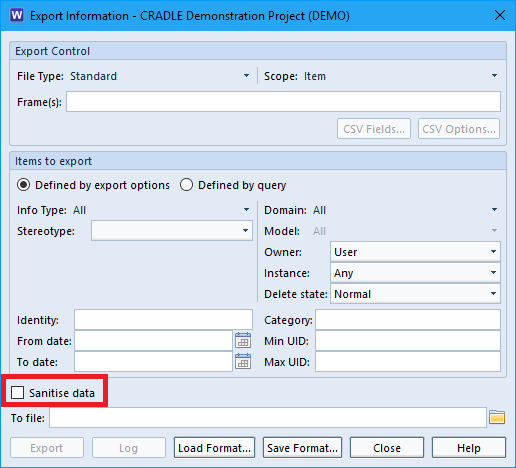
Sanitising you data during export is quite simple all if you are exporting via the WorkBench there is a check box called “Sanitise Data” in the export dialog which you just need to enable.
Sanitise Option in Export Dialog
You can also sanitise your data when exporting via c_io all you need to do is add a -sanitise flag to your command for example:
c_io -login MANAGER,MANAGER,DEMO -export myfile.exp -type all -sanitise
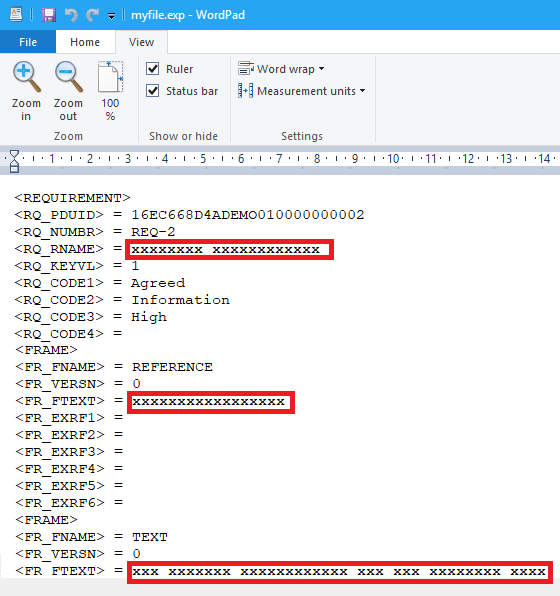
After you export you will be able to open the export file in an editor. You can then see that your data has been replaced with x’s
Sanitised Data in Import File
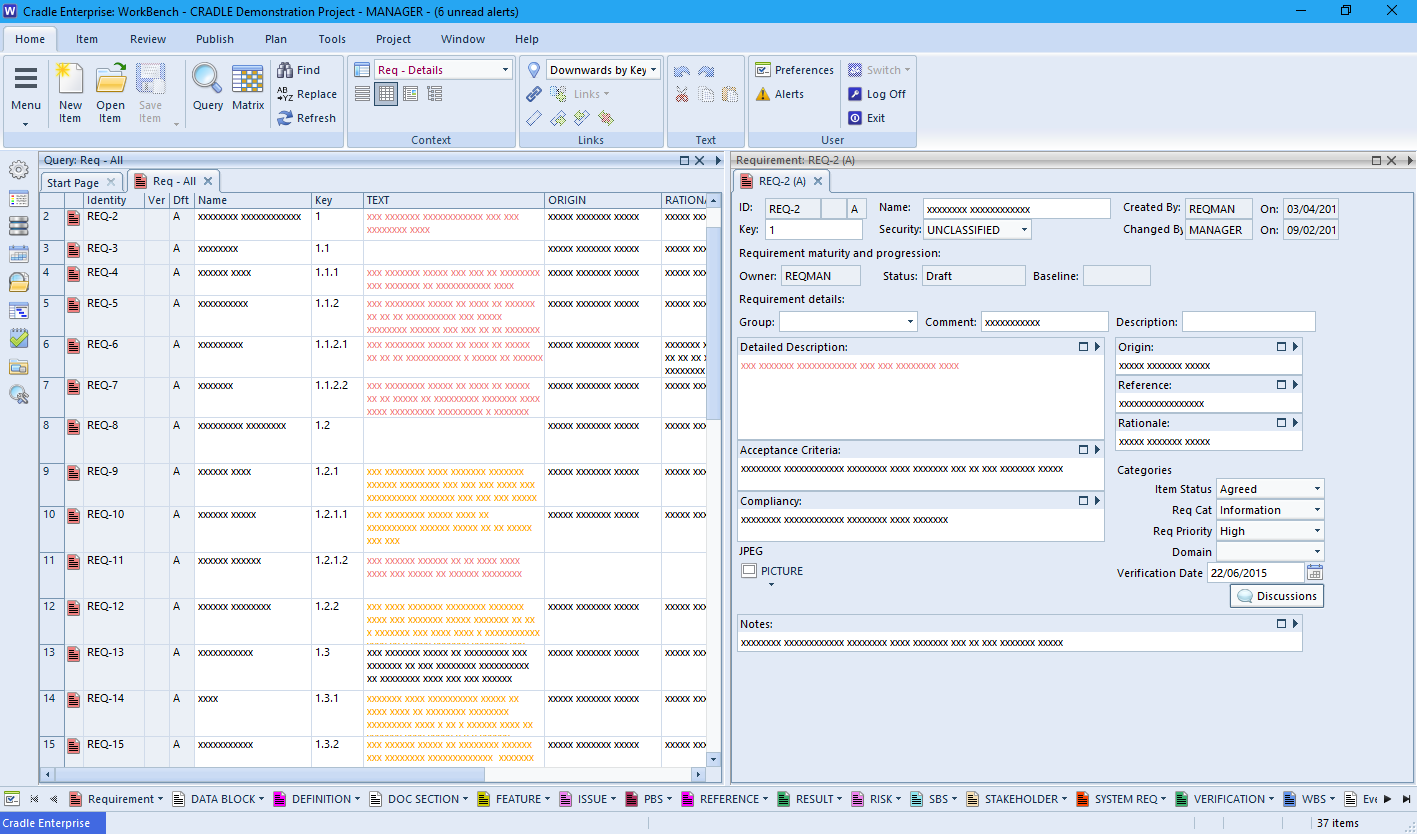
Or you can import the export file into a test project and look at the data in WorkBench.
Sanitised Data in WorkBench
For further information on sanitising your data in Cradle please see the following section in our online help.
Now the warmth of families and friends packed into living rooms too small to hold them are left behind, the last scraps of Christmas cake and bags of nuts have been consumed, we’re here in wintry February 2018. However we’ve sped into the year with a new FTTP link. See here for more details of how to download Cradle even faster.
Cradle Features Coming Soon….
We’re all busy here, in the chilly winds and rain and sleet of Cumbria working on the features for Cradle 7.4 I can reveal that we’ve been working on some enhancements to alerts to allow more comprehensive content to be sent in emails. This will help with collaborative working, swiftly informing interested parties that an item has changed which may need their attention. Item level Workflows are being enhanced to improve automation of your product lifecycle.
GDPR
GDPR
Time is racing towards the GDPR implementation date. We’re working hard to ensure our policies are up to date and in a fit state to deal with any data requests. However, there’s still a lot of confusion out there. Some things are obvious, were we to store sensitive information, like someone’s medical records, religious or political beliefs, its fairly obvious that this should never be swapped freely. The subject should be aware as to why we hold the data, what we hold and how we use and process it. We would then ensure any third party processors were up to the same standards before exchanging information.
At the other end of the scale, the ‘how would this ever be practical’ bit, there is little in the way of concrete guidance. If I email a company, from my desk at 3SL, my email address contains my name and associates me with 3SL. The sign off contains a phone number and an office location. By the letter of the legislation, this is personally identifiable information. Were I to leave 3SL (To become a top secret agent) and decided all previous traces of me needed to be removed, I could submit a ‘right to be forgotten’ to 3SL. They would have to remove all my personal data. (Except for ‘within date’ tax records etc.). As the data controller, all those emails with personally identifiable information within them would have to be recalled from all the recipients (who are now processors). Now how on earth could you do that?
If you’ve got any examples where the legislation appears to hit an impractical wall, drop us a line and we may feature it in a future blog. Note I’m using an anonymous email address social-GDPR@threesl.com !!
It’s National Send A Card To A Friend Day 2018 today 7th February.
Send a Card – National Days In these days of e-based everything, the number of people sending physical cards has declined. Placing a card, selected, bought and handwritten, on the mantelpiece or shelf is still more special than viewing a Tweet/Instagram/FB Message.
Send a Card to a Friend
If you’re a friend of 3SL’s Cradle and would like to wish 3SL a happy 30th Birthday you could send us a card. Include your company name and website and we’ll feature some of the best in future blog updates*.
Featured cards will be at the sole discretion of 3SL (Structured Software Systems Ltd.) and will exclude any defamatory or promotion of products/services that are contrary to 3SL’s ethos.
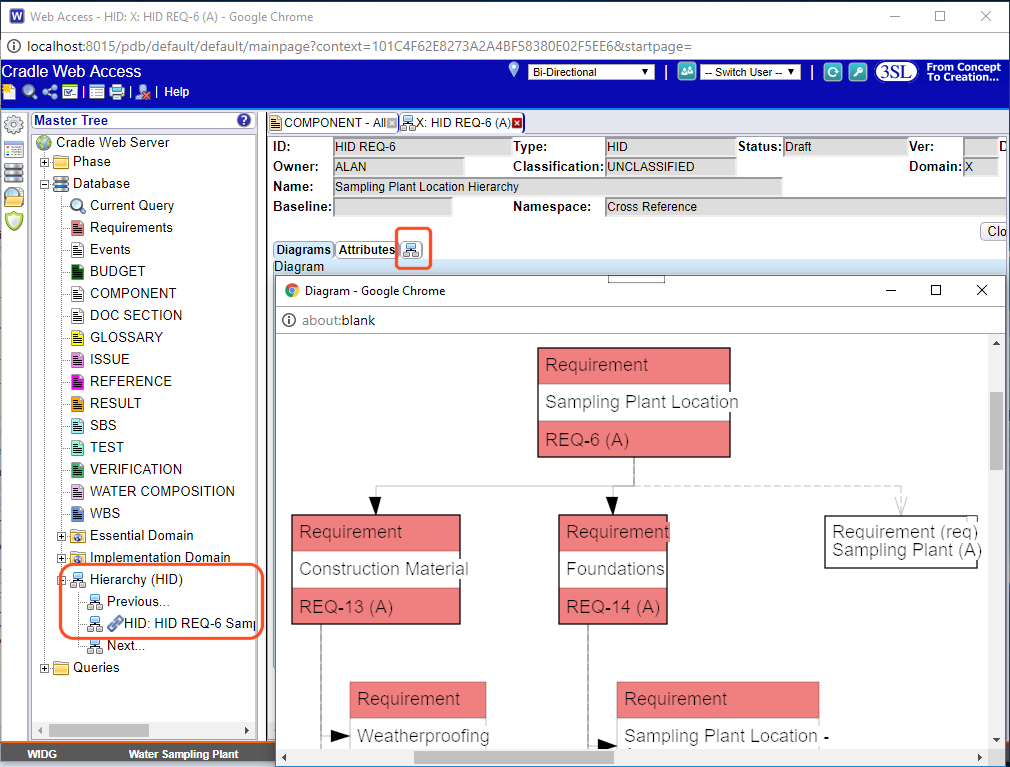
You can show a hierarchy diagram in Web Access, but first of all it needs to be set up.
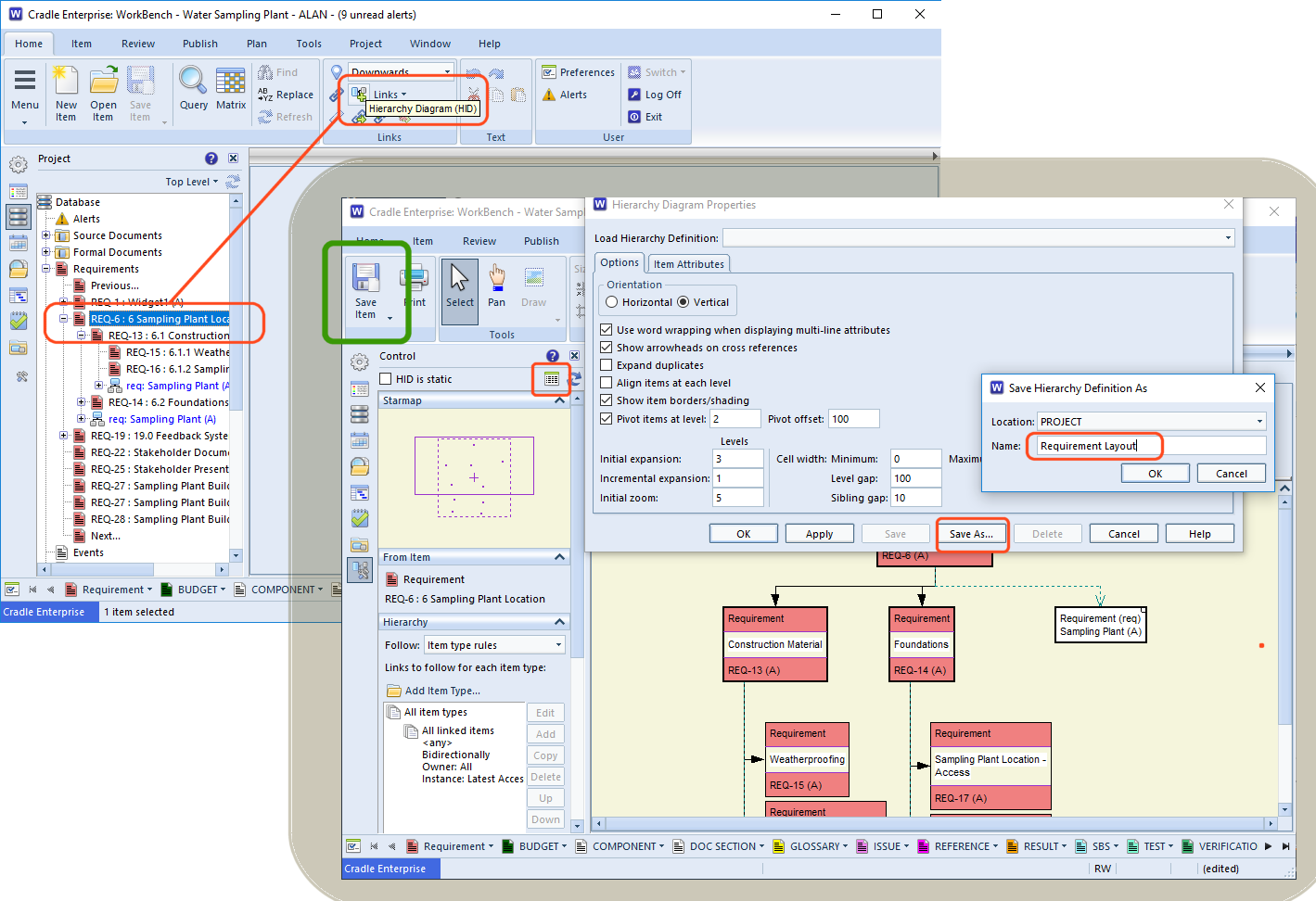
You can create dynamic and static HIDs in WorkBench. By right clicking the item of interest and then following Links->Hierarchy Diagram (HID) . Once displayed the properties for the diagram and the item types on it can be set.
If you want to return to these display settings, this ‘template’ can be saved.
The diagram will expand as defined in the settings and show in the item tab. The ‘Save’ option will now be available for the diagram itself. At the top of the HID Sidebar there is the option to make the HID static this results in the entire diagram being saved as a frozen snap shot. Leaving it un-ticked the diagram will remain dynamic. Next time you open the diagram all the links will be checked and redrawn. This is most useful when tracking how your project items and their links are growing.
Setting up a HID
Running Saved HIDs
Now that the named HID exists, it can be run from the Project Sidebar under the Hierarchy (HID) node in the project tree . You can run a query to return HIDs in the same way you can any other item type. If you write a query that returns only one HID item, it can be added to a phase with a run query and open item action. This makes it easy to control what users see and use from the project phases.
Web Access
Once you have a named HID available in Cradle it can be run from the sidebar in Web Access. The main item form will show a hierarchy diagram in Web Access. Additionally the ‘expand diagram’ icon allows the user to see the diagram in a separate scrollable window.
Blighted with cloud and rain for most of the evening on the 31st, we see the last remnants of the super blue blood moon over Barrow-in-Furness on the morning of 1st February. Many more world wide had much better views.
Super blue blood moon 2018 – Barrow-in-Furness
Pinch Punch
“Pinch Punch First of the month”. Were you fast enough to catch someone in your office today? If they are claim you are acting strangely, perpetrating mild violence in the office, try blaming it on the full moon….
Whether you are a current or prospective customer we want to ensure all our customers (current and future) have the support they need this coming year.
We are committed to your successful use of Cradle and provide a range of support services to ensure that Cradle delivers optimal benefit to your projects.
Options
Prospect Support
We’ll help you get your evaluation up and running and assist with questions on setting up for your company’s process.
Single User Products
These extremely competitively priced products come with 7 days active support. After that you can use the LinkedIn discussion groups, online help, online videos and bundled user manuals. Users may upgrade to any point.point releases denoted by their licence, e.g. 7.3 users may install 7.3.1 and 7.3.2
Enterprise Support
Enterprise products with maintenance are covered by unlimited active support from 3SL and their partners. They also have access to online material as above. Users can upgrade for free to any later product versions during their maintenance period. Users with Named User Licensing are able to request a number of user changes each year for free. Additional licences for extra features or personnel may be purchased at any time.
Product Re-instatement.
Whilst we wish all our customers have continued use for Cradle, we do understand that some long term projects go through design quiet phases. It may be that during these lulls following product design/development or test software tools are ‘parked’. 3SL will endeavour to re-instate any old projects and bring users up to the latest version of Cradle once the maintenance gap is filled, or a later version of the product purchases. We strive to ensure a full upgrade path and compatibility of all you historic Cradle data.
Training
We can supply a number of off the shelf Cradle training courses. However, to ensure you get the best benefits from these, we will consult with you to tailor the course for your company’s needs.
Bespoke Development
Whilst Cradle offers a full suite of products that cover most of our customers needs, some functionality requests are very bespoke. For example if you are using the WebAccess product and require customised pages with your company logo, you’re free to alter the templates. If, however, you have not got the expertise in-house, 3SL would undertake funded work to do this. Custom applications and new product features are also undertaken and 3SL will be happy to discuss your requirements.
Contact
Our UK technical support help-desk is available from 09:00 until 17:00 UK time (GMT/BST), Monday to Friday and excluding UK national holidays.
You can contact the help-desk by any of the following:
Tel: +44 (0) 1229 838867 Fax: +44 (0) 1229 870096 E-mail: support@threesl.com Website: www.threesl.com Post: Support 3SL Suite 2 22a Duke Street Barrow in Furness Cumbria, LA14 1HH UK
Please log all questions, concerns, problems and requests with the 3SL Support Department as above. You’ll be given a call reference and can then use this to keep track of its progress.
Don’t worry if your not in the UK, customers outside the UK can log calls with the Support Department as above, or with their local support representatives, either local 3SL support or local 3SL partner support, as appropriate. Our partners bring the additional benefits of speaking your language and being in your time zone. They have full assistance from 3SL and the complete range of Cradle products. Please see the Contacts Page for additional contact information.
For more information on our support and services please see the following page of our website.