A set of updated white papers are now available from our website. These cover topics such as document management, regulation compliance, information assurance and links to programme management.
Want to ship a read-only copy of your project to a Customer or Supplier?
Web Publisher Output
Use Web Publisher to create a hyper-linked output of your project. This can be copied onto a pen-drive, CD, Intranet and sent to your customer. They don’t have to have Cradle to see your work on the project, just an html browser. Of course we would suggest that they get a copy of Cradle for themselves and then they load the project items and query, publish, alter and necessary, but we know that’s not always practicable.
You can limit what an end user will see by selecting various options. This could be either one item type or All the items types within the project. You can then give the hyper-linked project an owner and select a location of where the files are to be sent.
If you require any more information on Web Publisher then you can find this within our Cradle help. Please click the link.
Article updated 05/12/2018 – Added information about restricting items published
Having developed a schema, added item types, defined workflows, tailored categories to your process, a new project starts. The last thing you want to do is start from scratch defining the it all over again.
Solution
If you have a really useful setup that you want to reuse in a new project then simply “drag’n’drop” it in Project Manager. Log into the projects with a user with privilege to import project settings and then drag the schema from the developed project to your new project. The alternative would be to export just the project schema from your original project and then import it into the new project. Whatever you do, you don’t need to start typing and clicking to create a new project setup.
Copy a Project Schema
Reporting on a Project Schema
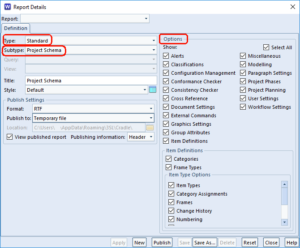
Schema Report Details
In order to see the Project Schema in a tabular form, log into the project from Project Manager and simply select the Schema in the tree. Pressing the Publish button will output this as a report. If you want finder granularity of what shows in the report open WorkBench and run the Standard Report “Project Schema” from the Publish->Reports tab.
Your chosen Cradle ‘Form’ or ‘View’ is not showing the item category you want to see. It may be that you select a different form, if one has been defined showing the item information you want. You could also select one of the automatically generated forms that contains the category or redefine the one you already have. However, this is not always possible as the user may not have the correct privileges. The CREATE_DEFS privilege is required to allow them to change it. All this may just be over the top for a quick peek at a value.
Solution
Select ‘Information’ from the ‘Item’ ribbon for a quick view of all the details for the selected item.
The Item Information dialog can be used to view categories, item attributes, dates, calculations and even the logic matches in a rule set.
Cradle Preferences: Controlling the tool to suit your needs.
“I want to see the Dashboard when I log in” Says the Manager
“I want to see the Modelling sidebar” Says the Engineer
Set everything just how you want it in Cradle. Tailor and save your individual preferences for whenever you log into any project.
User Preferences
Cradle is delivered with a set of default preference settings. These can be altered by the system administrator by editing the system configuration files. However, these preferences may not suit everyone. Two people working on the same project may legitimately have different formats for time and date as they are based in different countries. Edited user preferences are applied on top of the system settings giving two layers of control, defaults set by the installation, tweaks set by users. To read more see the Cradle help on preferences
The Quick Access Bar
The QAB (Quick Access Bar) bar at the bottom of the screen shows your most used queries. It can be configured to show the item types most relevant to you.
Diagrams
The way your diagrams look and the information shown on the screen can be tailored with Diagrams setting.
What Opens What?
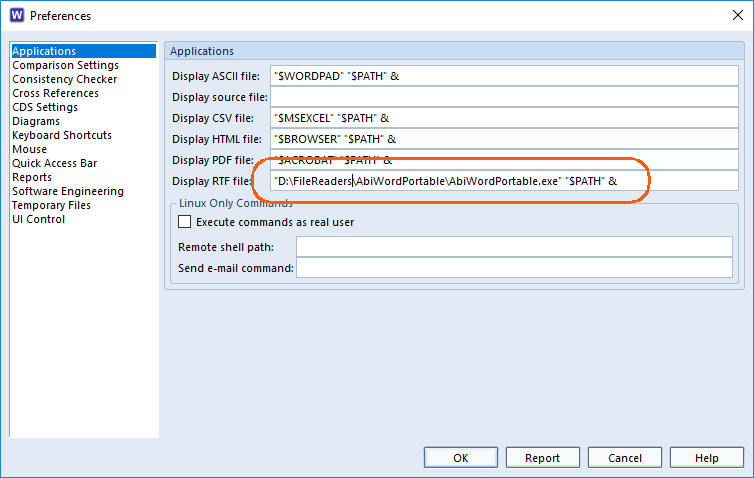
By changing the details of the Applications listed in the preferences, you can control the software used to open a particular file type. If you have a favourite RTF viewer, say, that you want to use to show published queries, you can set the value here.
Application Preferences
What’s the Time Mr Wolf?
How your display show the time and date are also set by the user preferences. Internally information is held in UTC, but as a result of altering preference settings, you can show this to suit your locale.
All in an .ini
A users local preferences and the global preferences set for your company are held in configuration files. These are detailed in this article.
Everything within this post can be found within our Cradle online help, with in depth instructions and guides. You can also find other options that are available within preferences.
Article Updated 22/05/2018
Article Updated 17/09/2018 – Added links to Cradle online help
We are pleased to announce the release of Cradle-7.1 that introduces SysML into Cradle’s existing modelling capabilities and allows SysML to be integrated with the needs, goals, objectives, user stories, sprints, SBS, PBS, test cases, verifications and validations (and so on…) in the full systems engineering lifecycle.
This is more than mere MBSE. This is lifecycle-enabled MBSE!
Only from 3SL and only from Cradle!
For more details, visit www.threesl.com and talk to us at salesdetails@threesl.com or me at: mark.walker@threesl.com or contact me through LinkedIn!
If you want to upgrade to Cradle-7.1, you will need a new Security Code as Security Codes for previous versions (such as 7.0 and 6.8.x) will not work with this release. Also note that if you upgrade Cradle anywhere (such as a client or your server) then you must upgrade all Cradle installations.
Once again, we would like to take this opportunity to thank everyone who gave up their time in the Beta test programme. Your hard work is very much appreciated!
The new Cradle version (7.1) is very close combining SysML, other modelling notations with full-lifecycle requirements management and systems engineering!
Watch for developments here, or visit: www.threesl.com for more updates!
It is time to announce the end of the Beta test period for Cradle-7.1, our release that introduces SysML into the set of notations that are supported by Cradle’s modelling tools.
We would like to express our thanks to all of the people who provided their time to study Cradle-7.1, and we would also like to thank their organisations for agreeing to this use of their time.
We have received much valuable feedback from the Beta testing and we have included as much of this feedback as possible into the Cradle-7.1 release.
We expect to make an announcement about the release of Cradle-7.1 very soon!
As has been the case with all previous releases of Cradle:
– Security Codes for previous versions of Cradle will not work with Cradle-7.1 – New Security Codes for Cradle-7.1 will be provided, on request, to anyone who has an active maintenance agreement with 3SL
Once again, to all Beta testers, thank you very much!
We have recently seen cases where a Document Publisher template – which is an ordinary Word document – contains references to other Word templates that have been created by an organisation.
Generally, this is OK, everything works correctly as you would expect.
However, if the Word templates (.dot or .dotx files) are not available, or are corrupted, then problems can occur because Word (running inside Document Publisher) may display error messages and prompt you to re-try access to the template, or repeat an attempt to save changes back to it, and so on.
You can either accept that these messages will occur over and over again, or you can disconnect your Document Publisher template (the Word document) from the Word templates.
It is difficult for us to offer general advice as every organisation is different, but our inclination would be to sever connections to these Word templates if you ever seen any warning or error dialogs from Word.