July has come around again and we turn our thoughts to hot sunny days, (in the northern hemisphere), beach holidays perhaps and take time to relax. We look forward to sun, sand and new releases…
Sun, Sand and New Releases
We can use this time to re-assess how we do things, how to do things better and make improvements in our personal and working lives.
On the topic of improvements, July marks the month in which 3SL releases our new 7.7 version of Cradle. There are many enhancements and improvements that will be beneficial to our users.
Cradle-7.7 Release
New features coming in this release:
Cradle 7.7 coming soon
Pie charts
Metrics in graphs
Many small enhancements to documentation
New dial type in dashboards – anular percentage
Update to DEMO project
Enhancements to baseline reports
Snapshots
Test Mail button added to test mail settings
Test Execution UI in Project Setup enhanced
Added support for Windows 11
Added support for Office 2019 and Office 365
Training Courses
We now have a new training course available for all users of Cradle. The User Training course will be taking place on October 5th – 6th 2022.
*If you will have the same users in the new project that are in the existing project.
The Solution
To avoid the Personal and/or User definition files being part of this import, we would suggest the following:
Log in to the existing project as MANAGER
Select Project > Export
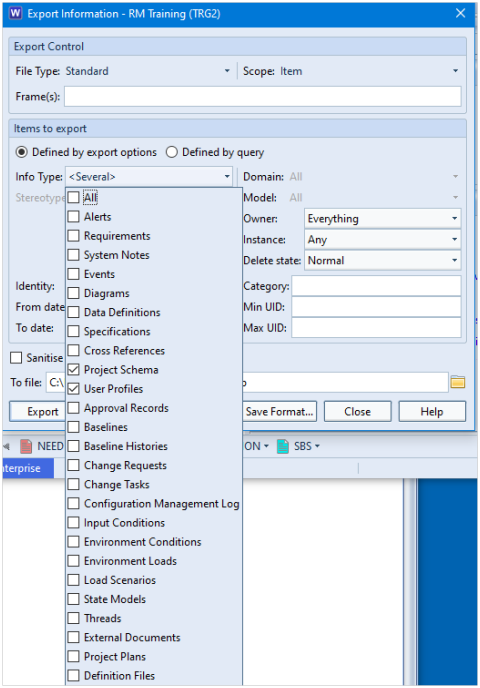
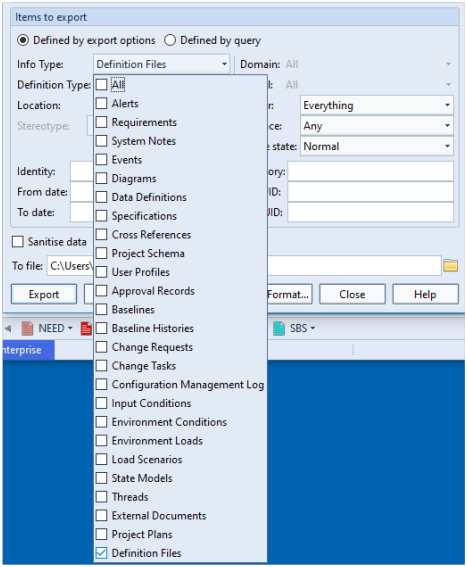
In the Export dialog set Owner to Everything and Info Type to ProjectSchema and User Profiles (if users are required, see comment above)
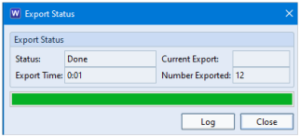
Press Export to create the export file and close the Export Status dialog but do NOT close the Export Information dialog:
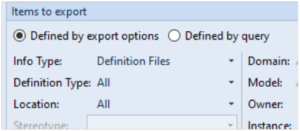
In the Export Information dialog, change the Info Type to ONLY show Definition Files:
You will see that some new options appear – Definition Type and Location:
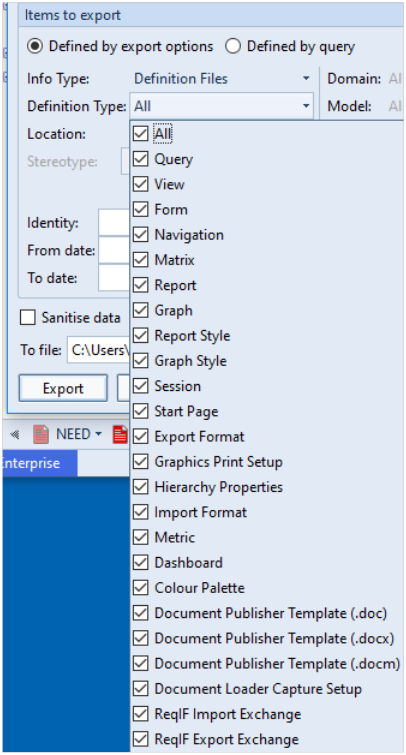
The Definition Type option allows you to specify the types of definition file to be included in the export. For this example, we will leave this as All:
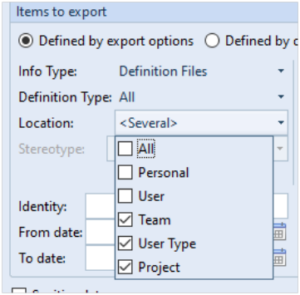
The Location option defines which location you are exporting the definition files from. Users may have created Personal or User definition files that might not be relevant to the new project. Personal and/or User definitions might only have been useful to an individual person rather than the project so could be omitted. In this case, we would only need to select Team*, User Type* and Project
* It may only be necessary to select Project
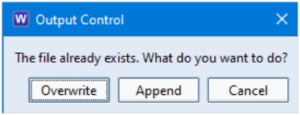
Press the Export button again. This will present you with the option to Overwrite, Append or Cancel. Select Append:
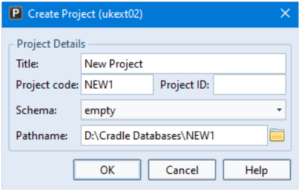
In Project Manager, create your new project with an EMPTY schema:
Log into the new project as MANAGER
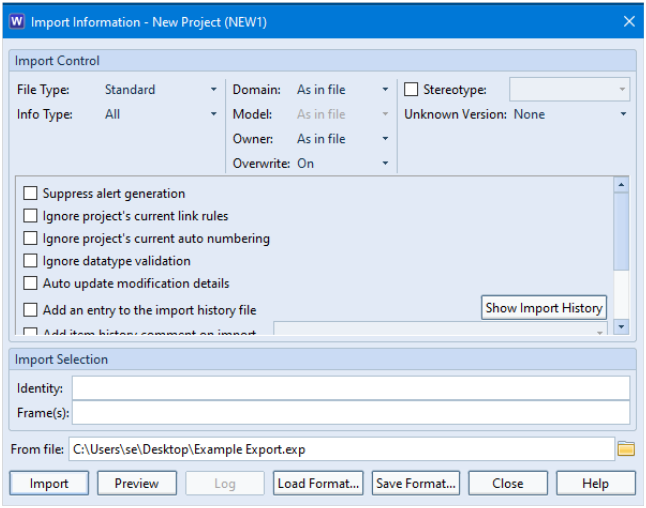
Select Project > Import and set Owner to As in File and Overwrite to On:
You will see that your new project contains:
Users
All the Project Setup information including the phase hierarchy and all supporting definition files
Summary Note
If you had NOT chosen to append the definition files, it is highly likely that the phase hierarchy from the existing project would not work in the new project and would produce errors.
These definition files are important to define the WorkBench environment.
Also, if you had chosen to export all the definition files, this may have resulted in numerous views, forms, queries, documents etc., that are not particularly relevant or accepted into project definitions.
Overview of the many capabilities in Cradle including best practices, demonstrating the Cradle tool and its features – User October 2022 course.
“A great opportunity for new users to familiarise themselves with Cradle”
Online User Course
Businesses that have chosen Cradle can benefit from this general Cradle overview and how to apply Cradle to their projects.
User Course 5th to 6th October 2022
“The User course is designed for both new users or users requiring a refresher course.
The Cradle User Course helps you to understand the benefits of Cradle and see examples of where Cradle is used. We provide explanations of the various Cradle modules as well as providing the basic concepts of Cradle, including items, cross references and the Cradle schema. There is a tutor led example of some of the WorkBench features and the Toolsuite tools.
Please note this course is provided through demonstration only, there are no “hands-on” exercises.
PC/Laptop – internet browser & Cradle installed **
Soft copy course materials, and printed certificate
If you would like to be kept in touch with the details for this Training Course – User October 5th to 6th 2022 please send an email to salesdetails@threesl.com
Pearls are the birthstone for the month of June. Pearls are associated with purity, honesty, and wisdom, as in the term “Pearls of wisdom.”
Pearls of Wisdom
That is a description of wise advice, concise pieces of sagacity that are metaphorically as precious as pearls. Originally, pearls of wisdom referred to bits of information or advice that the receiver truly found precious. Today, referring to information or advice one receives as pearls of wisdom is often, but not always, sarcastic, as the phrase is now considered a terrible cliché. The term pearls of wisdom dates back at least to the early 1800s.
Wisdom in Systems Engineering
Wisdom can take various forms of thinking. Strategic wisdom; system wisdom; decision wisdom; creative wisdom and so on. All these forms of wisdom can be utilised if they are organised to work together in a single, integrated solution. This will get the best results, as all the effort will guide that wisdom to be used systematically to reach the same required goals.
Cradle 7.7 Release
Cradle 7.7 coming soon
We are pleased to announce that the Cradle 7.7 release will be ready at the end of July. We are now in the final testing stages of the new release – watch for news. Those under maintenance will receive this update including the new features for free. Those without maintenance or using single user products from earlier point releases will need to purchase an upgrade to 7.7.
New features coming in this release:
Pie charts
Metrics in graphs
Many small enhancements to documentation
New dial type in dashboards – anular percentage
Update to DEMO project
Enhancements to baseline reports
Snapshots
Test Mail button added to test mail settings
Test Execution UI in Project Setup enhanced
Added support for Windows 11
Added support for Office 2019 and Office 365
Look out for more information on these enhancements in the future.
Training Courses
Online Cradle Training
We are pleased to announce that we shall be adding new training courses soon. We have a new one day User course and a Modelling course. These will be available on the website shortly.
Prices
Regrettably, the price for all variants of Cradle will be increasing by approximately 10% on the 1st of August 2022. All quotes given before then are still valid at the quoted price, even if the purchase takes place after 1st August 2022.
Dual Monitor Issues
Some issues have been detected when running our Toolsuite applications (Document Loader or Document Publisher), e.g. when running dual monitors, with certain scaling settings etc.
Some issues have been detected when running our Toolsuite applications (Document Loader or Document Publisher), e.g. when running dual monitors, with certain scaling settings etc.
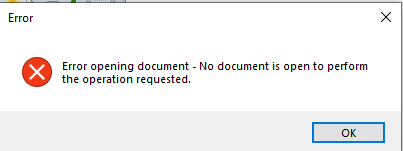
Example of Toolsuite Errors
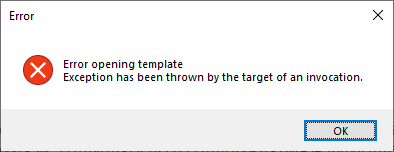
Sometimes when having more than one monitor connected you may see one of the following error messages.
Solutions
The following solutions can fix the problem without having to remove the monitors.
Scaling
Set the scaling of both monitors to 100%
Restart your machine
Resolution
Set the resolution of both monitors to be the same
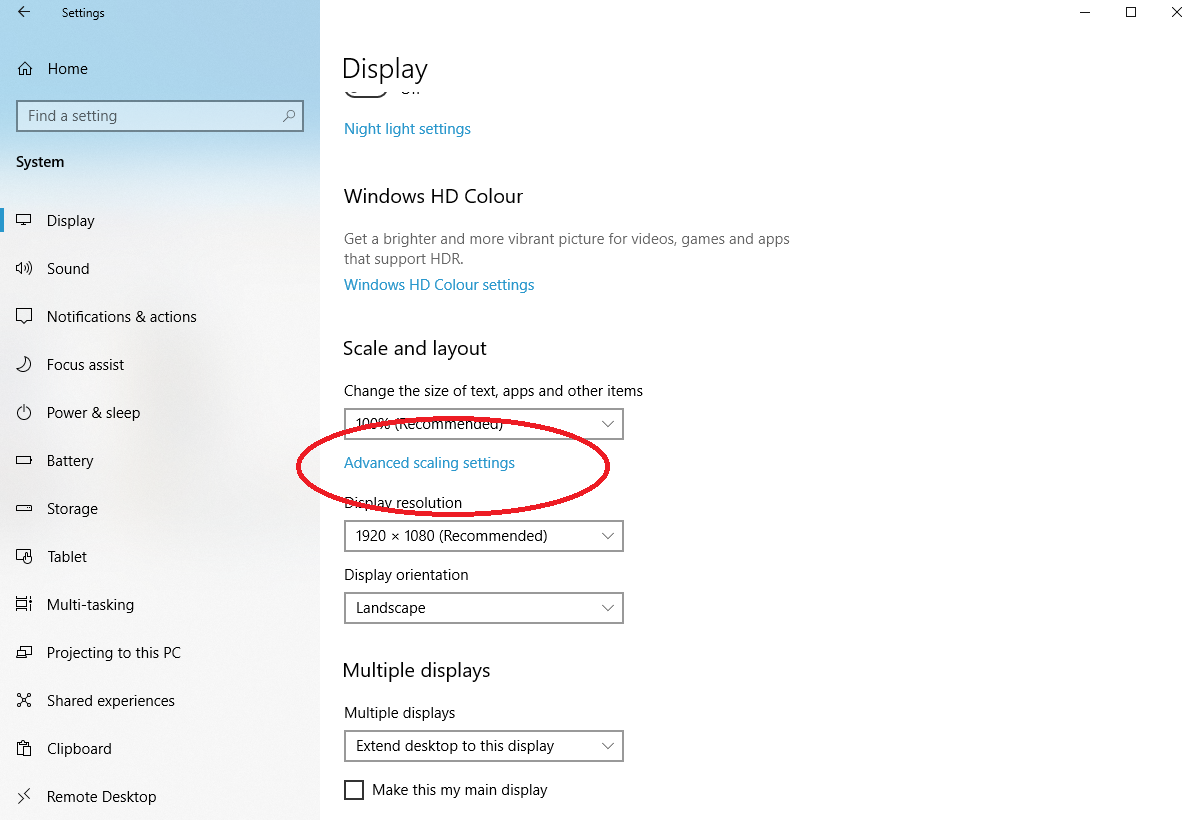
Advanced scaling
In Display settings click Advanced scaling settings
Enable Let Windows try to fix apps so they’re not blurry
Restart your machine
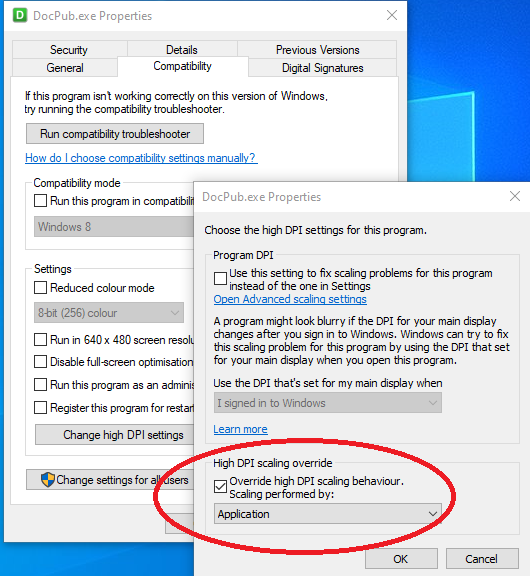
High DPI scaling override
Right click on DocPub.exe and choose Properties. Note: if your problem is with Document Loader then just follow the same steps but for DocLoader.exe
In the Compatibility tab select Change high DPI settings
Enable Override high DPI scaling behaviour
Restart your machine
Program DPI
If the above doesn’t work then in the same dialog as High DPI scaling override enable the Use this setting to fix scaling problems…. within the Program DPI section
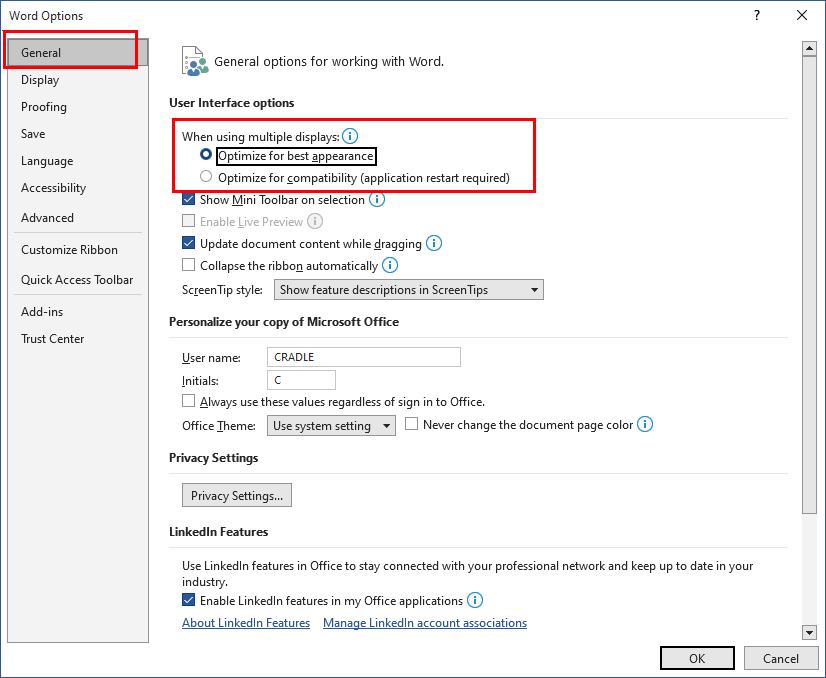
Optimise for Compatibility
Open Word Options
Select the General tab
In User Interface options ensure the When using multiple displays option is set to Optimize for best appearance
Word Options
Restart your machine
Test Document Publisher/Document Loader and IF you are still getting the error after following all of the above steps then change the option to be Optimise for compatibility and then restart your machine.
Every business requires successful, efficient and utilitarian processes to perform the functions which earn it money. The really simple way to describe this is those businesses which stick to successful processes thrive, whereas those which do not, fail. This is a gross over simplification, of course. However, a fundamental truth lies at the heart of that statement. This article will set out how requirements management tools and Six Steps to Success are the key to unlock successful project delivery.
Get it right at the start and success will come much more easily. The first steps are crucial.
Requirements Management Tools and Six Steps to Success is about starting in the right direction and keeping going in that direction until success occurs.
Business success
The Six Steps for Success
There exists a very simple set of six steps for guaranteed success in any endeavour. Personal development gurus and business leaders teach these steps at seminars all over the world.
The six steps:
Be very clear of your outcome
Know the outcome in detail
Quantify the outcome with measurable metrics
Ensure that the outcome is possible, even if very ambitious
Take an action to achieve that outcome
Measure the result of that action and determine if it is getting you closer to that outcome
If it is not, then change course
Keep taking action, checking and if necessary, changing course, repeating steps 2 to 4
Never give up, repeating steps 2 to 4 until that outcome is achieved
Whilst that list is very simple, completely lacking in applicable detail and at first glance, completely banal, or even vapid. It should not be dismissed entirely. That simplistic list of steps is applicable to every situation, from a toddler learning to walk, to ensuring an aircraft arrives at its correct destination, to landing a person on Mars.
For example, the aircraft flight computer is aware of its destination and its location and it compares that with the flight plan and takes action by correcting course continually, until it arrives successfully at its destination.
So Where Do Requirements Management Tools Come Into This?
The first step is to be very clear of the outcome. Knowing the desired outcome in detail to a very granular level is essential. It must be possible to describe every part of that outcome. Listing every attribute required in detail. These outcomes can become a repository of requirements and it is these requirements that are to be managed throughout the lifecycle of any project. A Requirements Management tool will manage these requirements through defined processes to ensure that any project ultimately succeeds.
How to Create Requirements?
SMART requirements (Specific, Measurable, Attainable, Realisable, Traceable), are the best ways to define the specifics of your outcome as requirements. Each requirement should be either an item, piece of equipment, function, process etc. and linked in a hierarchy. For example, a cooling system is a requirement on an engine. That cooling system has a function, which is a requirement. That function must operate within pre-defined parameters, which are requirements. The cooling system is made up of various parts, like a radiator, pipes, pumps. Each of those are requirements with their own functions with operating parameters. All of those are requirements. Even a nut, or a bolt or a screw is a requirement with attributes of size, materials, strength, colour.
How to Manage Requirements?
As is evident from the above, any large system can rapidly become an enormous, labyrinthine mess of hundreds of thousands, or even millions of requirements of every aspect of your system. Try keeping track of those during the systems engineering process from concept to creation.
Unmanageable mess
Every defined and agreed requirement must be met to guarantee the outcome of the project. Each part of the project must be linked back to a requirement, to ensure that the steps 2 to 4 above can satisfy and implement that requirement successfully. But when there are millions of requirements, then help is available.
The Solution
A tool designed to manage all requirements. It must be able to store and link all requirements to every relevant part of the system. That tool should also be able to trace every part of that system back to a requirement. This full checking of every item to every requirement keeps projects on track. It should also be able to find any part of the system which does not link back to a requirement. Such items that do not link back to requirements are evidence of wasted effort and expense.
Cradle is the only tool that has transitive linking, allowing full requirement redundancy checking and so can find wasted items that are not linked back to any requirements.
All your projects are kept fully under control. Cradle can handle all requirements traceability and coverage whilst also linking that into the rest of the systems engineering project. For full systems engineering solutions, with the entire requirements management control system built in, Cradle is the answer. Ensuring that every item is linked to a set of requirements, and no effort is wasted.
Start your six steps to success in order to feel the satisfaction of successful project delivery
Cradle – requirement management tools and the six steps to success.
Learn how to identify, analyse, evaluate, treat and monitor the risks associated with activities or events within your business with this year’s – Risk Management September 2022 course.
“A great opportunity for managers to understand and mitigate risks”
Online Risk Management Course
Businesses that have selected Cradle for their Risk management process can benefit from an in depth understanding on how Cradle can manage your risk process
Risk Management Course 20th to 21st September 2022
“The Risk Management course is designed for project team leaders or managers who administer and manage Risks.
The Cradle Risk Course focuses on providing an introduction to Risk Management in Cradle. We will start by setting up the schema for a small example and use this to manage the risks and provide some example reports. In the final module, we provide a worked example.
However, if you have a larger team or wish to cover multiple topics, courses can be tailored and held at your premises / virtually depending on restrictions and requirements or online at a date and time to suit” see here.
PC/Laptop – internet browser & Cradle installed **
Soft copy course materials, and printed certificate
If you would like to be kept in touch with the details for this Training Course – Risk Management September 20th – 21st 2022 please send an email to salesdetails@threesl.com
Requirements management tools are at the heart of future development in tools for systems engineering. Organisations that are not following and implementing the developments in these tools and utilising them in their projects may well lose out significantly.
What are requirements management tools?
According to Professor Roland Traunmüller, requirements management is the systems engineering activity principally concerned with finding, organising, documenting and tracking requirements for software systems and products / projects in many different industries. Its focus is maintaining traceability. This is defined as the “ability to describe and follow the life of a requirement, in both forwards and backwards direction. i.e. from its origin, through its development and specification, to its subsequent deployment and use, and through all periods of on-going refinement and iteration in any of these phases.”
The need to be sure that any project is continuously and effectively moving towards the goal of satisfying all the required elements of that project is best and most effectively met with a dedicated requirements management tool. This is a tool which is designed from the outset to impose requirements management principles upon the project from the start and continue to impose them through all of the project lifecycle.
What happens to your projects, or indeed, your business if you fail to follow good systems engineering practice? How can your systems’ design properly satisfy requirements that are imprecise or incomplete? How can you implement a requirements management process without the effective deployment of a fully integrated requirements management tool? The project stakeholders lose sight of the requirements in the maze of changes and developments that always naturally occur during the project lifecycle. Time, money and energy are wasted creating and implementing solutions to problems that do not exist.
Let us use an example
An engineering company has won a contract to design and install a heating system in a new office block. The company offering the contract seeks an environmentally friendly, carbon neutral system. It would be cheaper to use existing heating systems available ‘off the shelf’, but they want to win environmental awards for green technology and so they want a new design.
They award the contract to a company that uses fashionable green language, but that company is not using a dedicated and integrated requirements management tool. Their systems are based on taking notes on paper and mobile devices, then transferring them to Microsoft ® Word documents and spreadsheets. They say that this document-centric approach works well, as shown by their low development price.
As their system progresses, they have designated naming conventions for these documents to keep their system from becoming too complicated and losing documents. Inevitably, some employees forget the naming convention, or fail to apply it correctly, or overwrite documents with the wrong content. Before long requirements are lost or forgotten and not included as they pivot from the design phase, or “slip through the cracks” into the testing and implementation phases. These losses are further compounded when changes are required later and there is no communication between the design engineers and the installation engineers and decisions made on the spur of the moment to make changes are not checked against the system’s requirements. Equipment gets designed and installed only then to discover, “Oh no!” when a part does not comply with the new corporate environmental regulations created by the Chief Environmental and Climate Change Officer. Such regulations were incorrectly entered into the manual, document-based process, so the design team didn’t ever see them and the installation engineers were utterly unaware of them! Disaster! The project runs over schedule, over budget, delivers the wrong system and the company’s reputation is tarnished!
All of this could have easily been avoided had they used a fully integrated requirements management tool such as Cradle. Not only does Cradle provide full end-to-end traceability and coverage of all requirements, it is also fully integrated into its Systems Engineering package that handles every part of your full project lifecyle. That means that whatever size or scale of project you are delivering, Cradle can be trusted to hold all your data securely and gives you the confidence to know that every single requirement that is gathered and entered into Cradle. All these requirement scan be tracked throughout your design, testing, implementation, maintenance phases and through to eventual upgrade/replacement or retirement. Any changes and their impacts can be managed fully and properly throughout the entire project lifecycle from concept to creation.
And that means you can enjoy the confidence that your projects can deliver what you promise to deliver on time every time.
We most likely understand this to mean encourage, provoke or urge. Unfortunately there is no underlying tasty treat associated with the phrase. Eggs and Easter eggs may represent the start of a new life or regeneration and are often given at Easter after their consumption would have been prohibited during Lent.
Project
An egg holds the building instructions for a new life, and when fertilised can grow into something great. Like a new life, a project needs to be nurtured in order to grow. However, it must be led in the correct direction, not allowed to grow too fast or out of control for the best success. There will be risks on the way and its progress needs to be monitored and checked.
Go-on
So we urge, cajole and encourage you to keep your projects safe, warm and cared for the only way we know how – in Cradle. Now does anyone fancy taking up the Chicken and Egg debate???
Return
3SL Offices
During April 3SL UK offices are making a phased return to the office. It’s been over 2 years since we’ve sat at our desks. It was a bit of a time capsule moment seeing diaries open on March 2020! You will still be able to email, use webinar, or snail-mail, but if you call us on +44 1229 838867 you may find different voices answer.
Training
Online Cradle Training
TheProject Administration 20th-21st April 2022 course is designed for project team leaders or managers who administer and manage Cradle projects. It will cover user and project administration. It will also include setting up project schemas helping your users to hit the ground running.
Social Media
Twitter
HII Tweet March 2022
We marvelled at how a dock can float in this tweet from HII.
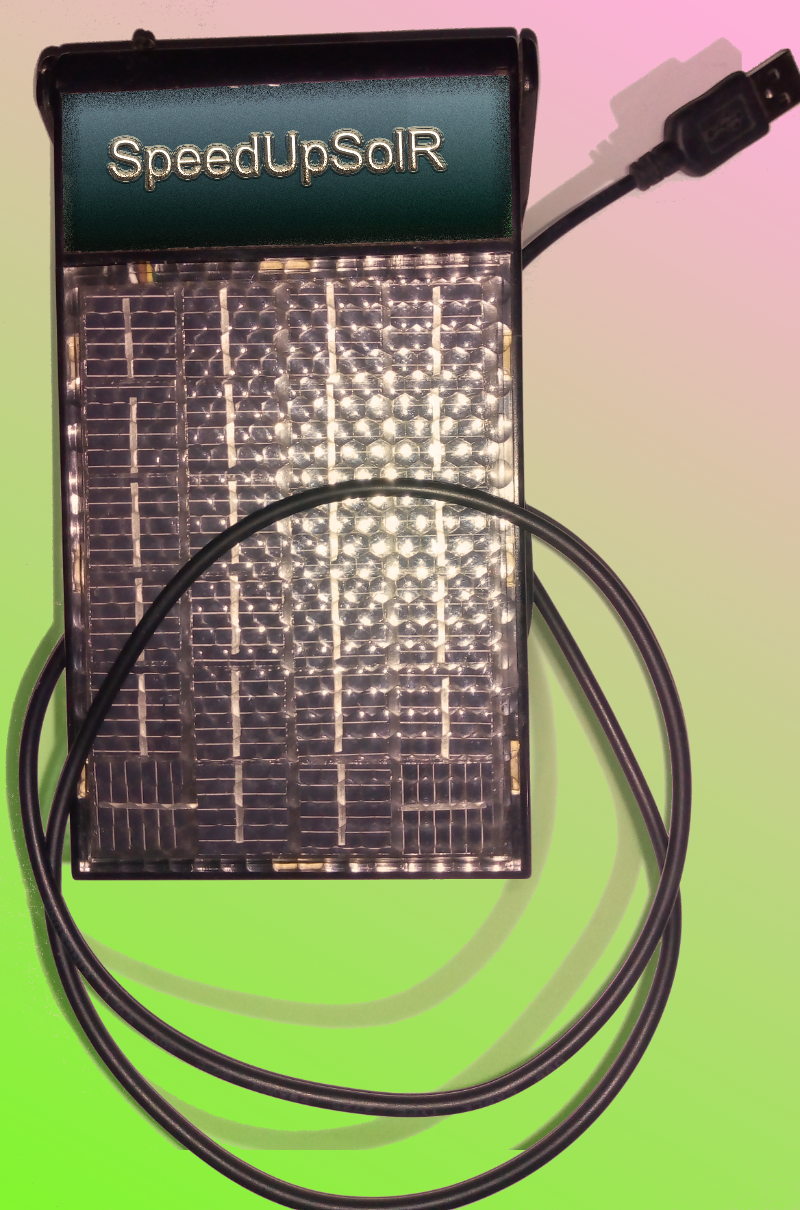
We reviewed the SpeedUpSolR(TM) device, but apparently a number of people have reported difficulty buying it….. SpeedUpSolR(TM) 😉
YouTube
Properties
Updating Item Properties. If you have a large number of items for which you need to change value(s) did you know you can set properties? Take a peek at this method on our YouTube Channel
We were interested to be provided with a SpeedUpSolRTM unit. We thought we’d test the claims and share them with you. The device works by “capturing ambient light waves and amplifying productivity software enhancements” We suspect a little has been lost in translation, however the blurb goes on to explain that generally workers want to complete their work more quickly in the daylight saving summer months (in our case anything after GMT turns to BST), in order to make the best of the rest of the day. By capturing the increased sunlight during these hours it can help speed up a your work by using their proprietary algorithm to assist and second guess the text or keys you are about to press. Once finished employees will have completed their schedule ahead of time and will be able to leave earlier benefiting their well-being.
The Unit
Comprising a “bubble matrix silicon cell panel” which uses lenses based on omnidirectional fly eyes, maximum sunlight is captured in unit around 150mm long. The interface is s standard USB connector. The drivers download automatically, as it supports plug and play.
Testing
We connected the SpeedUpSolRTM to a standard desktop and installed a copy of Cradle. We then closed the blinds on the window to simulate a darker time of day. The unit is balanced atop the monitor facing the window, to achieve maximum exposure. The staff member was then asked to simulate entering data for the requirement they were working on. You’ll see their usual speed of typing. We then opened the blinds to allow maximum light onto the SpeedUpSolRTM. This allowed the software to start its word guessing and action assisting operations. We think you’ll concur, there is a marked increase in speed.
Software
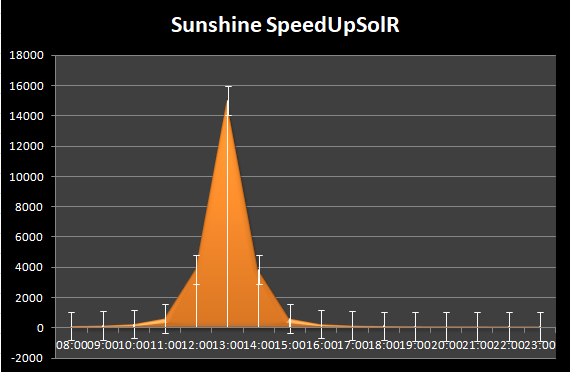
The software bundled with the SpeedUpSolRTM includes an average light level monitor with a rolling 7 day count. It suggests that this can be used to co-inside with maximum productivity bursts for employees. It is also noted that by monitoring the peaks, in winter months people who suffer from Seasonal Affective Disorder (SAD) may be able to time their coffee breaks outside to maximise benefit.