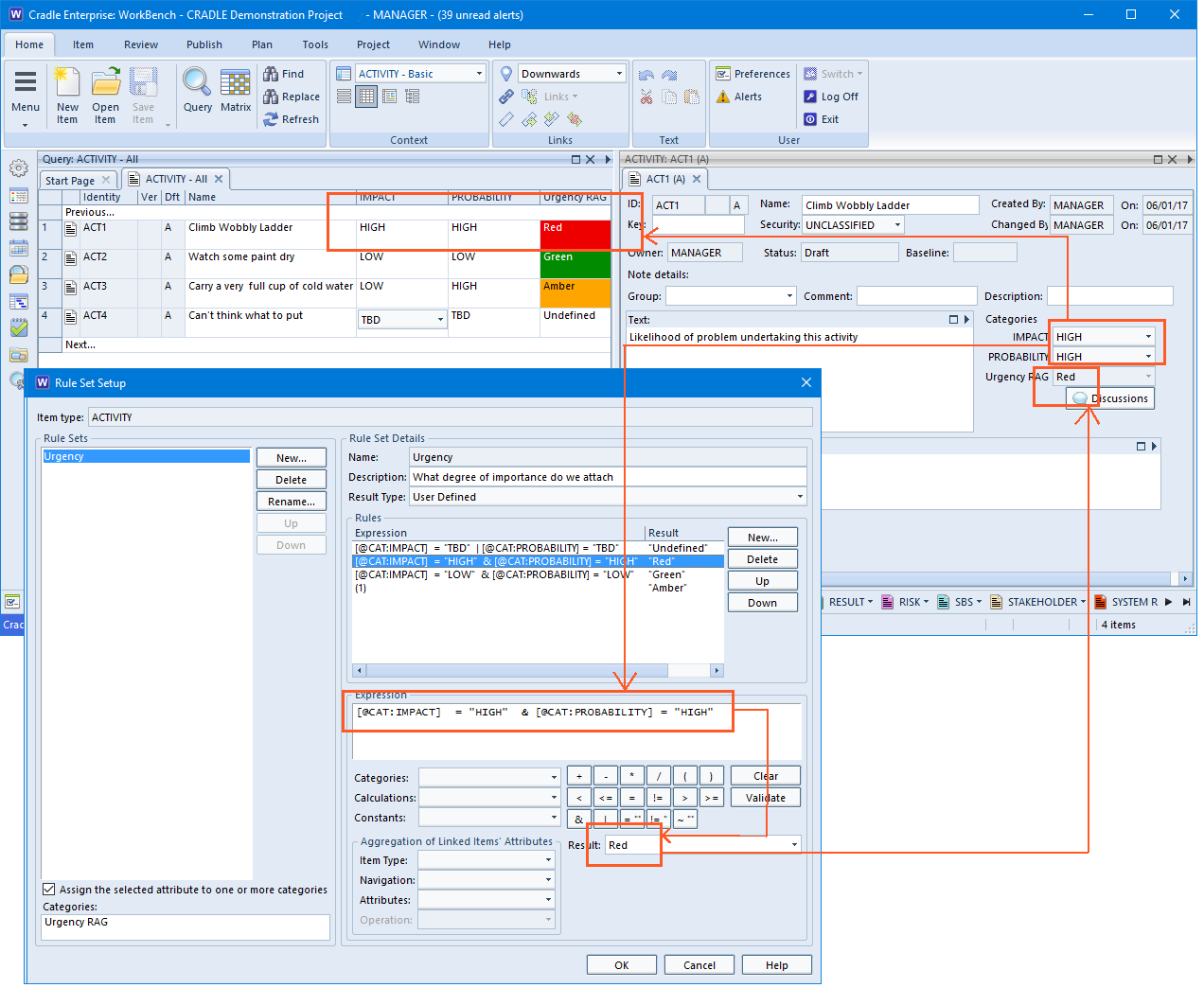
In Cradle you can define Rule Sets for your Item Types which can be used in a number of ways. You are able to auto set a category based on your rules. Your formula, for example, could produce a RAG (Red Amber Green) risk report from two categories such as Probability and Impact categories.
Use Rulesets to set coloured Categories
However, you’re not just limited to red, amber and green. If you can define a rule and pick a colour, there’s a rainbow of possibilities.
During installation, some customers see messages that the Visual Studio 2015 C++ Runtime cannot be installed, or cannot be found, or they cannot install their Security Code, or none of the Cradle servers or tools will start. All of these issues mean that the Windows C runtime is not installed and runnable. All parts of Cradle use this library. The library will only install and run if all the necessary Windows updates are installed. However, the library does not ‘tell Windows’ which updates it needs.
Solution
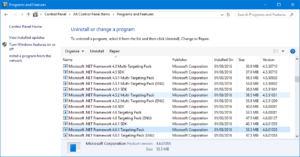
To fix these issues, you must install Windows updates. Since updates may allow other updates to install, you repeatedly install all Windows updates until no more will install. See the figure. Your installation may not display exactly as shown. You may have multiple versions of the library installed.
You can view your Windows updates. If you want a list of updates, start PowerShell as Administrator and paste this code:
During installation, some customers see messages that the .NET framework cannot be installed, or the currently-installed version cannot be found. Cradle needs the 4.6.1 or later release. We supply this version with Cradle-7.1 and later releases. All parts of the Cradle Toolsuite for Microsoft Office (including Document Loader, Document Publisher, SpellChecker, Project Link, Visio Link and so on) use .NET.
To fix these issues, you must install Windows updates. Since updates may allow other updates to install, you repeatedly install all Windows updates until no more will install. See the figure. Then install all remaining parts of Cradle. Your installation may not display exactly as shown. You may have multiple versions of the .NET framework installed.
Tired of having to change the colour of each symbol everytime you create one?
Well, it is possible to set the default colours for Cradle drawing symbols in the user preferences dialog. This can be over-ridden on a symbol by symbol basis using the colour palette or a colour set.
Below is a screenshot of where you can set symbol colours from preferences. Inside the symbol dialog along the menu ribbon. You can also select ‘Set colours’ which would change the colour of that symbol without having to go into preferences, making your life easier.
Set Symbol Colours
This enables you to completely customize your diagrams with as much or as little colour as possible. Using colour to co-ordindate your projects.
Article updated 05/12/2018 – Added an inroduction and conclusion
We are pleased to announce that we released Cradle-7.1.2 last month, with some useful new features and some fixes. We have sent announcement e-mails to all customers with active maintenance, and sent e-mails to the customers whose enhancements that have been added, and whose reported bugs have been fixed.
Some of the new features in this release are:
– Equipments in Physical Architecture Diagrams can be expanded to IDEF0 diagrams, as well as the other diagram types – Faster processing of baseline operations to retire and reinstate items – You can specify a date range for the change history entries to be shown in views – A skill linked to an item type can provide RO access to all items of the type – The External Command Interface includes new events for schema changes and operations on user profiles
If you upgrade to Cradle-7.1.2 anywhere, you must upgrade everywhere, the server and all clients.
Customers who purchased a single-user Cradle-7.1 product can also apply this new release.
A false positive is reported by the Bitdefender AV product (and products based on it, such as Solarwinds’ AV Defender) for the Cradle Database Server (CDS).
We have arrangements with other AV vendors to pre-qualify Cradle executables before release, but this mechanism does not exist for Bitdefender. We have requested that they add Cradle executables to their whitelist.
In the meantime, if you use Bitdefender or a product based on it, please disable this AV product before installing Cradle, and enable it again afterwards.
I know that this is not strictly Cradle-related, but for some time I and many of our customers have been annoyed that Windows 10 wants to use Edge to open PDF files. Yes, you can set Acrobat Reader as the default application, but after a while, Windows ‘forgets’ this setting and starts to open PDF files in Edge again.
Thankfully, there really is a solution. Unfortunately, it involves editing the Windows registry…
But, the good news is that after I used this fix a couple of weeks ago, Windows has not reset Edge to open PDF files, and PDF files are still being opened in Acrobat, as I want them to be.
If you have not seen the permanent fix, please look here:
Ensuring that the recently created data isn’t too difficult to find can be very important for businesses. Especially when trying to review projects. But how would you be able to find this relevant data without having to scroll through endless amounts of information?
Most projects need to review what has changed over a period of time, often the past month. These reports are typically called change logs.
Using a change log enables you to set up some instructions to only find data within a set period of time. You can;
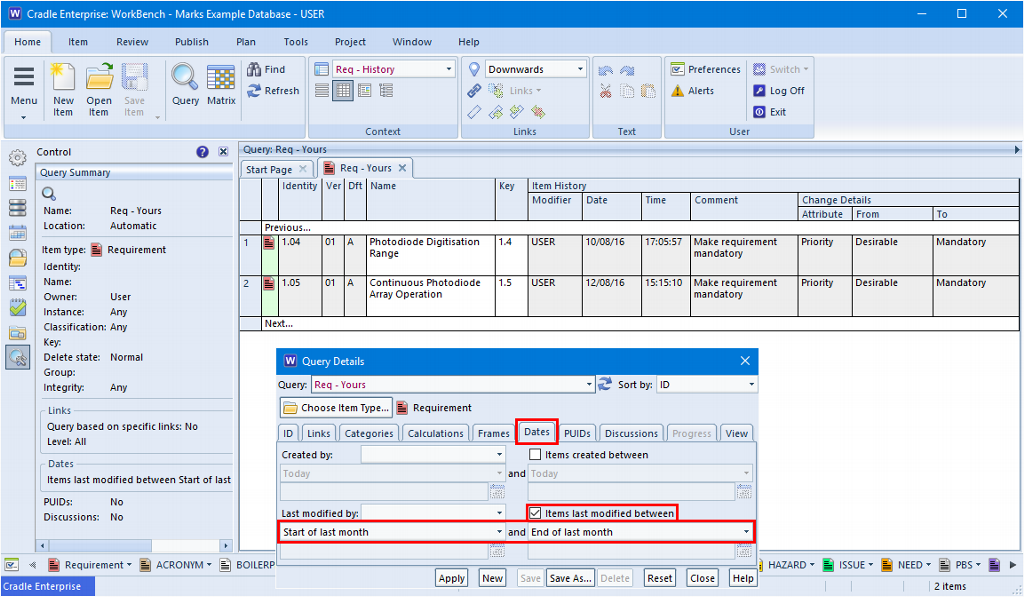
– Run a query that finds all items whose last modification date is between the start of last month and the end of last month – Display the results using a view that displays the change history, shown either as a summary or in full detail
To find the modified items, use the ‘Dates’ tab in the query definition and set the start and end dates. There are several choices
– Today – Start of this week – Start or end of last week – Start or end of last month – Start or end of 2 months ago – Start or end of 3 months ago – A specified date
To view the modified items, you can design a view, or use the Automatic scope view ‘XXX – History’ created by Cradle. Here XXX is your item type, so for an item type called issue, Cradle will have created the view ISSUE – History. This view shows the items’ identity, name, key and full details of the changes.
Running the query with this view produces the change log, as shown in the figure. By using relative dates (such as ‘Start of last month’) you will never need to change the query, it will work correctly every month.
You could combine the query and view into a report, and then add a shortcut to this report into your phase hierarchy or into a start page. Remember to save the query and report as Project scope, so that they are available to everyone in your project!