
How Not to Ruin Your Project With Office Tools

Scenario

Your project is running and you have little time to finish it.

You need documents for customer sign-off.

Everyone has Office installed, so you do the engineering with Word® and Excel®, and perhaps a little PowerPoint® or Visio® for the complex diagrams.

When you finish, not only is the work done, but you have the documents for approval. So you’ve solved two problems at once, completing the work and documenting it!

Unfortunately, no, you haven’t.

What you have done is to lay the foundations for major difficulties later on, and until the problem is recognised and fixed, the mistake will become larger and more costly.

Your work is locked into documents and the information is:

  • Not centralised, so changes in one document are not automatically made elsewhere
  • Inconsistent, you have no single point of truth
  • Not traceable, so you do not know what is linked, and what is not linked Inflexible, if documents or their structures change, you have serious problems

The Solution

Separate the data from the document.

Watch this short video: https://youtu.be/bgiQQ0N8bV4
and visit www.threesl.com for details of Cradle, the simple, flexible and scalable solution for your entire project that you can deploy in one week!

From concept to creation, you, Cradle and 3SL!

More Drawing Area

Need more space to see your diagram?

Closing the sidebar and the ‘Diagram Form Item details’ can leave more drawing area on your screen. Double clicking the ribbon will close this up too. Clicking the sidebar icons opens the sidebar once again or the ribbon title opens the ribbon. Performing all these actions will increase the drawing area to the maximum.

how to get More Drawing Area
More Drawing Area

Avoid Problems Comparing Versions of Formal Documents

Most Cradle users publish documents. Many users publish formal documents. When a formal document is published, Cradle:

– Increments a version number for that document, each formal document can exist in many versions
– Keeps a permanent copy of the document in the database
– Updates a register of formal documents with the title, issue, issue date and reference of the new version of the formal document
– Keeps a record of which item instances have been published in that version of that document, so if an item is to be changed, you can see the documents where it has been published so you know which formal documents need to be reissued

You can compare versions of formal documents. This uses Word’s document compare feature that shows the changes between the formal document versions with change bars, underlined and strikethrough text.

But, Word has a problem comparing large and/or complex tables in such documents. This problem affects Word 2007, 2010, 2013 and, we suspect, 2016. You will see the problem as a small dialog with the message ‘Word was unable to compare the documents’.

There is a solution to this problem that works for Word 2007, 2010, 2013 and, we expect, 2016. The solution is to create a new key in your definitions in the Windows registry. You may be able to edit the registry, or it may be limited to your IT. Be careful if you edit the registry as you can seriously damage Windows.

The solution is:

– Start regedit, for example, press Windows+R, enter: regedit and click OK
– Find the key: HKEY_CURRENT_USER\Software\Microsoft\Office\<office version>\Word\Options
Where <office version> is 12.0 for 2007, 14.0 for 2010, or 15.0 for 2013
– Select: Edit -> New, and choose: DWORD (32-bit) value
– Enter the name for the new key: DocCompareLargeTables
– In the regedit UI, select the new key, right click, choose Modify, enter the value: 1 and click OK
– Close regedit

We hope that this is helpful!

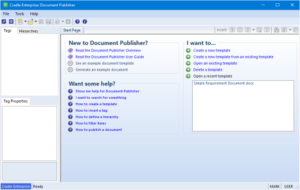
Cradle Document Publisher

Cradle Exception for Popup Blocker

Many people access Cradle through a web browser, either using one of 3SL’s web UIs or a custom web UI that has been created in-house by their organisation. In all cases, when you login to a I, that web UI will be shown in a new windows, a popup.

Since popups are often used to display irritating advertising or offensive content, all web browsers have controls to optionally block popups.

Please ensure that you allow the Cradle Web Server (CWS) to display popups, or you will not be able to view Cradle web UIs!

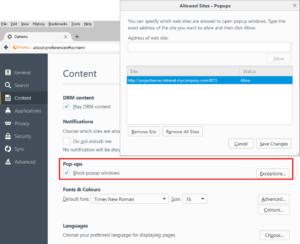
The normal way to do this is to add the CWS as an exception in the popup blocker rules in your web browser’s settings. Each browser has its own method for doing this. In Firefox, select Options and Content. The exception will be the URL of your CWS, such as:

http://cradle.intranet.mycompany.com:8015

Cradle exception for pop-up blocker

Re-Tracing Your Steps – the History Sidebar

The History sidebar is a useful productivity aid that is available in WorkBench in all Cradle products. It remembers what you did:

– Today
– Yesterday
– In the past 7 days
– In the past 30 days
– Older than 30 days

so you can quickly and easily repeat these actions by clicking nodes in the history. It remembers:

– Items that you opened in forms, including saved Hierarchy Diagrams (HIDs)
– Queries, reports, graphs, matrices and metrics that you used
– Phase hierarchy nodes that you used, including those that run commands or publish documents

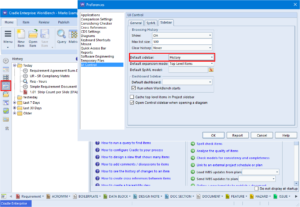
The History sidebar is so useful that you may want it to be the default sidebar when you start WorkBench. If so, select Edit -> Preferences and choose UI Control and select the Sidebar tab. Here you can also:

– Enable or disable histories, or only record a history for the current WorkBench session
– Specify the maximum number of entries in the history list
– Control whether old entries in the history will be automatically purged

Please experiment with the History sidebar and tell us what you think about it as comments in this discussion!

History Sidebar

New 3SL/Cradle Overview Presentation

We have released a new Cradle Overview presentation here:

https://www.threesl.com/downloads/download.php?version=v7.0&section=presentations&filename=rr00224-UK_3SL_Overview.pptx

and as a short link here:

http://ow.ly/bIC5303KDo2

containing details of Cradle’s scope, applications, lifecycle coverage and process support, with details of 3SL’s related training, consultancy and web services.

Your opinions and feedback are welcome!

Cradle Overview Presentation

Which Symbol?

Model Based Systems Engineering Drawings

Model-based Systems Engineering represents systems engineering components in domains, gathering together the data and functions in a formalised manner. This helps with the exchange of data between different disciplines, stakeholders and customers within a common frame work. Element details are often represented as a symbol on a diagram.

A common systems modelling technique, for say the functional aspects, would be to show them in a multi-tier, time-sequenced, step-by-step flow diagram or eFFBD. The diagrammatic format makes it much easier to assimilate the whole concept.

Whilst our help offers good coverage of the modelling capabilities in Cradle. We understand getting to grips with the details of the tool can be complex. When you are working with a new diagram type for the first time, some of the symbols can look very similar. The palette on in the sidebar shows tootips, but hovering over each is not very efficient. If you are confused about which symbol is which, select ‘Draw‘ button from Tools ribbon. You will then see the name of each symbol alongside its icon.

Selecting different symbols
Diagram Drawing Palette
Article Updated 16/05/2018

August Newsletter is Available!

August 2016

We are pleased to announce that our August 2016 newsletter is available here:

https://www.threesl.com/pages/news/webletter-August16/index.php

which announces Cradle’s availability as SaaS services on G-Cloud 8:

https://www.digitalmarketplace.service.gov.uk/g-cloud/search?q=3sl&lot=saas

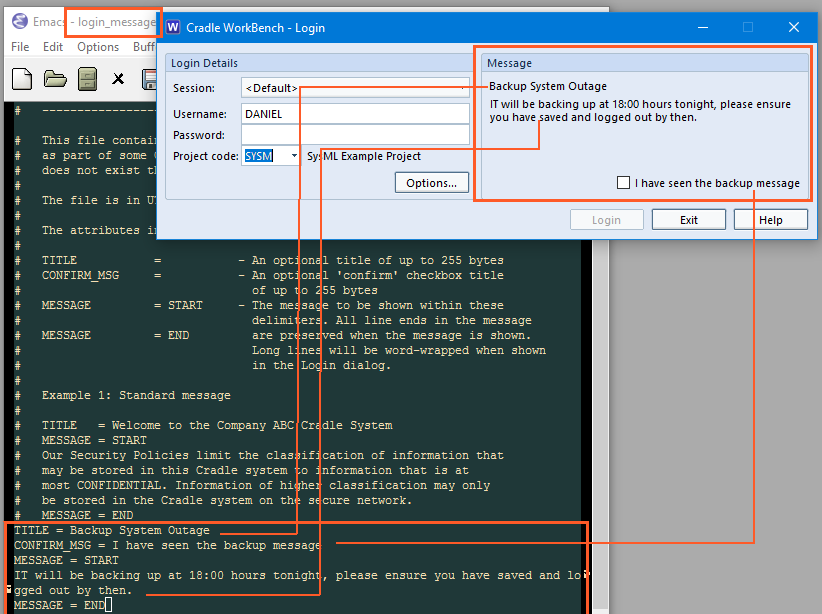
and our new systems requirements white paper, and includes technical notes on topics including login messages, environment variables on Windows 10, and the new anniversary update to Windows 10.

We hope that you find it interesting and helpful!

UPDATED: April 2020 – Meta Data