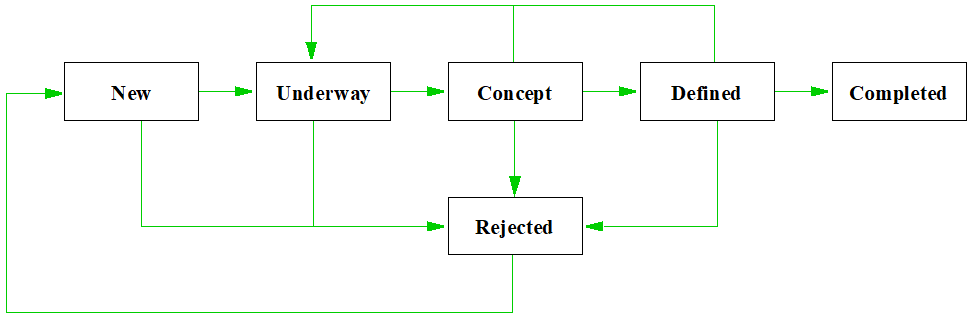
Lifecycle workflows allow users to progress items through a defined lifecycle. This process can set the item’s owner or an attribute in the item to a specific value. A workflow is a defined set of steps through which an item can progress. The stages could describe an items design, production or any other flow that matches your process.
Definition
The lifecycle of an item is described by the combination of stage steps and review steps. The review step specifies the review’s composition, its rules for making a decision, and the actions to be performed if the review approves item(s) or rejects item(s). The stage step will progress the item through the set of stages that represent its lifecycle. You can set the item’s stage to any of the values in the workflow’s stage category. The category must:
Whist review steps are triggered as an item reaches different stages in the review process (submitted, reviewed, registered and so on) stage steps are triggered by a User issuing an Advance command. This is available on the toolbar or the Configuration Management option on the context menu.
Display
Advance operations for items can be displayed in different forms making available different attributes that are related to the particular phases of their lifecycle.
Lifecycle workflows were introduced in Cradle 7.4, if you’ve not yet upgraded, download now!
When it rains we complain, and now that it’s reached more than 28°C here at 3SL ‘towers’, in Cumbria, we’re all searching for ice creams and sharing a few minutes with our servers in their air conditioned room! However, a week ago, our servers nearly suffered as much as we are now when their air conditioning stopped. Switching to the backup plan of ‘essential only’ machines, we were able to continue working, but it did highlight the importance of planning and designing a robust system. Whilst we may all be able to consider the design requirements/constraints/limitations within our own field, the scope of the environment also needs to be considered. In modelling terms, these are the environment elements:
Actors in SysML and UML use case diagrams (UCDs, uc’s)
Environment in data flow diagrams (DFDs)
Environment in function flow block diagrams (eFFBDs)
Environment in process flow diagrams (PFDs)
Environment in architecture modelling PADs and AIDs
Environment in ADARTS’ software architecture diagrams (SADs)
These symbols represent those parts of the environment with which our system will interact, and provide the means to describe the external interactions that our system has outside it’s own scope In this case the range of the expected external influences exceeded expectations. It’s worth bearing in mind when designing; whilst you may implement fail-safes, redundancy and extra capacity based internal parameters, it’s sometimes the influences outside our control that have the biggest impact.
G-Cloud 10
G Cloud
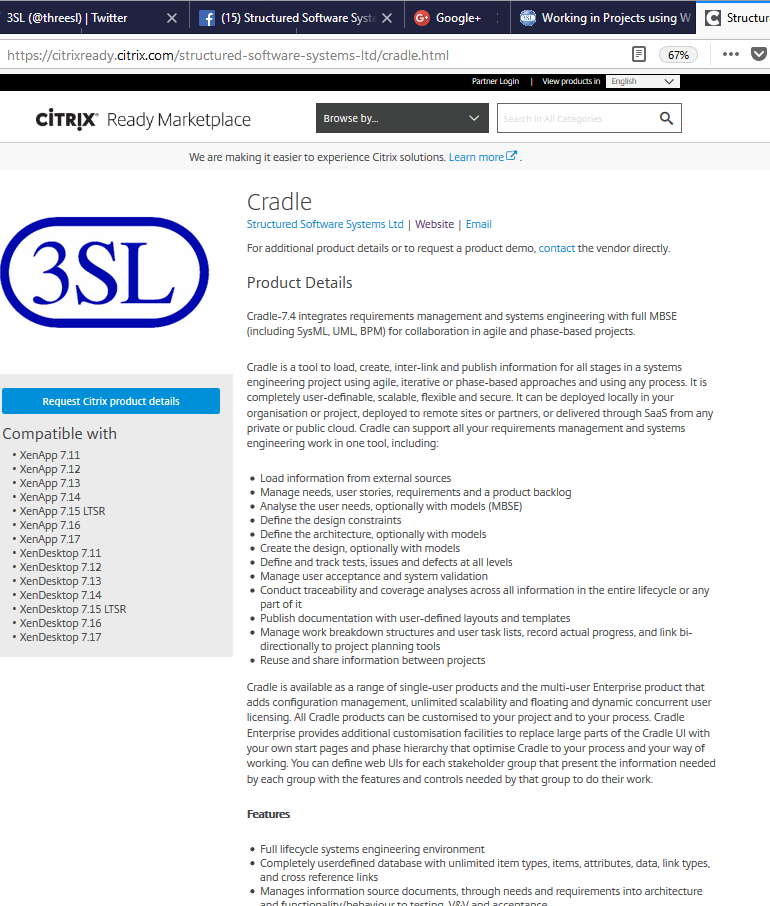
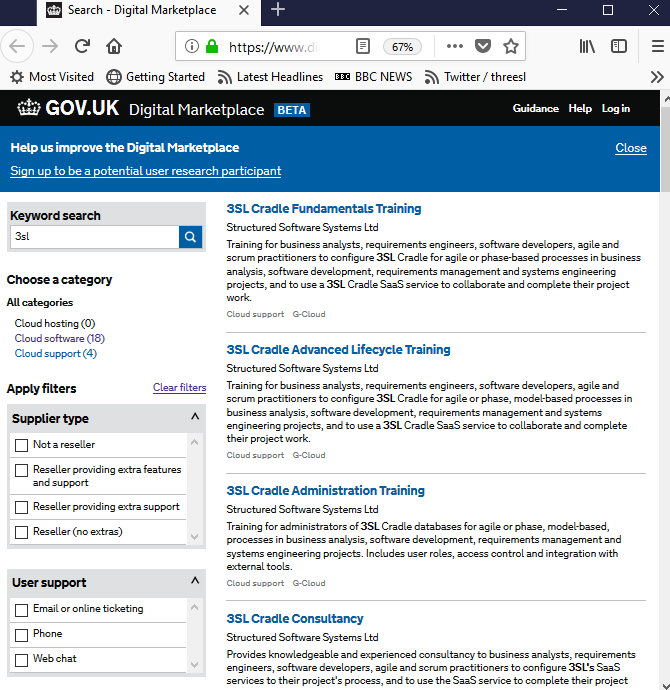
We are pleased to announce that Cradle is available as SaaS through G-Cloud 10. Aimed at projects using both agile and more traditional phase-based processes, Cradle SaaS can be found on the UK government Digital Market Place Cloud Software applications under the Information and communications technology (ICT) services area.
Services
We are offering a range of packaged SaaS services that include Cradle licences, a pre-defined schema and intensive support from 3SL for both unclassified (IL0) and OFFICIAL (certified IL3) deployments full details of which can be found in our article Cradle Available as Packaged SaaS through G-Cloud 10 with prices start from £20 per user per month.
Cradle Latest Version
Collapsible Panel
If you’ve not tried the following features yet, here are some highlights from the blog.
Forms – Collapsible Panels – If you have complex amounts of information to deal with on one form, you can roll-up and collapse panels or areas on you Cradle form.
Alerts – Email Templates – If you want additional information, or style customisation, you can now send SMTP client based emails.
Email Alert
For example if when an item is ready for review, if you want the email to say “Please prepare for review of the following item. Which in two weeks time will be the topic of a full Fagan inspection according to company procedure” you can. Alternatively you could add “Hey folks I hope you’ll all welcome this new user to our project” to the new user alert!
Items – Attribute Sets – A “8mm, Stainless, BSW (British Standard Whitworth)” is different from a “8mm, Stainless, UTS (Unified Thread Standard)” bolt. If you are specifying these components as part of your design solution, you may want to ensure they are unique, there’s no point specifying the same component twice. However, you may want to query on all your 8mm fixings, so having each element as a separate category is really useful. Attribute Sets are a useful tool to ensure that groups of component attributes are unique.
However, those buying Cradle Enterprise licences can choose to donate £30 per licence bought to a charity of their choice. Ts&Cs apply
England!
People from several nationalities work in 3SL. Thankfully, none of our respective nations have been playing against each other in the World Cup.
After just securing victory over Columbia on penalties as we write this newsletter, and noting that for England to win a penalty ‘shoot-out’ is itself a rare event (thanks Germany!), we would like to join the thousands of others to wish everyone ‘good luck’ if your nation is still in the competition.
On behalf of the majority of us in 3SL UK: “England!”.
Social Media
Twitter
Megaproject Tweet
We love keeping an eye on what’s new with our customers and what’s changing in the
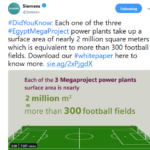
community. You may all be aware of football at the moment, but can you envisage a power plant the size of 300 football pitches? Siemens can #LargeScaleEngineering
The UK government Digital Market Place Cloud Software applications offer a wide range of software aimed at fulfilment of central and regional government contracts, government agencies’ work and local authority use. This ranges from accounting to transport, healthcare to sales. We are pleased to announce that Cradle is available as SaaS through G-Cloud 11 for agile and phase-based projects under the Information and communications technology (ICT) services.
Services
We are offering a range of packaged SaaS services that include Cradle licences, a pre-defined schema and intensive support from 3SL for both unclassified (IL0) and OFFICIAL (certified IL3) deployments:
3SL Cradle Business Analysis (unclassified) and Official IL3 (classified)
3SL Cradle Agile Collaboration (unclassified) and Official IL3 (classified)
3SL Cradle Systems Engineering (unclassified) and Official IL3 (classified)
3SL Cradle Requirements Management (unclassified) and Official IL3 (classified)
3SL Cradle Application Lifecycle Management (unclassified) and Official IL3 (classified)
3SL Cradle Business Process Modelling (unclassified) and Official IL3 (classified)
3SL Cradle Agile Software Development (unclassified) and Official IL3 (classified)
3SL Cradle Agile Software Management (unclassified) and Official IL3 (classified)
3SL Cradle Application Lifecycle Development (unclassified) and Official IL3 (classified)
Prices start from as little as £20 per user per month. Including Email, webchat and phone support and full documentation included. Optional onsite support and training available. This can be supplied on Windows® or Linux®.
Customisation
A wide range of user customisation is available including:
Items’ (attributes, links and properties)
Display of chosen data and layout through queries, views, forms,
Processing data to give graphs, reports, documents, metrics, KPIs/dashboards, process
CM (Configuration Management) system workflows
UI (User Interface) layout and content
Authentication and access control
Details
For details, see here:
G Cloud
For a short summary of Cradle, see our video here: We’re sure you’ll find our services useful to completing successful projects. We look forward to working with you!
A form is a layout template that is used to display information about items within Cradle. There are multiple attributes of an item that may be displayed, from the name, to categories, to frames. Forms can soon get complicated, this is where collapsible panels can help.
Collapsible Panels
A feature new in Cradle 7.4
Collapsible panels are placed as a row, or a column on a form definition. These can be barked to display as a normal row/column when opened or to “Show collapsed by default”
The bar at the top of the panel toggles its open state.
Q&A
Some of the questions often asked regarding forms.
Q: What if a user does not have a skill required to see an attribute?
A: The form will not display this particular aspect of the item. There is no need to create a separate form.
Q: I’ve just added some new frames and categories. Do I have to design a new form?
A: No, the Automatic scope forms will generate a basic form with the new elements included.
Q: Do I have to start from scratch designing a form?
A: No, you can choose any existing form (including the automatically generated ones) suitable for that item type, make your changes and then ‘Save As‘ to store the newly altered definition.
Q : Do you have to show everything that every user needs on a form?
A: No, forms can have a scope of System, Automatic, Project, User type,Team, User, or Personal. This allows different users to show different aspects of an item most relevant to them.
Q: Can I show related items?
A: Absolutely, linked items can be shown within a form.
Q: Can I convert existing forms?
A: Yes, just select an existing Row or Column and change the Syle from Basic to Panel. then Save or Save As
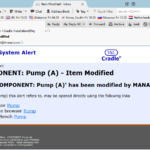
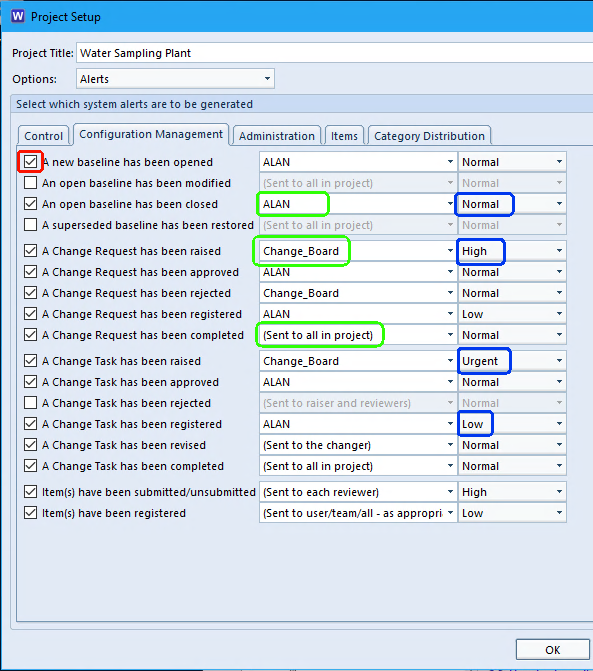
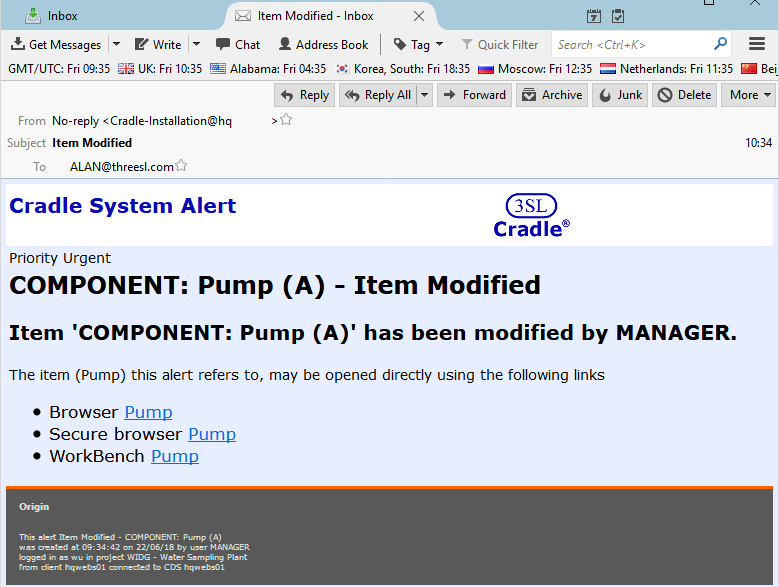
When working in a multi engineer environment, it is important to communicate. However, when the team is spatially/geographically distributed it’s not easy to shout across the office that you’ve just updated a particular requirement. You may send an email to your colleagues, but it is easy to forget. It’s much easier if the tool you’re using does it for you. Cradle raises alerts for system and item level activities. These can be toggled active, the recipient chosen and the importance set in the Project Schema.
Cradle Alert Settings
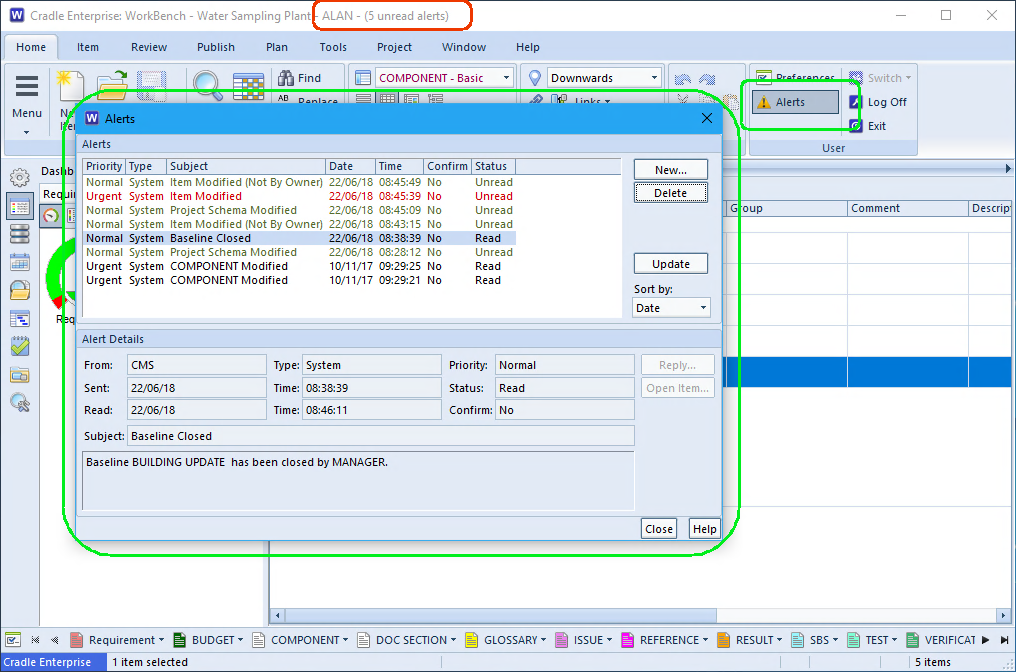
Recipients can be a Cradleindividual, a user list, an automatic selection or a category distribution. When the user next signs in they will see their alerts.
Cradle Alerts
Alerts by Email
Whilst it is really handy to see the alerts that have been raised when working in the tool, it’s not much use if you’re not logged on. Difficult though it may be to believe, not every user is constantly logged onto Cradle! However, most users are able to accept emails. A number of enhancements were made to Cradle’s email alerts in version 7.4. Previously email could only be sent if the user had a MAPI client on their Windows® machine or SMTP on their Linux client. Now Cradle ships with an SMTP program that will connect directly to your company email server. We now provide templates for the emails that you can customise for corporate style or by including/filtering information.
Setup
In the Cradle setup file cradle.ini or cradle.rc find the MAIL_parameters and fill in your company’s settings. MAIL_HOST = mail.mycompany.co.uk MAIL_PORT = 587 MAIL_LINE_LEN = 500 MAIL_DEF_SENDER = MAIL_CMD = "$C_MAILSEND_EXEFILE" -smtp $MAIL_HOST -port $MAIL_PORT -to $RECIPIENT -from $SENDER -name "$SENDNAME" -sub "$SUBJECT" -mime-type "$MIMETYPE" -cs "$CHARACTERSET" -msg-body "$PATH" -q
Alert Templates
The email templates exist in %CRADLEHOME%/admin/email_templates where the three main alert types have templates that can be altered. The settings are documented within the template. Specific templates can be added for particular alerts if you want to add specific content, say instructing people how to conduct a review. Cradle URLs also supported in item alerts, allowing the recipient to click and open Cradle on the subject item.
In the words of Phineas T. Barnum starting with the smallest blocks you can build it “….one brick at a time…”[1] and then you should be able to achieve anything you can dream of.
LEGO® bricks
Consider your ‘dream’ as the top level requirement, this is your ultimate goal. The problem is you’re not sure what constitutes a ‘brick’. Unless it’s a wall you’re building the smallest parts are unlikely to be equal. If only all world engineering problems could be solved with LEGO®! The aim, however is still the same, take the goal and break it down to atomic parts that we can quantify, specify and build. Together those elements will form the whole.
Breakdown Structure
Hierarchies are an important way to describe, link and visualise the ‘dream’ you’re building. The bottom of the hierarchy should be as close to the ‘brick’ as possible. A self contained, unit, the ‘atom’ within your project.
People
Most people are familiar with a company structure from the MD to the process workers via managers and team leaders workers. Imagine a company where every worker tried to talk to the main boss, as soon as there are more than a handful of employees, this would become unmanageable. Conversely consider too many layers of middle management, all pulling in slightly different directions, then the workers end up without clear direction. It’s a balancing act.
Requirement Breakdown
Your ‘dream’ may be to reach for the stars, or it may be to install the machinery to make spaghetti. In both cases you have an end goal, the main top level requirement. In each case these problems can be broken down into smaller problems, launch, travel and land, or ingredients, process and pack.
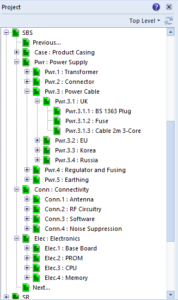
A Collection of SBS Hierarchies
These in turn may break down into mechanical, electrical and software problems. The decision as to where to break will depend on the industry you are in, the number of issues that need to be tackled and the logical breakdown of the components. In this comparison, the launch may be considered completely different to the travel or landing requirements. However, in the factory system, it may be more prudent to devolve the level directly into the mechanical and electrical areas as there may be no significant difference between process and packing. Falling out the bottom the atomic ‘bricks’ may now be motors, control sensors, and pipes.
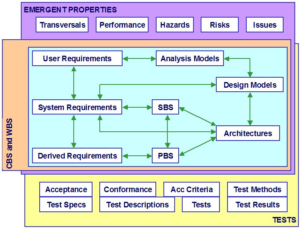
Realistically a more complex project can consider in parallel with the ‘dream’ or ‘User Requirements’, that there are the ‘System Requirements‘ which possibly lead to ‘Derived Requirements‘. These in turn link to the ‘System Breakdown Structure‘ (SBS) and ‘Product Breakdown Structure’ (PBS) .
Work Breakdown
Project plans process
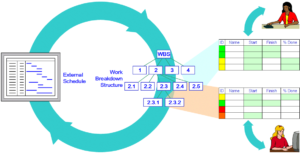
When the problem has been broken down into the smallest conceptual parts the order that these must be assembled can also be broken into a hierarchy. The mechanical systems must be installed before they can be wired, the control systems may be developed in parallel, but they can’t be integration tested until the sensors are installed. A work breakdown structure (WBS) is a plan to ensure that the right bricks are in place at the right time to support the next layer of the structure.
Dependencies
Complex Project Dependencies
There will be a complex relationship between each of the hierarchies in your project. If your team of electrical engineers are required to complete two different parts of the WBS they can’t be completed in parallel. This is where plan schedules are useful. Microsoft® Project is one way to achieve a schedule using Gantt Charts to illustrate the sequencing. The links between which System Requirement links to an item in the SBS or which Derived Requirement links to a PBS item must also be maintained.
Tools
Therefore, to manage a big problem it needs to be broken down into smaller atomic ‘bricks’. But the interrelationship of those components is complex and needs to be managed. Cradle allows all these components to be managed, linked, visualised and reported. From whatever your original concept, to the final brilliant creation, you can build it one brick at a time.
The UI of the WorkBench tool in 3SL’s Cradle is very flexible. It allows you to display the items and the results of running queries in individual tabs. You can split the display into panesand have many of these tabs in each pane. You may need to increase the UI Object limit if you want to have a very complex WorkBench UI.
UI Object Limit
Each part of the UI uses Windows resources called User interface objects. There is a limit on the number of these UI Objects that each WorkBench process can allocate.
The default is a maximum of 10,000 UI Objects per process. This can be increased to a maximum of 18,000 UI Objects per process by changing a setting in the Windows registry.
If you open so many tabs that WorkBench exhausts the UI Objects that it can allocate, then the WorkBench UI will hang.
Increase the UI Object Limit
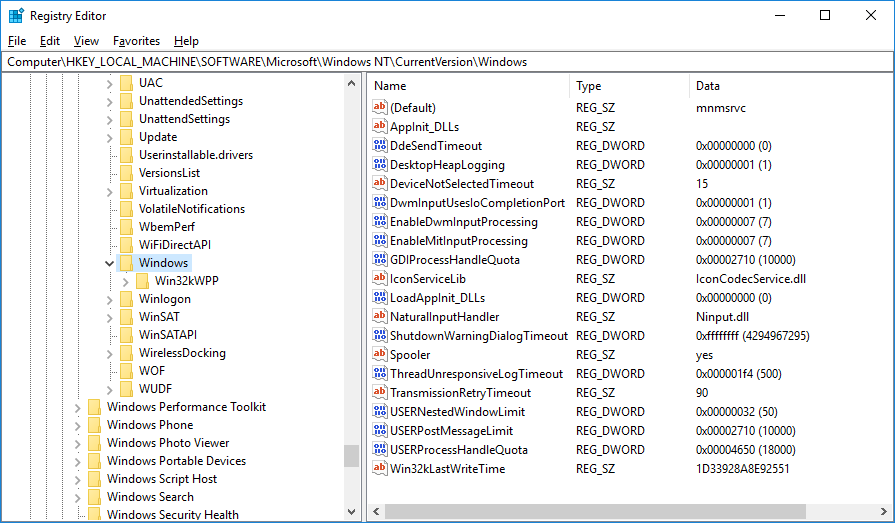
To increase the UI Objects Limit you must edit the Windows registry value:
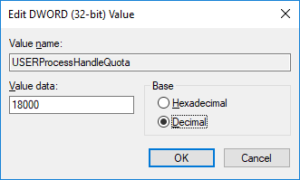
Double click the entry for USERProcessHandleQuota, and set Decimal
Enter the new value 18000 and click OK:
USERProcessHandleQuota
Exit the registry editor
This change takes effect on any processes created from now on.
Do I Need to Do This?
In general, no you do not need to make this change.
We have only seen one case where this change was necessary. In this case, a customer had a form with 75 frames display in it. The WorkBench UI hung when a user tried to open the 6th item concurrently when using this form.
Increasing this limit allowed the user to open 10 items concurrently using this (very!) large form.
Of course, if you want to increase the UI Object limit as a precaution, then it will not do any harm!
As we eat our way through natural resources, our ever increasing hunger for power has to be fed.
One of the most significant developments of recent years has been the size and efficiency and installation methods used for wind farms. Global Wind Day 15th June (#GlobalWindDay) as defined by GlobalWindDay.org seeks to highlight and celebrate these successes.
Walney Wind Turbine
Local Engineering Feat
Here at 3SL towers, we’re only a stones throw away from one of the world’s largest offshore wind-farms. Situated 15 Km off the coast it’s a great example of large scale engineering. Walney 1 and Walney 2 farms have a combined capacity of 367MW. Over 100 turbines in depths of water of around 20m it was quite an undertaking. Undersea cables bring the power ashore across Morecambe Bay towards Heysham.
Planning Large Projects
There are so many aspects to consider when planning a project. The more complex and the greater the importance of good requirements management. However, that’s not to say that you don’t need to manage requirements for small projects. This is why we believe it is important to offer the same functionality for single users all the way to full enterprise deployments. So whether you are planning a small scale windmill atop your holiday cottage, or a grand scale farm, Cradle could be the tool for you. Starting at €349 (June2018 price) , there’s no excuse for ‘just writing it in a document‘ and a ‘couple of spread sheets‘ shop now or contact us for enterprise licensing.