

Reorder Item and Their Hierarchies
Hierarchies are seldom created in a single operation. It is more usual for you to create a hierarchy interactively, gradually developing the hierarchy item-by-item. It is also very likely that the hierarchy will need to be reorganised, to reorder items as it is being built, for example:
- To add a new top-level item into the hierarchy and move existing items below it
- Move individual items to a different position in the hierarchy
- Move sub-trees in the hierarchy upwards, downwards, or to any other new position
We term this process of rearranging – “reordering”. Cradle fully supports reordering using drag and drop.
To enable this feature:
- Items must be of the same type (system notes or requirements)
- Auto-numbering must be selected for the item
- Items must allow hierarchical numbering using Key
- CREATE_XREF and DELETE_XREF privileges needed
- Set the preference “Allow drag and drop in same tree”
- A navigation that sorts by Key
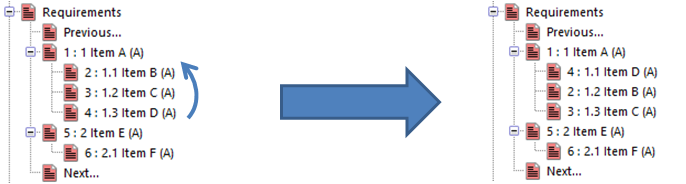
Why we use hierarchies
Hierarchies are useful to show the users of a project a view of the Top level item and all its branches, and with Cradle it is easy to join many hierarchies into one, you can create a new top-level item and connect hierarchies to it.
For further information on reordering please head over to our online help.