Collaborative Model Based Systems Engineering across the Systems Lifecycle
Complete Application Lifecycle Management (ALM), Model Based Systems Engineering (MBSE) and documentation solution for the entire project lifecycle, fully user-definable and applicable to all agile and phase based processes.
Supports the full systems development lifecycle at system, subsystem and lower levels
Integrates in one product features normally spread across separate tools from different vendors
Completely user-definable and user-extensible with point-and-click UIs
Manage any information, including requirements, risks, interfaces, tests and verifications
Scalable to millions of items of information
Full traceability of data from external sources and version management of source documents
Full traceability and coverage analyses
User-definable views of data including tables, trees, documents, matrices, diagrams and graphs
User-defined metrics and management dashboards
Cradle Enterprise is a complete multi-user solution to manage, trace and document all the data for your agile and phase-based projects.
Capture and Track Information
Capture information from external documents and tools, and track changes in these sources. You can build new sets of requirements, analysis, architecture and design models, tests or verifications, and link them to the source data and to each other. Check the consistency and quality of this information, and prove the integrity of the models and other data with bi-directional coverage and traceability analyses.
Customers’ confidence can be raised with proof that your work satisfies its sources and constraints, and will meet their needs.
Easily track progress with metrics and KPIs and link to your WBS and actual progress to your project planning tools.
Create Databases and Information
Create any number of databases, each with a schema and multiple projects that contain any number of items of any number of user-defined item types. Each item has any number of attributes with up to 1TByte of data, held in Cradle, or referenced in files, URLs or other tools.
All items can be linked with user-defined types of cross reference. The links have attributes to justify, explain or parametise them. Links are direct and indirect, for full lifecycle traceability, impact and coverage analyses.
External documents can be loaded into hierarchies of items. Every item in Cradle is linked to its source in a document. Changes in new document versions are automatically found and the database updated. You can prove the integrity of all source data to your customers with a range of detailed coverage analyses of their documents.
Items can be linear, hierarchical and in many-to-many relationships. Items can be split, merged and reordered. All information can be shared and reused. Cradle can support product ranges, models, variants and builds, and generate comparative analyses between them as tables, pivot tables and matrices.
Create any number of analysis, logical, process, architecture or design models in SysML, UML, SASD, IDEF, ADARTS and other notations. Optionally group models in hierarchies and link elements of all models to requirements, SBS, issues, test cases and all other information.
Track and View Information
Cradle tracks all edits to every requirement, test case, verification and all other information that you want it to hold. Edits can be reversed selectively or by group. Full or partial change logs are readily available.
Control the work with team hierarchies, roles and access controls. Review items with discussions, user-defined workflows and built-in CM with baselines, full version control and formal change management.
You define how information is viewed and reported in any number of views, shown as nested tables, trees, matrices, pivot tables and as diagrams.
Generate versions of documents such as a URD, SRD, IRS, SDS and SSDS to match your or your client’s formats with user-defined templates and detailed traceability of which items were published in each document issue.
Manage Projects
Manage your projects with:
Metrics, user-defined calculations of items’ values
Bi-directional links to Project, including user task lists and actual progress reporting
Cradle is open. It supports many import/export formats, has several interface mechanisms to link to other tools, and connects to Microsoft Office components Word, Excel, PowerPoint, Visio and Project.
Cradle is simple to customise and use through point-and-click UIs.
Major Features
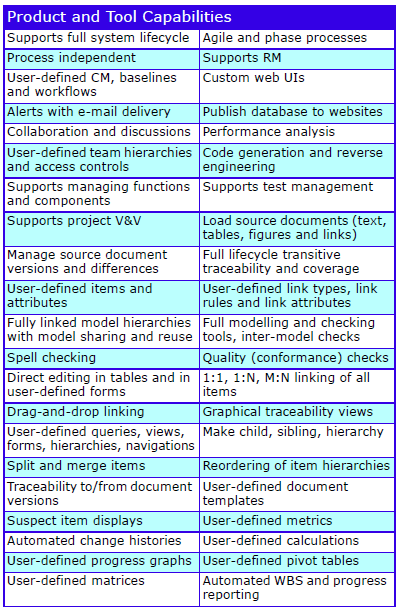
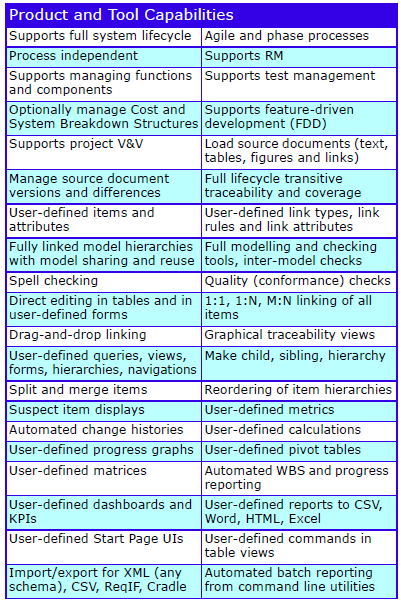
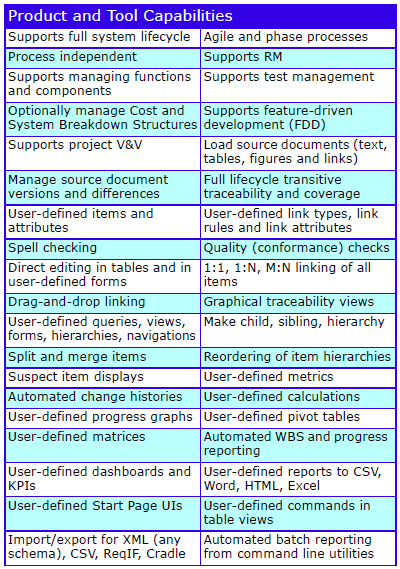
The major features are:
Cradle Enterprise Features
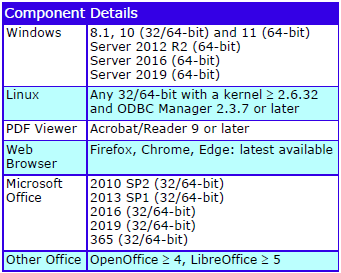
Supported Platforms
The supported platforms are:
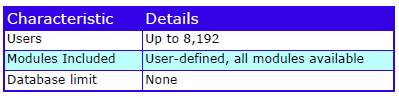
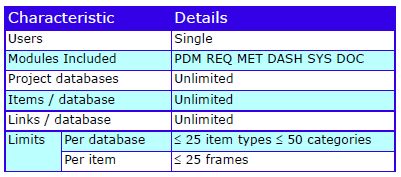
Characteristics
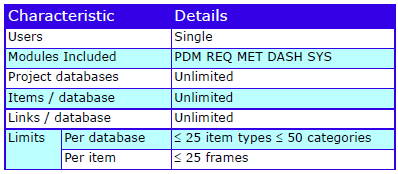
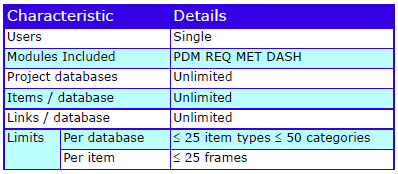
The characteristics are:
Cradle Enterprise Characteristics
Cradle Enterprise is part of the Cradle product range that includes low cost, single-user tools.
Model Based Systems Engineering across the Systems Lifecycle
Complete Application Lifecycle Management (ALM) and Model-Based Systems Engineering (MBSE) and documentation solution for the entire project lifecycle, fully user-definable and applicable to all agile and phase based processes.
Supports the full systems development lifecycle at system, subsystem and lower levels
Integrates in one product features normally spread across separate tools from different vendors
Completely user-definable and user-extensible with point-and-click UIs
Manage any information, including requirements, models, risks, interfaces, tests and verifications
Scalable to millions of items of information
Full traceability of data to source and generated documents with complete version management
Full traceability and coverage analyses
User-definable views of data including tables, trees, documents, matrices, diagrams and graphs
User-defined metrics and management dashboards
Cradle-SE Pro is a complete solution to manage, trace and document all the data for your agile and phase-based projects.
Capture and Track Information
Capture information from external documents and tools, and track changes in these sources. You can build new sets of requirements, analysis, architecture and design models, tests or verifications, and link them to the source data and to each other. Check the consistency and quality of this information, and prove the integrity of the models and other data with bi-directional coverage and traceability analyses.
Customers’ confidence can be raised with proof that your work satisfies its sources and constraints, and will meet their needs.
Easily track progress with metrics and KPIs and link to your WBS and actual progress to your project planning tools.
Create Databases and Information
Create any number of databases, each with a schema and multiple projects that contain any number of items of any number of user-defined item types. Each item has any number of attributes with up to 1TByte of data, held in Cradle, or referenced in files, URLs or other tools.
All items can be linked with user-defined types of cross reference. The links have attributes to justify, explain or parametise them. Links are direct and indirect, for full lifecycle traceability, impact and coverage analyses.
External documents can be loaded into hierarchies of items. Every item in Cradle is linked to its source in a document. Changes in new document versions are automatically found and the database updated. You can prove the integrity of all source data to your customers with a range of detailed coverage analyses of their documents.
Items can be linear, hierarchical and in many-to-many relationships. Items can be split, merged and reordered. All information can be shared and reused. Cradle can support product ranges, models, variants and builds, and generate comparative analyses between them as tables, pivot tables and matrices.
Create any number of analysis, architecture, logical, process or design models using UML, SASD, IDEF, ADARTS, SysML and other notations. Group models in hierarchies and link all elements of all models to requirements, SBS, issues, test cases and all other information.
Track and View Information
Cradle tracks all edits to every requirement, test case, verification and all other information that you want it to hold. Edits can be reversed selectively or by group. Full or partial change logs are readily available.
You define how information is viewed and reported in any number of views, shown as nested tables, trees, matrices, pivot tables and as diagrams.
Generate versions of documents such as URD, SRD, IRS, SDS and SSDS to match your or your client’s formats with user-defined templates and detailed traceability of which items were published in each document issue.
Manage Projects
Manage your projects with:
Metrics, user-defined calculations of items’ values
Bi-directional links to Project, including user task lists and actual progress reporting
Cradle is open. It supports many import/export formats, has several interface mechanisms to link to other tools, and connects to Microsoft Office components Word, Excel, PowerPoint, Visio and Project.
Cradle is simple to customise and use. You do not need to learn a scripting language or become a programmer to tailor it to your process. After every change to your schema, Cradle will automatically update collections of queries, views and other definitions that make you productive immediately.
Major Features
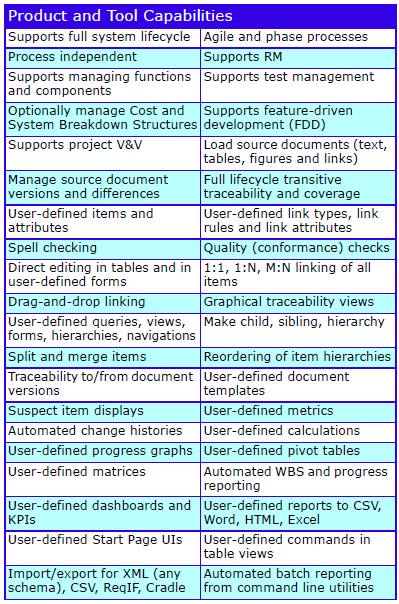
The major features are:
Cradle-SE Pro Features
Supported Platforms
The supported platforms are:
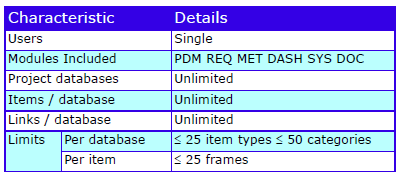
Characteristics
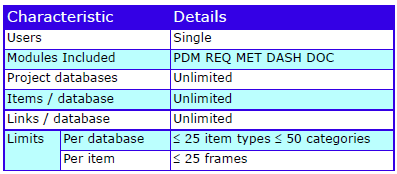
The characteristics are:
Cradle-SE Pro Characteristics
Cradle-SE Pro is part of the Cradle product range. The full, multi-user, product is Cradle Enterprise.
This newsletter contains a mixture of news and technical information about us, and our requirements management and systems engineering tool “Cradle”. We would especially like to welcome everyone who has purchased Cradle in the past month and those who are currently evaluating Cradle for their projects and processes.
We hope that 3SL and Cradle can deliver real and measurable benefits that help you to improve the information flow within, the quality and timeliness of, and the traceability, compliance and governance for, all of your current and future projects.
If you have any questions about your use of Cradle, please do not hesitate to contact 3SL Support.
PDUIDs
When we work with information, we need a way to distinguish each piece of information from all other pieces of information so we can be sure we have found what we were searching for. We do this by marking each piece of information in a unique way.
For information in databases, the markings are unique values called keys or identities. A piece of information can have multiple identities, each for a different purpose. For example, although a company’s payroll system is likely to identify each person by a unique Employee ID, each person’s details will also include their governmental tax ID (such as a National Insurance number, a Unique Taxpayer Reference, a Sozialversicherungsnummer or a Social Security Number). This tax ID will also be unique and so could also be used as an identity for that person’s information.
Cradle has two forms of identity, item identities and Project Database Unique IDs (PDUIDs).
We will publish a series of blog posts about PDUIDs, describing what they are, how to view them, how to use them, and how PDUIDs can be managed when you import information into your databases.
Item Identities
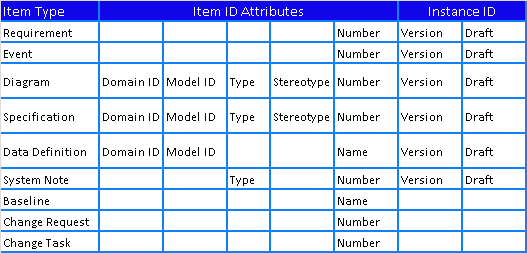
There are several basic item types in Cradle. Each basic item type uses a different combination of attributes to create a unique Item ID for items of that type:
An item is identified by this Item ID and a unique Instance ID, typically a version and draft.
PDUID Structure
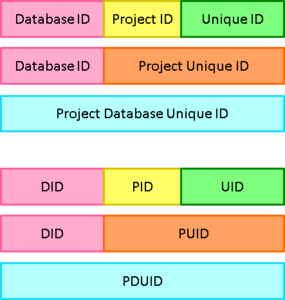
Project Database Unique IDs (PDUIDs) are a single, consistent, numbering system for all database information. Each PDUID is a 26 character string that contains a Database ID to identify a Cradle system, a Project ID to identify a project database and a Unique ID:
Structure of PDUIDs
A PDUID references all instances of an item. Therefore the combination of a PDUID and an Instance ID (a version and draft) will identify a specific item. So, this is an alternative to the Item ID and Instance ID and has the advantage of being consistent and a single numbering sequence for all types of item.
Further Details
For further details in this part 1 of a description of PDUIDs, please see the full blog entry here.
Remote Databases
A Cradle system can contain any number of databases. For the best performance, we recommend that databases are stored on disks connected to the machine that runs your Cradle Database Server (CDS). But, this may not be possible.
For example:
The local system may not have enough disk space available
The information in the database may be classified and must be stored separately
Here each database will be stored on a remote filesystem that must be referenced by a pathname so the CDS can work with it.
Further Details
For further details of remote databases, please see the full blog entry here.
Over Half Way Through the Year
It’s true; the 2nd July marked the halfway point of the calendar year. That went fast didn’t it?
It feels like we only just celebrated the New Year and now we are six months away from doing it all over again.
At this time of year, it is good to reflect on what’s already passed and what is to come this year. Here are some ways that might help if you are looking to refocus and recharge over the summer months.
Check in on Team Goals
How are the goals the team set at the beginning of the year going?
When was the last time your team reviewed them?
Now is a great time to reflect on any progress. Is your team on track? Is everybody on the same page?
Whatever the progress so far this year, there will be lessons to be learnt from it. It’s time to put an action plan in place for the remainder of the year. Now is a good time to get the team goals back on track:
Ask who do you need to help achieve those goals?
What’s the best way to communicate with them?
Is there an alternative way to achieve them?
Communication
Summer can be especially busy; school summer holidays, weekly events, fewer people in the office, and various demands can bring stress to everyone.
With all these additional activities going on, it’s easy for people to get distracted, lost and even burnt out.
Now is a great time to contact your team, employees and other connections. It can be as simple as a chat over a cup of coffee, a walk and talk or a business/working lunch. This will allow you to connect in a more casual way, which in turn, can help strengthen the link between you and your team.
Help your Team Avoid a Summer Decline
It’s no surprise that productivity can fall off a cliff when the sun comes out! Thoughts of ice cream, beer gardens and future holidays can lead our minds to wander off and our focus can end up in the bin.
Ice cream
Now is a good time to prepare your team and business to avoid any slump.
Congratulate your team on their efforts so far this year. One way to keep the momentum going is to set small achievable goals, something that can be done within a week to a month can help. As you complete and reach each one, the team will get a boost.
Having weekly/monthly meetings can allow the team to see those goals that have been achieved. Using metrics, dashboards and graphs can help your team see the progress made each week, month, year or more.
This progress will give reasons to celebrate and that can only be a good thing!
Remember: the team working together will make the dream work!
Feedback
We continue to receive positive feedback from our customers. We really appreciate ALL feedback, as this helps us to assess and improve both the products and services we provide.
In June, we provided a Cradle training course to one of our customers in Australia. They kindly sent the following feedback:
“Extremely informative classes. We are very appreciative of the customised content tailored for our envisaged use of the tool”
Independence Day (4th July)
4th July was a federal holiday in the United States commemorating the Declaration of Independence which was ratified by the Second Continental Congress on July 4th 1776, establishing the United States of America.
Social Media
We commemorated #DDay – 79 years ago. “We will remember them“:
DDay
Some of our customers, both old and new, attended various shows/exhibitions etc, e.g.:
@SercoGroup announced they have been awarded nine contracts to help the #IRIDE space programme. This programme is led by the Italian government and implemented by the European Space Agency. This is one of the most amibitous Earth Observation programmes in Europe.
With electric vehicles taking over the roads, our customer @Enphase talked about EV chargers.
A Cradle system can contain any number of databases. For the best performance, we recommend that databases are stored on disks connected to the machine that runs your Cradle Database Server (CDS). But, this may not be possible.
For example:
The local system may not have enough disk space available
The information in the database may be classified and must be stored separately
Here each database will be stored on a remote filesystem that must be referenced by a pathname so the CDS can work with it.
Remote Linux Filesystems
On Linux, a remote filesystem is mounted as a pathname. The CDS works through this pathname to access the remote filesystem. Remote filesystems include NFS (network file system) and others.
3SL does not recommend the use of CIFS (Common Internet File System) filesystems. We have seen several Linux systems that use CIFS to mount remote Windows filesystems. Sadly all these CIFS filesystems have provided very poor performance to the Linux server.
For NFS mounts, we suggest that you examine block sizes of 4K or more and consider nosuid mounts.
Remote Windows Filesystems
We are sure you are familiar with drive letters such as G: or H: that are the connection point to filesystems on remote systems.
For example, a filesystem disk1 on server myfileserver1 can be mounted as the X: drive. You can navigate to a pathname on X: such as:
X:\Cradle Databases\ABCD
You cannot use drive letters in the pathname to create a Cradle database on a remote drive. Drive letters are specific to a Windows profile and are created only when that profile is active.
So, please use UNC pathnames to refer to Cradle databases on remote drives. UNC pathnames are of the form:
\\servername\path
So in the above example, the pathname to the ABCD database would be:
\\myfileserver1\disk1\Cradle Databases\ABCD
Access to Remote Windows Databases
You must ensure that the access rights to remote directories will allow the CDS to search all directories inside the database and give RW access to all of the database files. Please note that the CDS runs as the local SYSTEM user on the machine where it is run. So it is this user who must have search, read and write access on the remote filesystem.
If you wish, you can control the user who will run the CDS. To do this iteratively (you may need to have Administrator rights depending on your system):
Open Task Manager and in the Services tab, stop the Cradle Services Manager
Open Windows Explorer
Navigate into your Cradle system and look in the folder bin\exe\windows
Press SHIFT and right-click on the CDS executable: crsvr.exe and choose Run As and enter the username and password that you want the CDS to run as
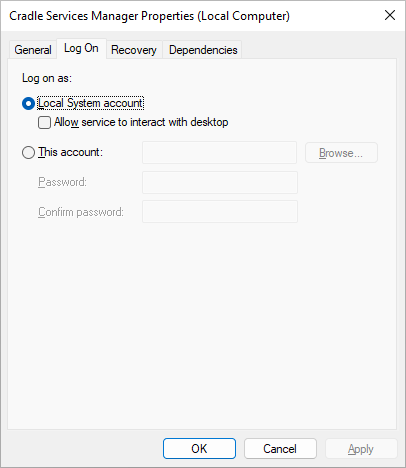
If you want to permanently change how the CDS runs, then (you may need to have Administrator rights on your system):
Open services.msc, the MMC (Microsoft Management Console) or Services Control Manager (depending on your version of Windows) to see all services and stop the Cradle Services Manager
Select the Cradle Services Manager, right click and choose Properties
Select Log On in the dialog and specify the user that you want the CDS to run as and the password for this account:
Click OK to close the dialog
Start the service and then close the list of services
This is the first in a short series of posts that explain Project Database Unique IDs (PDUIDs). This post explains the purpose of PDUIDs and their structure. Later posts will explain:
How PDUIDs can be viewed
How they can be used in operations in Cradle tools, API and WSI
How PDUIDs can be changed or preserved when information is moved between databases
Identifying Information
Each piece of information must be distinguishable from all other pieces of information so we can be sure we have found what we were searching for. We do this by marking each piece of information in a unique way.
For information in databases, the markings are unique values called keys or identities. A piece of information can have multiple identities, each for a different purpose. For example, although a company’s payroll system is likely to identify each person by a unique Employee ID, each person’s details will also include their governmental tax ID (such as a National Insurance number, a Unique Taxpayer Reference, a Sozialversicherungsnummer or a Social Security Number). This tax ID will also be unique and so could also be used as an identity for that person’s information.
Cradle has two forms of identity, item identities and Project Database Unique IDs (PDUIDs).
Database and Host Identities
Every Cradle system has a Cradle Database Server (CDS) to manage the information in its databases. The CDS is locked to a Host ID, the last 8 digits of the MAC address of the host’s primary network interface.
All databases in a Cradle system share a common Database ID (DID), a 10-character ID of the form:
Platform ID Host ID
where:
Platform ID
:
CDS’s platform, 02 for Windows or 17 for Linux (other values are for obsolete platforms such as Domain/OS, SunOS, Solaris, HP-UX, Ultrix, SCO, OSF/1 and VMS)
Host ID
:
CDS’s host ID, also used in the system’s Security Code
For example: 1750D4FA4C
The role of a DID is to differentiate information in a database managed by one CDS from information in databases managed by any other CDS, even if all other particulars of the information are the same, such as they are the same item of the same item type in the same project in these disparate Cradle systems.
A common example is when organisations send information to each other, such as customers and suppliers. This creates two copies, or instances, of each piece of information. The databases’ DIDs differentiate the instances held by the customer and suppliers. This is important because:
An organisation cannot know if other organisations have changed information
It is important to know which organisations hold each piece of information and which pieces of information each organisation holds
It may be appropriate to designate one instance as primary so its content is authoritative and other instances are secondary
Project Identities
A Cradle system can manage many databases. Each database is used for one or more projects. Each database has a unique 4 character Project Code that is used at login to specify which database is to be accessed.
Separately, a Project ID (PID) can be specified when a database is created using the Project Manager tool, or c_prj utility. This is a 6-character string and is typically similar to the Project Code. It defaults to six underscores:
______
The Project ID can be used to label a database. It can be helpful if databases are related, for example as successive missions in a programme or separate vessels in a class of ships, when related Project IDs could be used:
ARTEM01
ARTEM02
ARTEM03
Role of Project IDs
It is likely that what might appear to be the same information could exist in two or more databases. This could be intentional and helpful, or it could be unhelpful and inconvenient. The fundamental role of a PID is to differentiate between databases:
In the most common scenario, an organisation uses its standard process in several projects. These projects’ databases will contain the same types of information, such as hierarchies of needs and user requirements, and the same structuring and numbering conventions. It is quite likely that the databases will contain items with the same hierarchical numbers and, for groups and sub-groups, the same names:
1 Context
1.1 Purpose
1.2 Roles
1.2.1
2 Stakeholders
2.1 Purchasers
2.2 Operators
Here it is inconvenient that multiple requirement 1.2.1s exist in the databases, each with unrelated contents. Viewing requirement 1.2.1 in isolation could give an incorrect understanding by interpreting it as part of one project when it is actually part of another project.
In an alternate scenario, two or more databases could be logically related. Indeed one database may be an extension of another, or an evolution of it at a later stage in the project. In this case, viewing information in isolation would not show which database it came from and could also create an incorrect understanding.
In both scenarios, including a PID would differentiate the content of each database from the others.
Item Identities
Cradle databases contain different types of information. The basic unit of information in a Cradle database is the item. Every item has an associated item type that defines the type of information it contains. Projects can create their own item types in the schema that describes the database’s structure and rules. For example:
HLURs, high level user requirements
SRs, system requirements
TEST CASE, description of a test to be run with the steps to perform and their possible outcomes
Collectively the items of such user-defined item types are called system notes.
Identities and Instances
Every item has an identity to uniquely identify it amongst other items. An identity is the combination of the values of several attributes.
Items evolve over time. Projects will usually keep copies of items at different stages in their evolution. Cradle has the concept of instances of an item. Instances are copies of items as they were at some time in the past, typically in previous baselines. In MBSE (model based systems engineering) users can create multiple instances of diagrams and specifications as alternative analyses or designs. These alternatives co-exist until a choice is made between them.
An instance is the combination of:
A version number, initially empty and increasing 1, 2, 3… through successive baselines
A draft ID, either A if the item is not in a baseline or empty if the item is baselined. The values B, C … Z are used for alternative diagram and specification items in MBSE analysis or design models.
Structure of an Identity
The identity of an item is:
Item ID Instance ID
where:
Item ID
:
The collection of attributes that identify a specific item of a given item type
Instance ID
:
Which of possibly many instances of the item is being referred to
The different parts of item identities are:
Components of Item Identities
where:
Domain ID
:
Either E (for Essential) or I (for Implementation), the domain containing the item’s model
Model ID
:
The item’s model, either a numeric Model Unique ID (MUID) or a namespace showing the model in the domain’s model hierarchy, such as: As Built.Prototype A.Architecture
Type
:
Either one of the 26 diagram types that Cradle supports such as DFD, eFFBD, UCD, PAD and so on, or a specification type (process specification, environment terminator or module specification) or a user-defined item type such as PRODUCT REQ, SBS or VALIDATION
Stereotype
:
Only used by information in SysML models, the item’s stereotype, such as <<actor>>, <<block>>, <<constraint>>, <<message>>, <<package>> and so on
The item identity is fundamental in Cradle. All other methods of identifying or labelling items, including those described in this document, are secondary to these item identities.
PDUIDs
The above tables show that there are significant differences between the identities of item types. They make specifying and working with identities complex, and do not provide a single sequence of values to identify all items in a database.
These problems are solved by the Project Database Unique ID (PDUID), which:
Apply to all of the item types
Have the same format for all of these item types
Are in a single sequence for all items, for example:
A PDUID could reference a diagram in a model with namespace B.C (with an equivalent MUID)
The next PDUID could reference a TEST CASE system note item
The next PDUID could be a diagram in a namespace Y model (different MUID to the above diagram)
The next PDUID could reference a change request
The next PDUID could be a data definition in the model with namespace B.C
PDUID Structure
The format of a PDUID is:
Database IDProject IDUnique ID
where the Database ID and Project ID are as described earlier, and the Unique ID is a number 1, 2, 3… zero-padded to 10 digits. PDUIDs are 26 character strings with the structure:
Structure of PDUIDs
PDUID Examples
Some example PDUIDs:
0280A992E5SYSML_0000000022, in which:
0280A992E5 : is the DID, the Database ID
SYSML_ : is the PID, the Project ID
0000000022 : is the UID, the Unique ID
0280A992E5SYSML_0000000023
0280A992E5 : is the DID, the Database ID
SYSML_ : is the PID, the Project ID
0000000023 : is the UID, the Unique ID
0280A992E5SYSML_0000000024
0280A992E5SYSML_0000000025
Role of PDUID Components
As such, and given their constituent parts:
The Unique ID enables the PDUID to uniquely identify a database item
The Project ID enables the PDUID to uniquely identify an item across multiple databases
The Database ID enables the PDUID to uniquely identify an item between separate Cradle systems, even if everything else about information in the databases in these Cradle systems is the same
PDUIDs as Item Identities
A PDUID identifies an item, but not a specific instance of that item. This is deliberate. It is more convenient if the PDUIDs of all instances of an item are the same. Therefore, an alternative for the identity of an item is:
PDUID Instance ID
which identifies a specific instance of an item, where:
PDUID
:
Is the item’s PDUID as defined above that identifies an item
Instance ID
:
Which of possibly many instances of the item is being referred to, with the same meaning as above
PDUID Item Identity Examples
As examples, in the example database SYSM:
There is a use case diagram Automobile Use Case Diagram whose identity is:
Domain ID: I
Namespace: SysML-Automobile, which has MUID 100
Type: uc, meaning a SysML use case diagram
Stereotype: use case
Number: uc-1
Version:
Draft: A
which has been assigned the PDUID 0280A992E5SYSML_0000000035 so the item’s identity is also:
PDUID: 0280A992E5SYSML_0000000035
Version:
Draft: A
that can also be expressed as:
Database ID: 0280A992E5
Project ID: SYSML_, and hence PUID: SYSML_0000000035
Unique ID: 0000000035
In the same database there is also a TEST CASE item Keycode verification whose identity is:
Type: TEST CASE
Number: TC-20
Version:
Draft: A
which has been assigned the PDUID 0280A992E5SYSML_0000000024 so the item’s identity is also:
PDUID: 0280A992E5SYSML_0000000024
Version:
Draft: A
that can also be expressed as:
Database ID: 0280A992E5
Project ID: SYSML_, and hence PUID: SYSML_0000000024
Unique ID: 0000000024
Version:
Draft: A
PUIDs
Project Unique ID (PUID) is the name given to the PDUID without its Database ID (DID). In other words, PUIDs are a means to identify pieces of information in a single database.
PDUID Lookup
Every Cradle database contains a table that is used to check if a PDUID has been used and to convert between item identities and PDUIDs. This table is empty when a database is first created. The table is not part of the information in Cradle export files. Rather, the table’s contents are created when items are created in the database, either by an operation in the database such as creating or copying items, or reordering a hierarchy of items, or by importing information into the database from an external file.
This table is used to:
Check if a PDUID has been used
Find the PDUID for a given item identity
Find the item identity for a given PDUID
Find the next UID to be used
Entries in the table are marked deleted when the last instance of the corresponding database item is deleted.
Selective Reuse of PDUIDs
PDUIDs are never reused for different pieces of information, but they are reused for the same piece of information. This means that if a piece of information is deleted, its entry in the PDUID table is marked deleted, but the entry remains in the table. If that piece of information is ever recreated, then the PDUID table entry will be found, marked active, and the PDUID recorded in the table entry will be applied to the piece of information.
If items are auto-numbered, then the items’ identities are never reused and so PDUIDs are never reused.
For items that are not auto-numbered, or do not support auto-numbering (such as diagram, specification or data definition items in models), then PDUIDs can be reused. PDUIDs can also be reused when information is imported, and previously-deleted items are found in the PDUID table and their PDUIDs reused. This can be over-ridden on import as will be discussed later.
Example Scenario
As an example, consider the scenario:
Create item r1, the assigned PDUID is: 020A3857A3FRED__0000000001
Create item r2, the assigned PDUID is: 020A3857A3FRED__0000000002
Delete item r1
Create item r3, the assigned PDUID is 020A3857A3FRED__0000000003. Note that the UID in this PDUID is not 1 (which is now available since r1 was deleted), it is 3, because new PDUIDs always use the next UID value.
Create item r4, the assigned PDUID is: 020A3857A3FRED__0000000004
Create item r1, the assigned PDUID is: 020A3857A3FRED__0000000001 because the original PDUID table entry for r1 has been found and marked active and its PDUID has been reused so that the new item r1 is assigned the same PDUID as the original item r1.
Reuse of PDUIDs on Import
The reuse of PDUIDs is the correct approach as it ensures that a given item always has the same identity, regardless of what happens during the life of a project.
If, for whatever reason, this is not the behaviour that you want, then use auto-numbered items so that every item will be guaranteed to have a new identity and hence guaranteed to also have a new PDUID. Since auto-numbering makes the reuse of item identities impossible; auto-numbering also ensures that it is impossible to reuse PDUIDs.
Model Based Systems Engineering across the Systems Lifecycle
Complete Application Lifecycle Management (ALM) and Model-Based Systems Engineering (MBSE) solution for the entire project lifecycle, fully user-definable and applicable to all agile and phase based processes.
Supports the full systems development lifecycle at system, subsystem and lower levels
Integrates in one product features normally spread across separate tools from different vendors
Completely user-definable and user-extensible with point-and-click UIs
Manage any information, including requirements, models, risks, interfaces, tests and verifications
Scalable to millions of items of information
Full traceability of data from external sources and version management of source documents
Full traceability and coverage analyses
User-definable views of data including tables, trees, documents, matrices, diagrams and graphs
User-defined metrics and management dashboards
Cradle-SE Desktop is a complete solution to manage and trace all the data for your agile and phase-based projects.
Capture and Track Information
Capture information from external documents and tools, and track changes in these sources. You can build new sets of requirements, analysis, architecture and design models, tests or verifications, and link them to the source data and to each other. Check the consistency and quality of this information, and prove the integrity of the models and other data with bi-directional coverage and traceability analyses.
Customers’ confidence can be raised with proof that your work satisfies its sources and constraints, and will meet their needs.
Easily track progress with metrics and KPIs and link to your WBS and actual progress to your project planning tools.
Create Databases and Information
Create any number of databases, each with a schema and multiple projects that contain any number of items of any number of user-defined item types. Each item has any number of attributes with up to 1TByte of data, held in Cradle, or referenced in files, URLs or other tools.
All items can be linked with user-defined types of cross reference. The links have attributes to justify, explain or parametise them. Links are direct and indirect, for full lifecycle traceability, impact and coverage analyses.
External documents can be loaded into hierarchies of items. Every item in Cradle is linked to its source in a document. Changes in new document versions are automatically found and the database updated. You can prove the integrity of all source data to your customers with a range of detailed coverage analyses of their documents.
Items can be linear, hierarchical and in many-to-many relationships. Items can be split, merged and reordered. All information can be shared and reused. Cradle can support product ranges, models, variants and builds, and generate comparative analyses between them as tables, pivot tables and matrices.
Create any number of analysis, process, architecture and design models using UML, SASD, IDEF, ADARTS, SysML and other notations. Group models in hierarchies and link all elements of all models to requirements, SBS, issues, test cases and all other information.
Track and View Information
Cradle tracks all edits to every requirement, test case, verification and all other information that you want it to hold. Edits can be reversed selectively or by group. Full or partial change logs are readily available.
You define how information is viewed and reported in any number of views, shown as nested tables, trees, matrices, pivot tables and as diagrams.
Manage Projects
Manage your projects with:
Metrics, user-defined calculations of items’ values
Bi-directional links to Project, including user task lists and actual progress reporting
Cradle is open. It supports many import/export formats, has several interface mechanisms to link to other tools, and connects to Microsoft Office components Word, Excel, PowerPoint, Visio and Project.
Cradle is simple to customise and use. You do not need to learn a scripting language or become a programmer to tailor it to your process. After every change to your schema, Cradle will automatically update collections of queries, views and other definitions that make you productive immediately.
Major Features
The major features are:
Cradle-SE Desktop Features
Supported Platforms
The supported platforms are:
Characteristics
The characteristics are:
Cradle-SE Desktop Characteristics
Cradle-SE Desktop is part of the Cradle product range. The full, multi-user, product is Cradle Enterprise.
Requirements Management across the Systems Lifecycle
Complete Application Lifecycle Management (ALM) and Requirements Management (RM) and documentation solution for the entire project lifecycle, fully user-definable and applicable to all agile and phase based processes.
Supports the full systems development lifecycle at system, subsystem and lower levels
Integrates in one product features normally spread across separate tools from different vendors
Completely user-definable and user-extensible with point-and-click UIs
Manage any information, including requirements, risks, interfaces, tests and verifications
Scalable to millions of items of information
Full traceability of data to source and generated documents with complete version management
Full traceability and coverage analyses
User-definable views of data including tables, trees, documents, matrices, diagrams and graphs
User-defined metrics and management dashboards
Cradle-RM Pro is a complete solution to manage, trace and document all the data for your agile and phase-based projects.
Capture and Track Information
Capture information from external documents and tools, and track changes in these sources. You can build new sets of requirements, functions, components, interfaces, tests or verifications, and link them to the source data and to each other. Check the quality and structure of this information, and prove the integrity of information with bi-directional coverage and traceability analyses.
Customers’ confidence can be raised with proof that your work satisfies its sources and constraints, and will meet their needs.
Easily track progress with metrics and KPIs and link to your WBS and actual progress to your project planning tools.
Create Databases and Information
Create any number of databases, each with a schema and multiple projects that contain any number of items of any number of user-defined item types. Each item has any number of attributes with up to 1TByte of data, held in Cradle, or referenced in files, URLs or other tools.
All items can be linked with user-defined types of cross reference. The links have attributes to justify, explain or parametise them. Links are direct and indirect, for full lifecycle traceability, impact and coverage analyses.
External documents can be loaded into hierarchies of items. Every item in Cradle is linked to its source in a document. Changes in new document versions are automatically found and the database updated. You can prove the integrity of all source data to your customers with a range of detailed coverage analyses of their documents.
Items can be linear, hierarchical and in many-to-many relationships. Items can be split, merged and reordered. All information can be shared and reused. Cradle can support product ranges, models, variants and builds, and generate comparative analyses between them as tables, pivot tables and matrices.
Track and View Information
Cradle tracks all edits to every requirement, test case, verification and all other information that you want it to hold. Edits can be reversed selectively or by group. Full or partial change logs are readily available.
You define how information is viewed and reported in any number of views, shown as nested tables, trees, matrices, pivot tables and as diagrams.
Generate versions of documents such as a URD, SRD, IRS, SDS and SSDS to match your or your client’s formats with user-defined templates and detailed traceability of which items were published in each document issue.
Manage Projects
Manage your projects with:
Metrics, user-defined calculations of items’ values
Bi-directional links to Project, including user task lists and actual progress reporting
Cradle is open. It supports many import/export formats, has several interface mechanisms to link to other tools, and connects to Microsoft Office components Word, Excel, PowerPoint, Visio and Project.
Cradle is simple to customise and use. You do not need to learn a scripting language or become a programmer to tailor it to your process. After every change to your schema, Cradle will automatically update collections of queries, views and other definitions that make you productive immediately.
Major Features
The major features are:
Cradle-RM Pro Features
Supported Platforms
The supported platforms are:
Characteristics
The characteristics are:
Cradle-RM Pro Characteristics
Cradle-RM Pro is part of the Cradle product range. The full, multi-user, product is Cradle Enterprise.
Requirements Management across the Systems Lifecycle
Complete Application Lifecycle Management (ALM) and Requirements Management (RM) solution for the entire project lifecycle, fully user-definable and applicable to all agile and phase based processes.
Supports the full systems development lifecycle at system, subsystem and lower levels
Integrates in one product features normally spread across separate tools from different vendors
Completely user-definable and user-extensible with point-and-click UIs
Manage any information, including requirements, risks, interfaces, tests and verifications
Scalable to millions of items of information
Full traceability of data from external sources and version management of source documents
Full traceability and coverage analyses
User-definable views of data including tables, trees, documents, matrices, diagrams and graphs
User-defined metrics and management dashboards
Cradle-RM Desktop is a complete solution to manage and trace all the data for your agile and phase-based projects.
Capture and Track Information
Capture information from external documents and tools, and track changes in these sources. You can build new sets of requirements, functions, components, interfaces, tests or verifications, and link them to the source data and to each other. Check the quality and structure of this information, and prove the integrity of information with bi-directional coverage and traceability analyses.
Customers’ confidence can be raised with proof that your work satisfies its sources and constraints, and will meet their needs.
Easily track progress with metrics and KPIs and link to your WBS and actual progress to your project planning tools.
Create Databases and Information
Create any number of databases, each with a schema and multiple projects that contain any number of items of any number of user-defined item types. Each item has any number of attributes with up to 1TByte of data, held in Cradle, or referenced in files, URLs or other tools.
All items can be linked with user-defined types of cross reference. The links have attributes to justify, explain or parametise them. Links are direct and indirect, for full lifecycle traceability, impact and coverage analyses.
External documents can be loaded into hierarchies of items. Every item in Cradle is linked to its source in a document. Changes in new document versions are automatically found and the database updated. You can prove the integrity of all source data to your customers with a range of detailed coverage analyses of their documents.
Items can be linear, hierarchical and in many-to-many relationships. Items can be split, merged and reordered. All information can be shared and reused. Cradle can support product ranges, models, variants and builds, and generate comparative analyses between them as tables, pivot tables and matrices.
Track and View Information
Cradle tracks all edits to every requirement, test case, verification and all other information that you want it to hold. Edits can be reversed selectively or by group. Full or partial change logs are readily available.
You define how information is viewed and reported in any number of views, shown as nested tables, trees, matrices, pivot tables and as diagrams.
Manage Projects
Manage your projects with:
Metrics, user-defined calculations of items’ values
Bi-directional links to Project, including user task lists and actual progress reporting
Cradle is open. It supports many import/export formats, has several interface mechanisms to link to other tools, and connects to Microsoft Office components Word, Excel, PowerPoint, Visio and Project.
Cradle is simple to customise and use. You do not need to learn a scripting language or become a programmer to tailor it to your process. After every change to your schema, Cradle will automatically update collections of queries, views and other definitions that make you productive immediately.
Major Features
The major features are:
Supported Platforms
The supported platforms are:
Characteristics
The characteristics are:
Cradle RM Desktop Characteristics
Cradle-RM Desktop is part of the Cradle product range. The full, multi-user, product is Cradle Enterprise.
Integrated Systems Engineering from the Desktop to the Enterprise
Manage all information for the entire lifecycle with full traceability, metrics, quality checks and performance indicators, all linked to your project schedules.
Supports the full systems development lifecycle at system, subsystem and lower levels
Integrates in one product features normally spread across separate tools from different vendors
Completely user-definable and user-extensible with point-and-click UIs
Manage any information, including requirements, models, risks, interfaces, tests and verifications
Embed process in tool UIs, minimised user training
Cradle is a complete multi-user solution to manage, trace and document all data in your agile, and phase-based projects.
Capture information from external documents and tools, and track changes. You can build new sets of requirements, analysis, architecture and design models, tests or verifications, and link them to the source data and to each other. Check the consistency and quality of this information, and prove the integrity of the models and other data with bi-directional coverage and traceability analyses.
Customers’ confidence can be raised with proof that your work satisfies its sources and constraints, and will meet their needs.
Easily track progress with metrics and KPIs and link to your WBS and actual progress to your project planning tools.
Manage users’ work with user-defined CM, workflows and access controls, and multi-team collaboration and discussions.
Cradle is a complete product range, from single-user requirements management to enterprise scale, multi-user collaborative environments. All are fully compatible with each other, sharing their architecture, database and I/O formats. You can start with a single-user tool and migrate to the multi-user Cradle Enterprise product, seamlessly and easily.
Example configurations suitable for many different processes, each with its own process guide
A range of user guides
Fully indexed, searchable help
Cradle supports all variants of Windows and Linux. Different platforms can be mixed in a Cradle deployment. Cradle servers are designed to run 24×7, unattended, and need no administration. No routine upkeep is needed.
Virtual servers and clients are supported. Supports IPv4 and IPv6. Cradle may be served as SaaS using all popular web and non-web remote deployment tools. Can be served through firewalls and from DMZs.
Includes access, security and licence usage logs, and a range of management reporting tools.
Supported Platforms
Supported Platforms
Deployment
Cradle systems are installed on your computers. Cradle is also available as SaaS in a subscription where you choose the features required, the number of users to be supported, and how long you want to use Cradle.
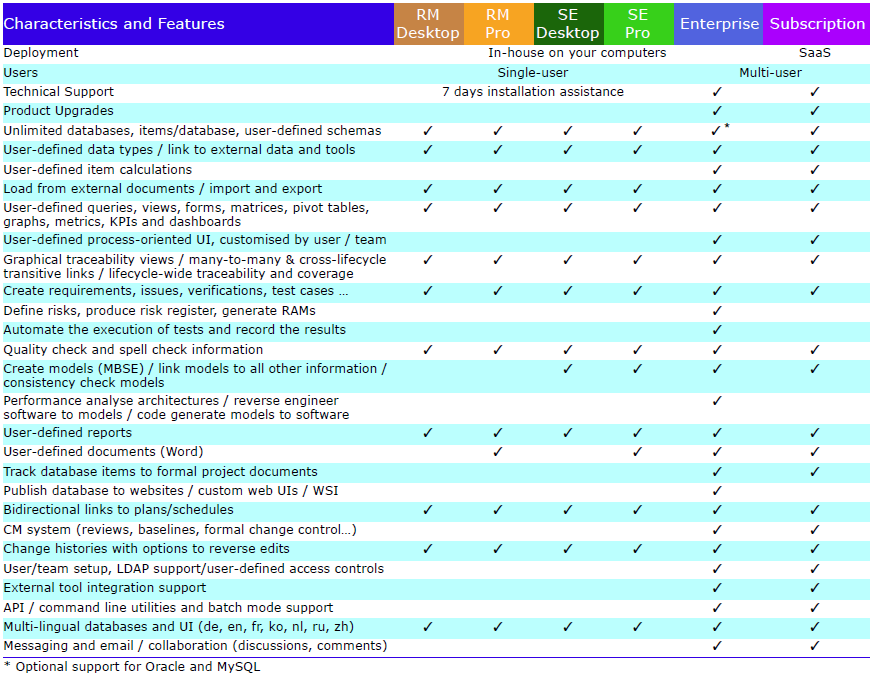
Product Characteristics and Features
The characteristics and features of all Cradle products are shown below:
This newsletter contains a mixture of news and technical information about us, and our requirements management and systems engineering tool “Cradle”. We would especially like to welcome everyone who has purchased Cradle in the past month and those who are currently evaluating Cradle for their projects and processes.
We hope that 3SL and Cradle can deliver real and measurable benefits that help you to improve the information flow within, the quality and timeliness of, and the traceability, compliance and governance for, all of your current and future projects.
If you have any questions about your use of Cradle, please do not hesitate to contact 3SL Support.
Configuration Management
All projects need configuration management, even if only to create protected copies of the items being worked on in one or more baselines. Cradle Configuration Management System (CMS) is a flexible, customisable framework. You can use the CMS to adapt Cradle to your process and the needs of your project.
The CMS contains a variety of features and capabilities. You can use these to configure the CMS to be a simple change manager. You can also configure the CMS to be extremely rigorous in all stages in the evolution of your project information from initial creation through to formal acceptance.
The scope and effect of these mechanisms are controlled by privileges and also by workflows.
Simple Process
A simple CM process is typically a series of stages that items will pass through on their way to a baseline. There are typically no formal reviews in this sequence.
The steps to create a simple process are:
Decide on the stages in your process and what each stage means
Create a category code with these stages as its possible values
Assign this category code to the item type(s) that are to follow the process
Create a workflow that references your category code and define the sequence of stages, each step in the workflow will set items’ status to be one of the values in your category code
Assign the workflow to the item type(s)
It is easy to use this workflow. You and your colleagues create items. You change items and link them to other items in the database. At the end of each step, you use the Advance operation to move the items to the next step in the workflow. When items reach the stage of being baselined, someone will need to open a baseline before you can Advance items into it. When everything has been moved into the baseline, it can be closed.
Review Process
A more complex workflow can be for a process that includes reviews. Any number of the steps in a workflow can be a review. You can specify the characteristics of each review. These include:
Which users will be involved in the review?
How many of these users must contribute to the review?
How will an approve result be determined from reviewers’ responses?
How will a reject result be determined from reviewers’ responses?
What actions are to be performed for items that are rejected by the review?
What actions are to be performed for items that are approved by the review?
Is the rework mechanism to be used and if so, how?
The process to implement a review process is the same as for a simple process except that some of the workflow steps require the configuration of reviews.
Managing Changes to Items
You can review items into project baselines and make formal changes to these items. Use of the CMS is therefore fundamentally about progressing items through one or more reviews into baselines, and then subsequently making formal changes to these items, which culminate in new versions of the changed items appearing in new baselines.
The CMS is not concerned with the details of how changes to items occur. It is not concerned with whether 1 or N edits have occurred to effect a change to an item. It is not concerned with recording the before and after values of the attributes that are affected by each edit, but is simply concerned with the high-level process of agreeing that a change is needed (a change request), initiating consequential changes to one or more items (managed in one or more change tasks), recording the formal reviews of the changed items, and ultimately storing the amended items in a new baseline.
Audit Trail / Configuration Log
For many projects, the automatically and transparently recorded audit trail, and the formalism of the use of change requests (CHRs), change tasks (CHTs), formal reviews and formal baselines, is sufficient. For other projects, more detailed records are required.
Public Training
3SL are running a public CM course in June. If you want to learn more about CM in Cradle, book your place now.
PDUIDs
Project Database Unique IDs are an alternate method for identifying items in a Cradle database. PDUIDs are particularly useful for users of the Cradle Application Programming Interface (API) and Web Services Interface (WSI) because they have the same format for all types of information.
We will provide a series of short articles on PDUIDs over the coming weeks. We hope that these will be helpful.
Integrity of 3SL’s SSL Certificates
All of 3SL’s web-based services use HTTPS, the secure form of HTTP. Wherever possible, all of our Internet-based services also use secure protocols. So this means we need a certificate to confirm our identity that your web browser and other tools check when you visit our website and other services.
We have a certificate for:
*.threesl.com
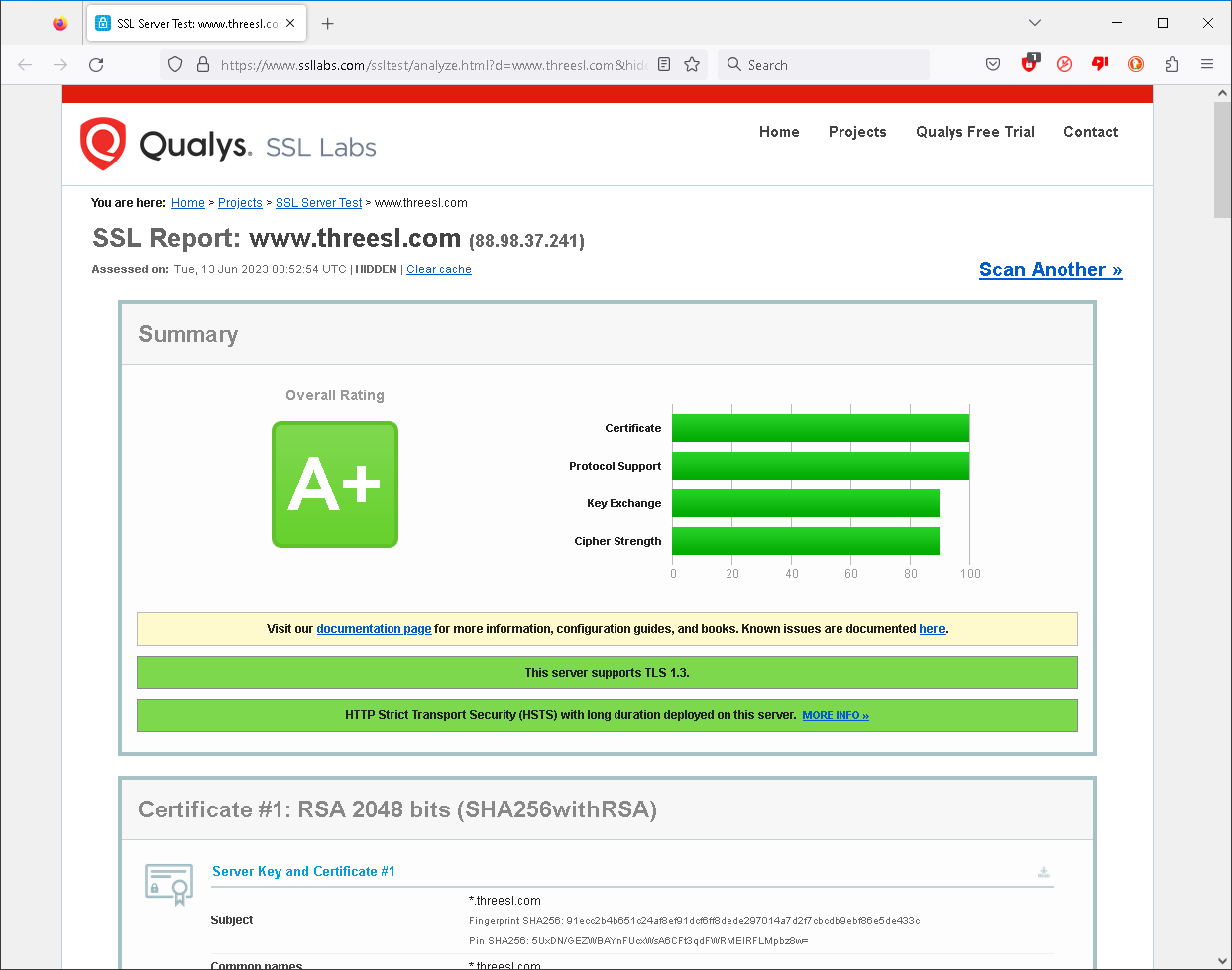
This includes our website, mail server, shared SaaS and other portals. Certificates have a fixed lifespan and so on 9th June we refreshed our certificate. Our current certificate is issued by Sectigo RSA Domain Validation Secure Server CA. It is valid until 23:59:59 UTC Tuesday, 9th July 2024.
You can check the integrity of a website certificate using Qualys here. You can check 3SL’s website here. Our site is rated A+:
Qualys report for 3SL
The King’s Official Birthday (17th June 2023)
Celebrations of the monarch’s official birthday are held in June across the Commonwealth, including the Trooping of the Colour. The date not necessarily correspond to the date of the monarch’s actual birth.
The sovereign’s birthday was first officially marked in the Kingdom of Great Britain in 1748, for King George II. Since then the date of the king or queen’s birthday has been determined by:
Royal proclamations issued by the sovereign or viceroy, or
Statute laws passed by the local parliament
We will individually mark the King’s birthday and invite others to do so in respect to the Crown.
Social Media
We congratulated @WeAreHII on their record first quarter 2023 revenues and @Siemens on their outstanding performance.
We also congratulated @KBRincorporated on the award of the contract by Hindustan Petroleum Corporation Ltd. This is to implement supercritical solvent deasphalting technology.
Our customer @MIRAEngineering were exhibiting at the Future Mobility Asia Exhibition & Summit. Did you visit stand ME18?