Integrated Systems Engineering from the Desktop to the Enterprise
Manage all information for the entire lifecycle with full traceability, metrics, quality checks and performance indicators, all linked to your project schedules.
Supports the full systems development lifecycle at system, subsystem and lower levels
Integrates in one product features normally spread across separate tools from different vendors
Completely user-definable and user-extensible with point-and-click UIs
Manage any information, including requirements, models, risks, interfaces, tests and verifications
Embed process in tool UIs, minimised user training
Cradle is a complete multi-user solution to manage, trace and document all data in your agile, and phase-based projects.
Capture information from external documents and tools, and track changes. You can build new sets of requirements, analysis, architecture and design models, tests or verifications, and link them to the source data and to each other. Check the consistency and quality of this information, and prove the integrity of the models and other data with bi-directional coverage and traceability analyses.
Customers’ confidence can be raised with proof that your work satisfies its sources and constraints, and will meet their needs.
Easily track progress with metrics and KPIs and link to your WBS and actual progress to your project planning tools.
Manage users’ work with user-defined CM, workflows and access controls, and multi-team collaboration and discussions.
Cradle is a complete product range, from single-user requirements management to enterprise scale, multi-user collaborative environments. All are fully compatible with each other, sharing their architecture, database and I/O formats. You can start with a single-user tool and migrate to the multi-user Cradle Enterprise product, seamlessly and easily.
Example configurations suitable for many different processes, each with its own process guide
A range of user guides
Fully indexed, searchable help
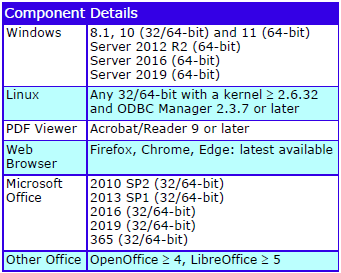
Cradle supports all variants of Windows and Linux. Different platforms can be mixed in a Cradle deployment. Cradle servers are designed to run 24×7, unattended, and need no administration. No routine upkeep is needed.
Virtual servers and clients are supported. Supports IPv4 and IPv6. Cradle may be served as SaaS using all popular web and non-web remote deployment tools. Can be served through firewalls and from DMZs.
Includes access, security and licence usage logs, and a range of management reporting tools.
Supported Platforms
Supported Platforms
Deployment
Cradle systems are installed on your computers. Cradle is also available as SaaS in a subscription where you choose the features required, the number of users to be supported, and how long you want to use Cradle.
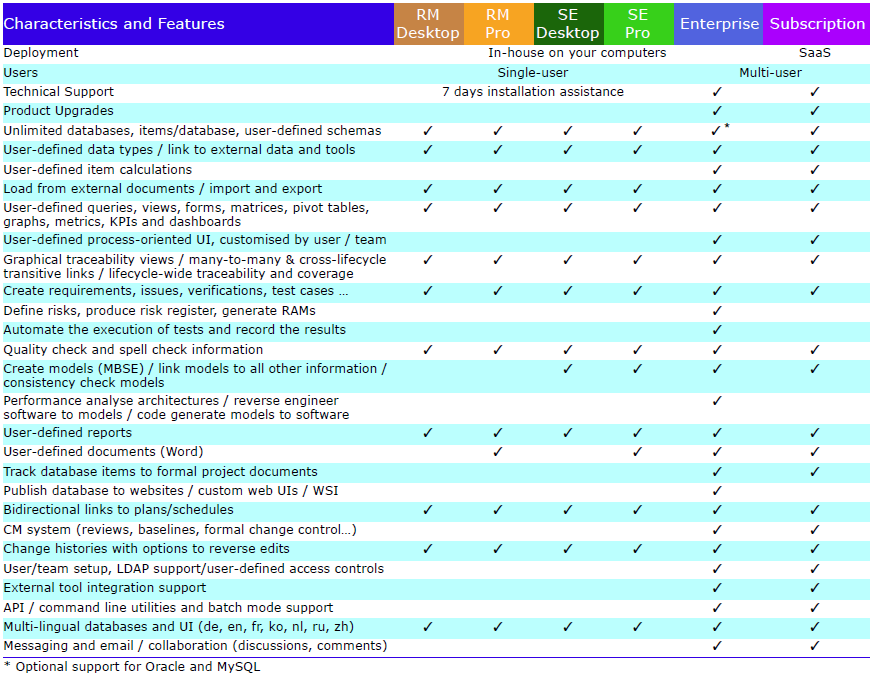
Product Characteristics and Features
The characteristics and features of all Cradle products are shown below:
This newsletter contains a mixture of news and technical information about us, and our requirements management and systems engineering tool “Cradle”. We would especially like to welcome everyone who has purchased Cradle in the past month and those who are currently evaluating Cradle for their projects and processes.
We hope that 3SL and Cradle can deliver real and measurable benefits that help you to improve the information flow within, the quality and timeliness of, and the traceability, compliance and governance for, all of your current and future projects.
If you have any questions about your use of Cradle, please do not hesitate to contact 3SL Support.
Configuration Management
All projects need configuration management, even if only to create protected copies of the items being worked on in one or more baselines. Cradle Configuration Management System (CMS) is a flexible, customisable framework. You can use the CMS to adapt Cradle to your process and the needs of your project.
The CMS contains a variety of features and capabilities. You can use these to configure the CMS to be a simple change manager. You can also configure the CMS to be extremely rigorous in all stages in the evolution of your project information from initial creation through to formal acceptance.
The scope and effect of these mechanisms are controlled by privileges and also by workflows.
Simple Process
A simple CM process is typically a series of stages that items will pass through on their way to a baseline. There are typically no formal reviews in this sequence.
The steps to create a simple process are:
Decide on the stages in your process and what each stage means
Create a category code with these stages as its possible values
Assign this category code to the item type(s) that are to follow the process
Create a workflow that references your category code and define the sequence of stages, each step in the workflow will set items’ status to be one of the values in your category code
Assign the workflow to the item type(s)
It is easy to use this workflow. You and your colleagues create items. You change items and link them to other items in the database. At the end of each step, you use the Advance operation to move the items to the next step in the workflow. When items reach the stage of being baselined, someone will need to open a baseline before you can Advance items into it. When everything has been moved into the baseline, it can be closed.
Review Process
A more complex workflow can be for a process that includes reviews. Any number of the steps in a workflow can be a review. You can specify the characteristics of each review. These include:
Which users will be involved in the review?
How many of these users must contribute to the review?
How will an approve result be determined from reviewers’ responses?
How will a reject result be determined from reviewers’ responses?
What actions are to be performed for items that are rejected by the review?
What actions are to be performed for items that are approved by the review?
Is the rework mechanism to be used and if so, how?
The process to implement a review process is the same as for a simple process except that some of the workflow steps require the configuration of reviews.
Managing Changes to Items
You can review items into project baselines and make formal changes to these items. Use of the CMS is therefore fundamentally about progressing items through one or more reviews into baselines, and then subsequently making formal changes to these items, which culminate in new versions of the changed items appearing in new baselines.
The CMS is not concerned with the details of how changes to items occur. It is not concerned with whether 1 or N edits have occurred to effect a change to an item. It is not concerned with recording the before and after values of the attributes that are affected by each edit, but is simply concerned with the high-level process of agreeing that a change is needed (a change request), initiating consequential changes to one or more items (managed in one or more change tasks), recording the formal reviews of the changed items, and ultimately storing the amended items in a new baseline.
Audit Trail / Configuration Log
For many projects, the automatically and transparently recorded audit trail, and the formalism of the use of change requests (CHRs), change tasks (CHTs), formal reviews and formal baselines, is sufficient. For other projects, more detailed records are required.
Public Training
3SL are running a public CM course in June. If you want to learn more about CM in Cradle, book your place now.
PDUIDs
Project Database Unique IDs are an alternate method for identifying items in a Cradle database. PDUIDs are particularly useful for users of the Cradle Application Programming Interface (API) and Web Services Interface (WSI) because they have the same format for all types of information.
We will provide a series of short articles on PDUIDs over the coming weeks. We hope that these will be helpful.
Integrity of 3SL’s SSL Certificates
All of 3SL’s web-based services use HTTPS, the secure form of HTTP. Wherever possible, all of our Internet-based services also use secure protocols. So this means we need a certificate to confirm our identity that your web browser and other tools check when you visit our website and other services.
We have a certificate for:
*.threesl.com
This includes our website, mail server, shared SaaS and other portals. Certificates have a fixed lifespan and so on 9th June we refreshed our certificate. Our current certificate is issued by Sectigo RSA Domain Validation Secure Server CA. It is valid until 23:59:59 UTC Tuesday, 9th July 2024.
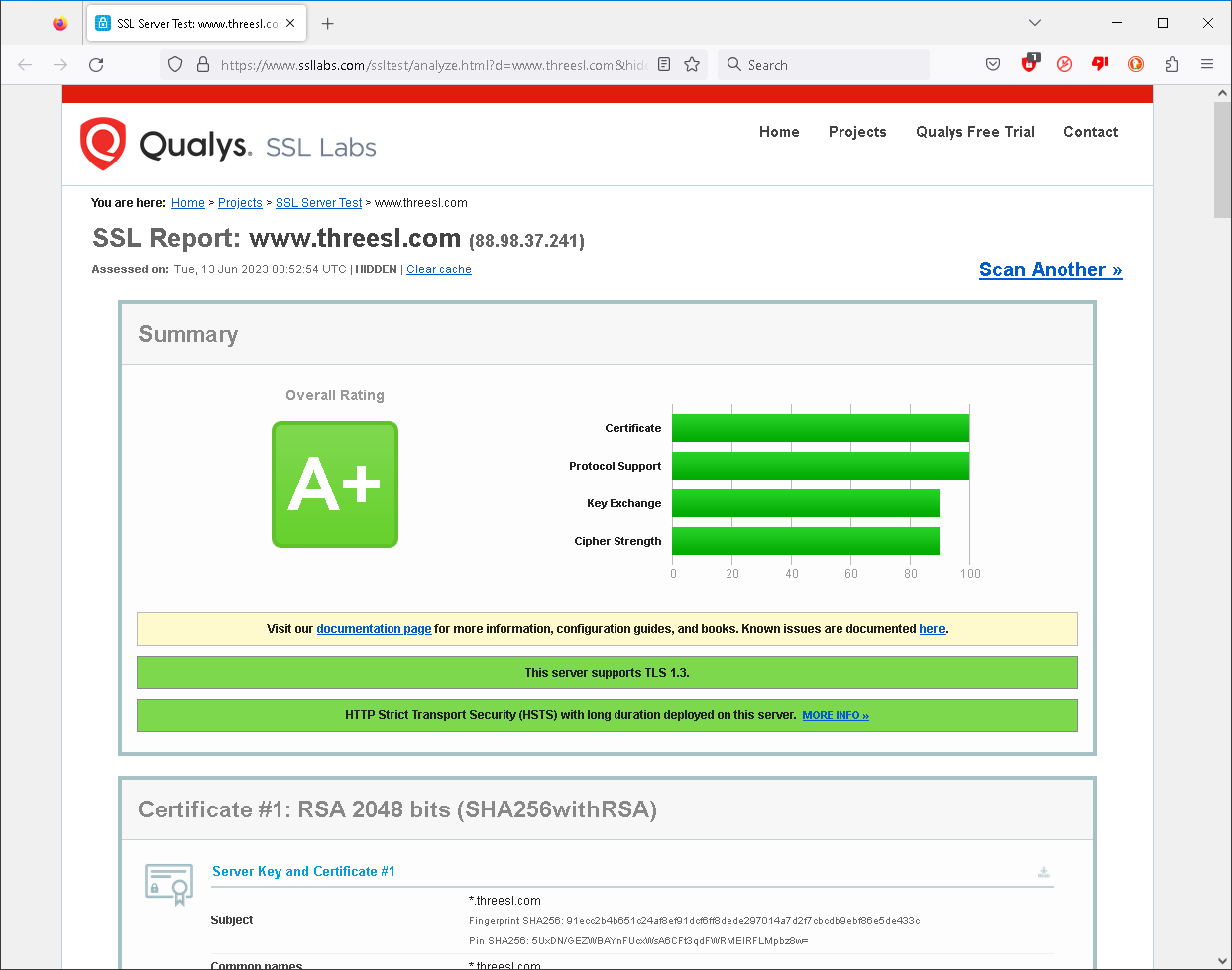
You can check the integrity of a website certificate using Qualys here. You can check 3SL’s website here. Our site is rated A+:
Qualys report for 3SL
The King’s Official Birthday (17th June 2023)
Celebrations of the monarch’s official birthday are held in June across the Commonwealth, including the Trooping of the Colour. The date not necessarily correspond to the date of the monarch’s actual birth.
The sovereign’s birthday was first officially marked in the Kingdom of Great Britain in 1748, for King George II. Since then the date of the king or queen’s birthday has been determined by:
Royal proclamations issued by the sovereign or viceroy, or
Statute laws passed by the local parliament
We will individually mark the King’s birthday and invite others to do so in respect to the Crown.
Social Media
We congratulated @WeAreHII on their record first quarter 2023 revenues and @Siemens on their outstanding performance.
We also congratulated @KBRincorporated on the award of the contract by Hindustan Petroleum Corporation Ltd. This is to implement supercritical solvent deasphalting technology.
Our customer @MIRAEngineering were exhibiting at the Future Mobility Asia Exhibition & Summit. Did you visit stand ME18?
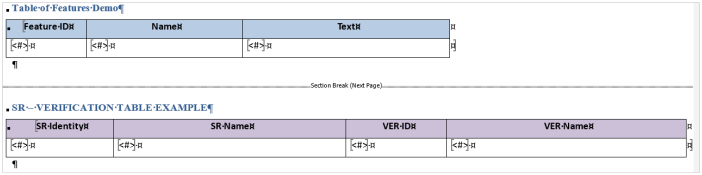
A Table tag allows you to generate uniform tables where the resulting items are reported in rows. This can be a list of individual items or links to other items using a defined hierarchy. Below shows an example definition of both.
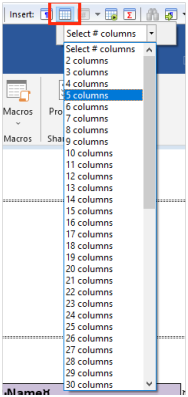
Insert a Table tag:
Insert Table Tag button
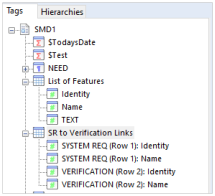
Add Field tags into the table cells:Field TagsTables in Document Publisher
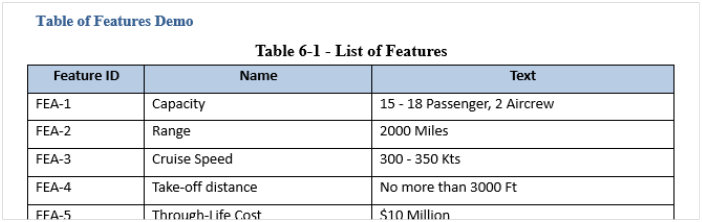
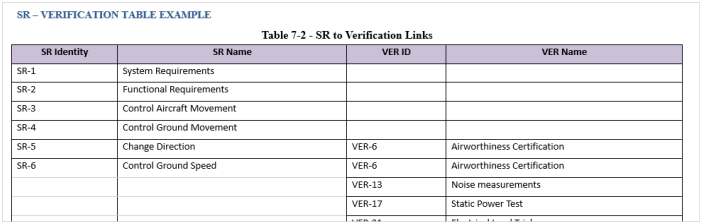
This will output the examples below:
Table showing FEATUREs
Table showing System Requirements
WorkBench Table Tag
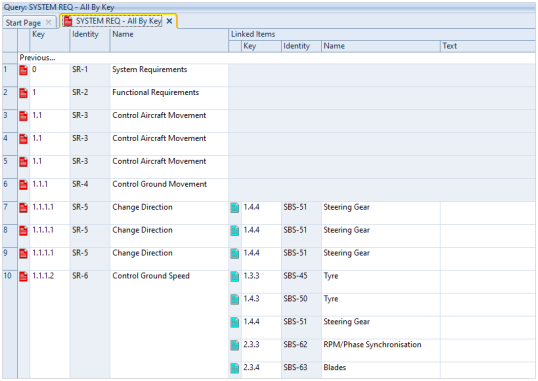
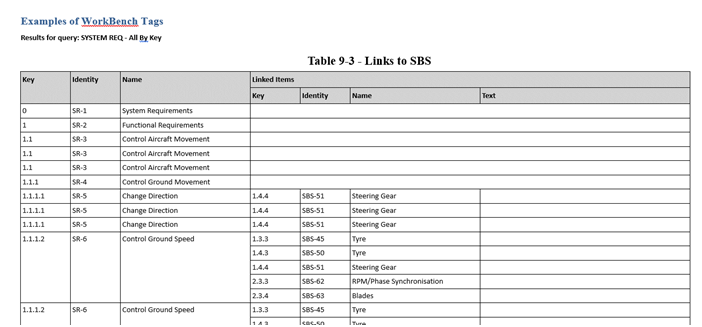
Many tables will probably have been used as a result of queries in WorkBench. For example, one shown here is a list of System Requirements linked to SBS items:
SRs linked to SBS items
These tables can be used as a WorkBench Table tag in a Document Publisher output:
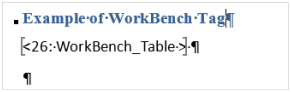
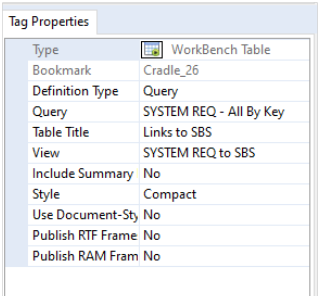
WorkBench Table Tag buttonExample WorkBench Table TagWorkBench Table Tag Properties
This is a quick and easy method of producing tables without any need for defining Field tags as the table attributes are already defined in WorkBench. An example output is shown below:
WorkBench Table Output
Inserting into Table Cells
Document Publisher also provides the ability to insert data into table cells by the use of a special Computed Insert_Table_From_Bkmk Field tag. The steps to achieve this are:
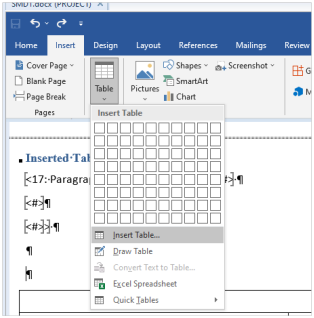
Insert a Word table and format as appropriate:Word Insert Table option
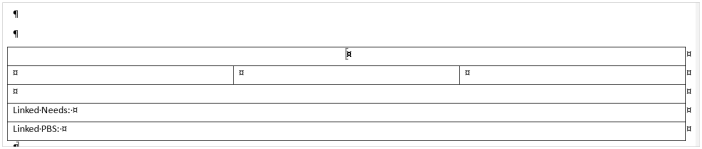
Inserted Word table
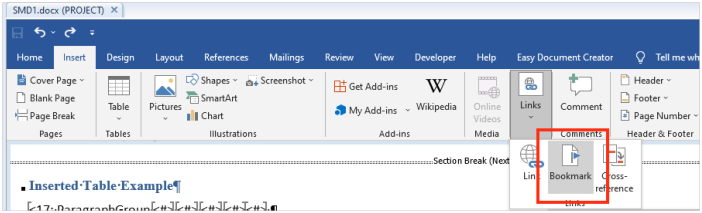
Highlight the table and insert a Word bookmark:
Insert Word Bookmark option
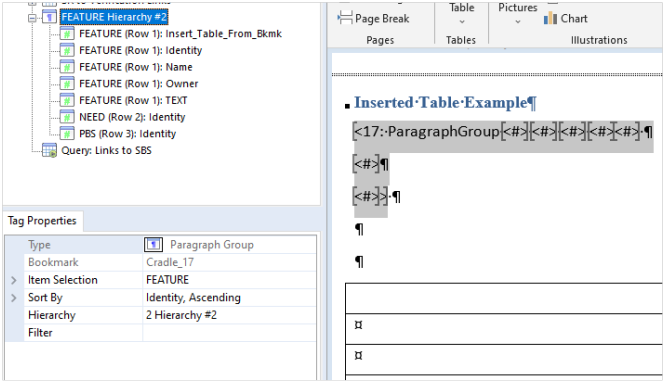
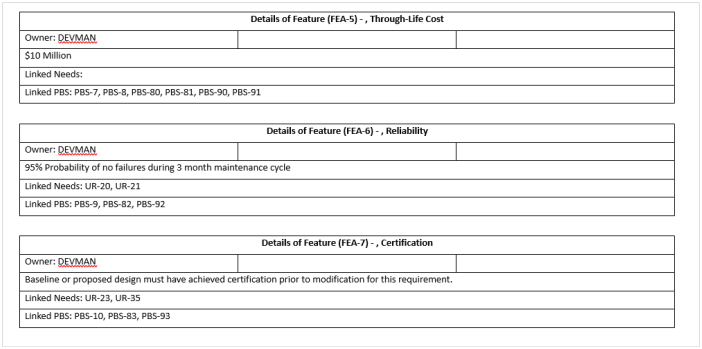
Before the table, insert a Paragraph Group tag and define the item type that you would like to shown in the table. For example – FEATURE items:
Example Paragraph Group tag
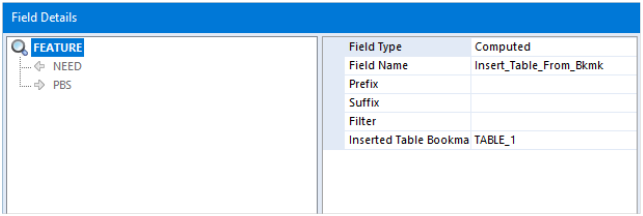
The first Field tag is very important as this specifies that the fields are going to be inserted into the table using the bookmark TABLE_1 that was defined. In this example, we also create a hierarchy to show linked NEED items and PBS items:
FEATURE hierarchy
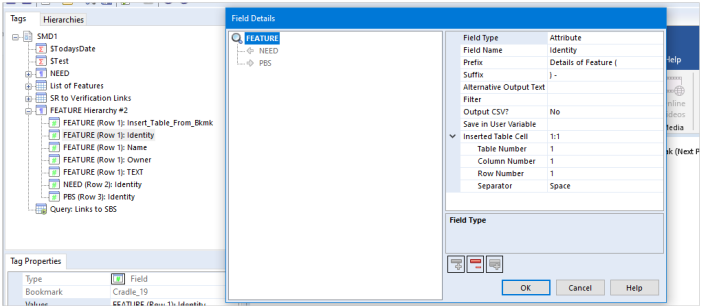
In subsequent Field tags, you can insert into a specified row and column of the table. In this first tag, it is inserting the FEATURE identity attribute into cell column 1, row 1:
Inserting FEATURE identity
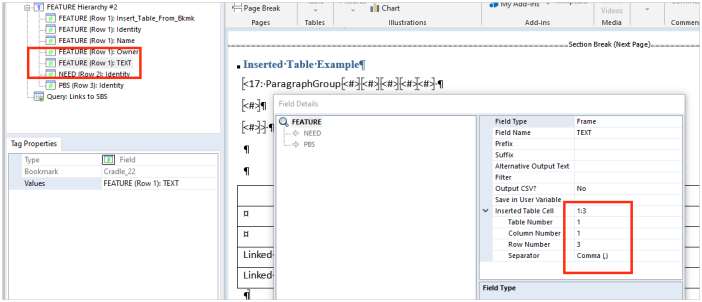
You can see here that another one of the Field tags is inserting the FEATURE TEXT frame into column 1, row 3 of the table:
Insert FEATURE TEXT frame
Once you have specified all of the cells to be populated in the table, this can then be published like the example shown below:
This newsletter contains a mixture of news and technical information about us, and our requirements management and systems engineering tool “Cradle”. We would especially like to welcome everyone who has purchased Cradle in the past month and those who are currently evaluating Cradle for their projects and processes.
We hope that 3SL and Cradle can deliver real and measurable benefits that help you to improve the information flow within, the quality and timeliness of, and the traceability, compliance and governance for, all of your current and future projects.
If you have any questions about your use of Cradle, please do not hesitate to contact 3SL Support.
3SL SaaS
Deploying Cradle as SaaS (software as a service) is becoming an increasingly attractive option for many organisations. Using SaaS greatly simplifies the deployment of Cradle as there is nothing that you, or your corporate IT, need to do.
We ask for the names of the people who will use Cradle, and the IP addresses from where they will access Cradle, and then we do the rest.
You and your colleagues get access to the latest Cradle, backed by our internationally renown technical support, with no need to be concerned about IT services, data integrity, backups or any of the other details that can be a burden for an in-house installation.
For more information, please look here. If you would like to talk to us about SaaS deployments of Cradle, please click here.
Baselines and Snapshots
Cradle provides two mechanisms to protect sets of information and provide read-only access to information as it was in the past.
Baselines
Baselines is the mechanism in Cradle’s Configuration Management System (CMS) to protect information from changes. Each baseline is a named repository for the state of a project at a specific point in time. A succession of baselines can be created over the life of a project, each containing more and more information as the project completes its sprints, iterations or phases.
Items can be registered into an open baseline and are given a version number: 01, 02, 03 … The version number assigned to each item is either 01 if there are no baselined instances of that item, or it is 1 higher than the highest version already in the database.
When the baseline is closed:
Unchanged items from the previous baseline migrate into (become a part of) the new baseline
A copy of all current links (cross references) is saved with the baseline
A list of the latest items and their versions is saved for the baseline
Snapshots
A snapshot is a copy of all the information in a database. Its contents can be viewed, read-only, at any time in the future. A succession of snapshots can be created over the life of a project. In effect, a snapshot is simply an online backup, a copy of a database.
A snapshot is a copy of an entire database. When a snapshot is created, everything in a database, including all of its baselines and definitions (excluding Personal and System scope) are copied into a separate area. Every snapshot is separate from all other snapshots and is separate from the live database.
Creating a snapshot is similar to making a backup copy of the database, except that this backup is directly accessible from within Cradle.
Comparison
#
Characteristic
Baseline
Snapshot
1
Summary
Creates a new approved set of items and links in a database that can be viewed RO.
Copies an entire database and related definitions to create a new database that can be viewed RO.
2
User Benefit
RO view of previous baseline that can be used for queries, view data, run metrics, publish reports or documents
RO view of everything in the database as it was in the past, for queries, view data, run metrics, publish reports or documents
3SL are proud to announce that we are supporting Circus Starr!
Circus Starr
The community interest circus company are dedicated to making a difference to the lives of vulnerable and disadvantaged children in Barrow-in-Furness and across England through the magical art of circus. We are pleased to support our community, and this accessible and inclusive event is such a worthy cause.
Circus Star
To find out more about how you can support the circus with a purpose visit www.circus-starr.org.uk or call +44 (0) 1260 288690.
The Coronation of King Charles III
Many people across the country and the Commonwealth will be celebrating the Coronation of His Majesty The King and Her Majesty the Queen Consort over a weekend of special events on 6th to 8th May 2023.
International Nurses Day
Every year International Nurses Day is celebrated on 12 May to commemorate the anniversary of Florence Nightingale’s birthday. This day also celebrates the contribution done by nurses to society around the world. On this day the International Council of Nurses organisation produces an International Nurses kit to educate and assist health workers globally with a different theme every year.
Nurse
World Multiple Sclerosis Day
On 30th May it is World Multiple Sclerosis Day. World MS day takes place on 30th May every year. Share stories, raise awareness and campaign with everyone affected by MS.
World MS Day
Social Media
We congratulated our customer ZF Group on the opening of their West Coast Mobility Hub which is a cutting edge facility dedicated to shaping the future of mobility.
Borg Warner were presenting how H2-ICE enables fast and efficient transportation at the World Hydrogen 2023 Summit & Exhibition.
Siemens Mobility demonstrated how their pioneering Vectron Dual Mode locomotives combined advantages of full featured diesel locomotive with those of electric ones.
We congratulated Horiba on obtaining UKAS accreditation against ISO17021-1.
Roche confirmed that the US FDA had granted approval to their new combination treatment for certain types of previously untreated diffuse large B cell lymphoma. This makes it the first therapy in nearly 20 years approved by the FDA for people with this aggressive disease.
We would also like to thank all attendees on our Risk Management course which we provided in April.
We also received a fantastic review from one of our customers:
“When there have been technical difficulties, the staff have been frequently quick, knowledgeable, and able to help restore normal operations. The level of service is above the levels of several large name companies, I struggle to think of what more I can ask for.”
We appreciate all feedback as this helps us to both assess and look to improve both the products and services we provide.
3SL are proud to announce that we are supporting Circus Starr!
Circus Starr
The community interest company are dedicated to making a difference to the lives of vulnerable and disadvantaged children in Barrow-in-Furness and across England through the magical art of circus. We are pleased to support our community, and this accessible and inclusive event is such a worthy cause.
Circus Star
To find out more about how you can support the circus with a purpose visit www.circus-starr.org.uk or call +44 (0) 1260 288690.
When setting up a single value pick list or multiple category, you can define any number of possible values. These can be chosen by a user as the value of the category in an item.
However, over time, category values may no longer be relevant.
Removing the values from the project schema would be the wrong course of action as values could still exist in items (possibly in old baselines) that would raise errors in item integrity checks and could cause problems when data is imported. For example, data that used to be valid can no longer be imported unless extra import options are selected to ignore the validation of data.
Set Category Values as Obsolete
Instead of deleting those values from the project schema, you can set category values as obsolete so that the value can no longer be entered by users but the historical values remain valid.
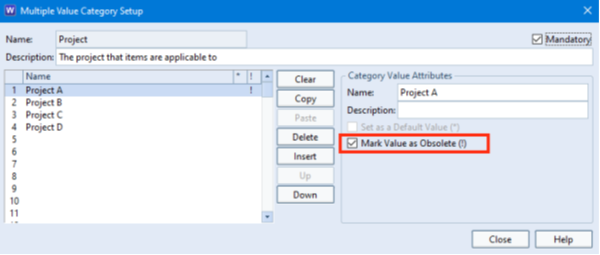
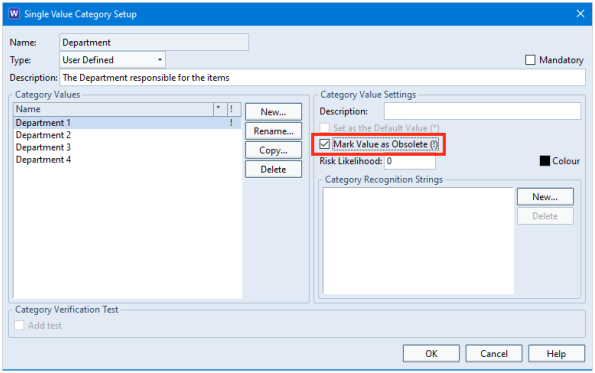
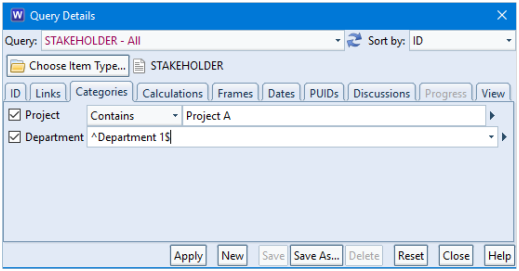
In this example, Project A might have been completed so is no longer valid to set for future items. Also, Department 1 might not be responsible for any future items but they were responsible for historical ones.
Marking a multiple value category value as obsoleteMarking a single value category value as obsolete
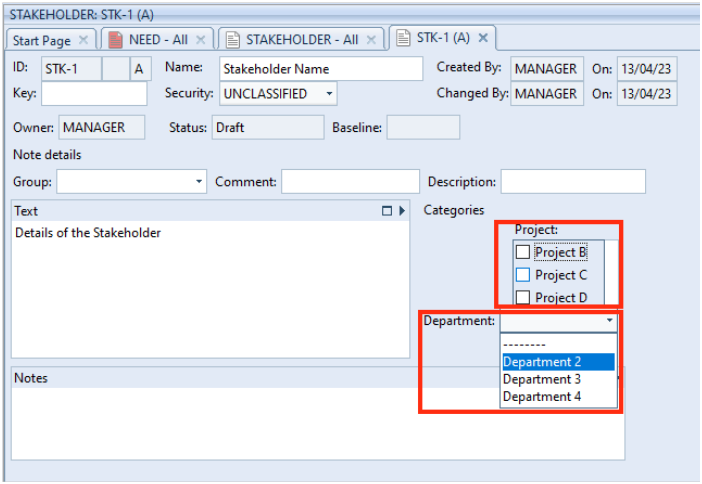
Once set, any items that had been set to the obsolete value remain valid. However, users can only enter the values that are currently valid; not the ones that are marked as obsolete.
Items only allow valid values to be set
When querying the database, you can still set the query criteria to search for items that are marked as obsolete.
Querying the database on category values marked as obsolete
Any validation checks on items in the database will return without error because the value remains defined in the schema.
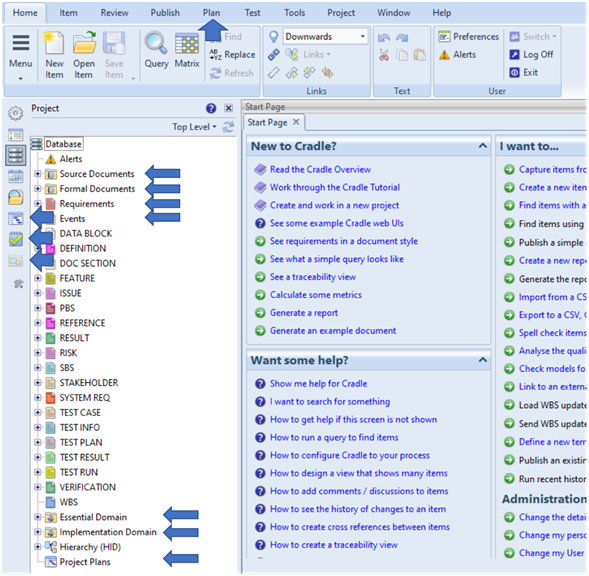
Requirements – standard requirement type that you might wish to replace with a system note type instead
Events – used in the analysis stage of a project to model the environment of a system and to describe how the system interacts with this environment
Essential Domain – analysis models
Implementation Domain – design models
Project plans – integration with Microsoft ProjectBefore hiding unused item types
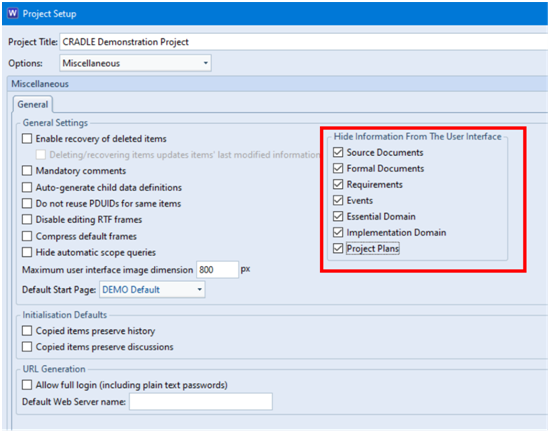
Some of the item types might not be necessary in your schema so you can remove unused item types/information in the Miscellaneous section of Project Setup:
Setting item types to be hidden
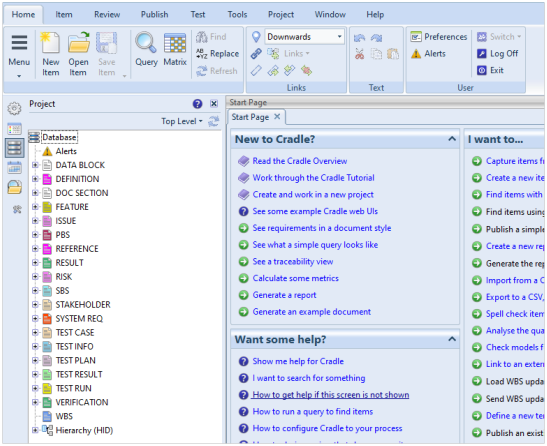
Once applied and WorkBench restarted, you will no longer see the item types/information you have chosen to hide. This includes:
This newsletter contains a mixture of news and technical information about us, and our requirements management and systems engineering tool “Cradle”. We would especially like to welcome everyone who has purchased Cradle in the past month and those who are currently evaluating Cradle for their projects and processes.
We hope that 3SL and Cradle can deliver real and measurable benefits that help you to improve the information flow within, the quality and timeliness of, and the traceability, compliance and governance for, all of your current and future projects.
If you have any questions about your use of Cradle, please do not hesitate to contact 3SL Support.
Is SaaS Beneficial?
Traditionally, software was installed on in-house computers. You managed the hardware that ran the software, ensured the integrity of the data created with the software with appropriate backups, and applied all the operating system and firmware updates needed to keep the system running properly.
Increasingly, individuals and companies simply want to use software, and have someone else host it, ensure the integrity of the data that they create, and manage the resilience of the underlying hardware and software infrastructure.
This is SaaS – software as a service.
Most large software companies try hard to force all customers to use SaaS by buying subscriptions. For example, although it is possible to buy Microsoft and Adobe products to install in-house, you have to work hard to find the part of their websites where such purchases can be made.
SaaS is charged on a per user per month basis for the functionality used. You pay more as you add users and as you access more functionality. You can stop the service when access to the software will be removed, all your data will be deleted, and you will stop being charged. This is all reasonable.
Some SaaS Benefits
SaaS brings benefits including:
You do not need to provide resources (hardware or VMs) to run the software
You do not have to maintain these resources nor provide the staff to perform this maintenance
You can easily react to short term needs
You do not need to provide integrity for the data that is created
You do not have any costs if you don’t need the resource for a while
Problems with SaaS
Of course there are also disadvantages to SaaS:
It will be more expensive than deploying in-house, typically after 2 years
You have no direct access, so you are reliant on your SaaS provider being responsive and complying with the SLA – you do have a Service Level Agreement don’t you?
You cannot directly interact with the software and must rely on the SaaS provider’s competence with the software and their understanding of what you want to achieve. This could cause delays or errors.
You do not have physical control over your data or the hardware that hosts it
Your data may be exposed by being given to third parties without your knowledge or consent, given such as the US Patriot Act (parts of which are still in effect) and the collaboration between groups including the EU and 5 Eyes – this includes all data centres managed by US companies regardless of their location, so be mindful when considering US-owned Infrastructure as a Service such as, but not only, Azure and AWS
You have to manage the IP ranges that are to have access, unless your SaaS allows access by the entire Internet
Is a Cradle SaaS Worth It?
This depends on your situation. In general:
if you do not have an IT organisation, or
if Cradle is too small to be applicable to your IT organisation
and:
if you are confident that 3SL understands Cradle and will be responsive to your needs and
if the SLA and Cradle SaaS are acceptable (see the 3SL Cradle End User SaaS Agreement – EUSA), and
you have agreed a location for your data (within 3SL or in a SaaS Virtual Private Cloud – VPC – that 3SL will build for you in an agreed location)
then, yes, SaaS is a good solution as it allows you to concentrate on using Cradle to the benefit of your projects and leaves the management of the Cradle infrastructure to others.
Fixed IPs for Cradle SaaS
We do not want a Cradle SaaS to be accessible by the entire Internet. Each Cradle SaaS includes an external firewall that specifies the IP addresses or ranges (CIDRs) of the locations that are allowed access. Access from any IP address is ignored if it is not in this list of allowed locations.
This method works well except when a user’s IP address is not fixed. A user’s IP address is not fixed if they access the SaaS from either:
many locations, such as customer sites, hotel rooms, train stations, public tea rooms, or
a domestic Internet connection where the ISP assigns a different IP address to the user every time that they connect to the Internet
In these cases, 3SL will consider the size of the IP address range. A small IP address range may be acceptable to both you and 3SL. For example, the CIDR:
78.37.252.0/22
is a range of 1,024 IP addresses 78.37.252.0 to 78.37.255.255 inclusive. In general, 3SL will not accept CIDRs of more than 64 addresses.
The solution to this problem is to have a fixed IP address.
Fixed IP Addresses and VPNs
If the end user’s location is not fixed or does not have a fixed IP address, they can get a fixed IP address by:
An organisation may provide a VPN. If so, then route the user’s connection to the Cradle SaaS over this VPN. This has two advantages. First, the connection from the end user’s computer is encrypted by the VPN, so it can be used safely from highly insecure locations such as tea shops or hotel rooms. Second, the connection to the SaaS will be from the organisation’s fixed external IP address. This is transparent to the end user. The end user simply starts the VPN as they will for all company work, and then connect to the Cradle SaaS.
A fixed IP address can be purchased from a range of providers, such as are listed here
For an extra fee, 3SL can provide a reverse proxy server that provides a VPN. The end user connects this VPN using authentication details from 3SL, typically a certificate issued by 3SL. The connection to the Cradle SaaS will come from the reverse proxy server, which has a fixed IP address. This method is also secure as it uses an encrypted VPN connection, and so it is safe to use from insecure locations.
Happy Easter
Easter, also called Pascha or Resurrection Sunday, is a Christian festival and cultural holiday.
We would like to wish all our customers, prospects, distributors and suppliers a Happy Easter:
3SL Easter
St George’s Day
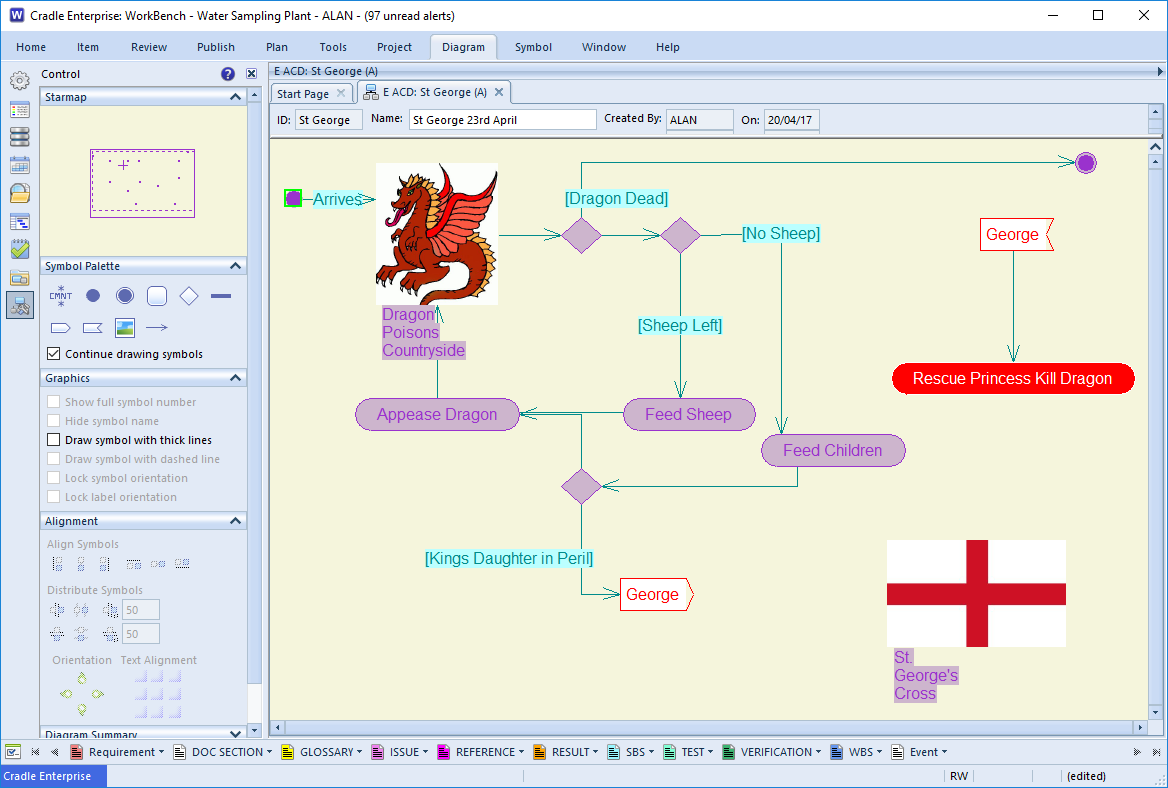
Saint George’s Day is the feast day of Saint George, celebrated by Christian churches, countries, and cities of which he is the patron saint:
St. George as a UML Activity Diagram (ACD)
If you ever want a reminder of the legend of St. George the diagram above may be handy. For more information see the Cradle help section for ACD
We would like to wish all our customers, prospects, distributors and suppliers a Happy Saint George’s Day.
World Autism Acceptance Week
World Autism Acceptance Week is on Monday 27th March to Sunday 2nd April with Autism Awareness Day on 2nd April. The theme for 2023 is colour.
Parental Alienation Awareness Day is on 25th April each year. This is a global campaign to raise awareness of Parental Alienation. It is an opportunity for parents, grandparents, extended family members or friends to come together to access information, advice and to enable connection and support for others affected by Parental Alienation.
#hensoldt were exhibiting at #HeliExpo (booth 5614) where they talked about airborne portfolio covering mission systems, situational awareness and certified lightweight flight data recorder. Hensoldt also won contracts from #Hyundai Heavy Industries to provide six offshore patrol vessels and two corvettes which are currently being constructed for the Philippine Navy.
Congratulations to the team at @SafranSeats who had been recognised by the Chartered Institute of Personnel and Development at the CIPD Wales Awards for being the Best Wellbeing Initiative in the region for a large company.
@MirionHQ were exhibiting (booth 3) at the Cyber Security Implementation Workshop where they provided an insight into their solutions for cyber security, command and control and lifecycle management.
@Roche and Lilly have joined together to enhance early diagnosis of Alzheimers disease.
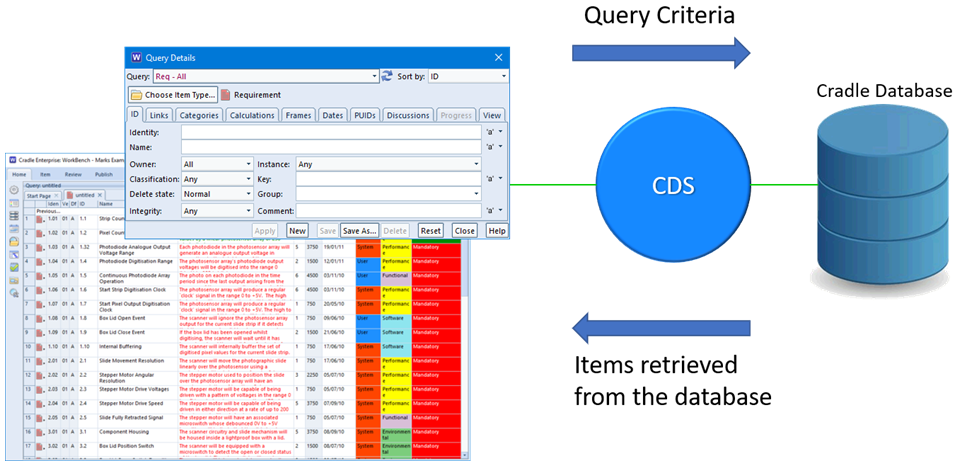
When a query is run in WorkBench, the tool will return a list of the items matching the criteria specified.
As a Cradle database can contain any number of items of information a query could find 0 to 1 million items.
Items in Cradle Database
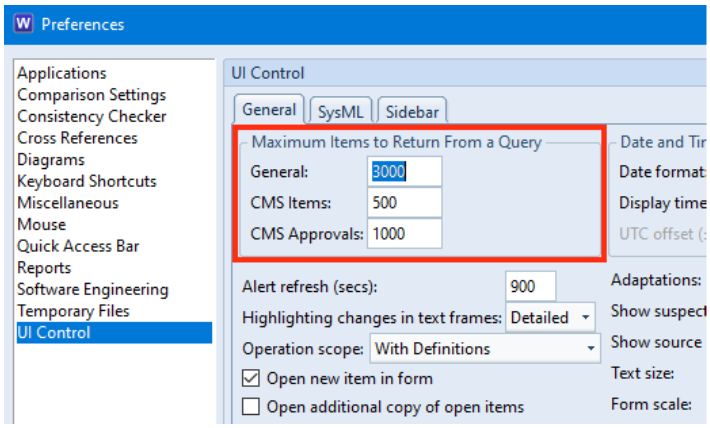
The time taken to find so many items could be excessive. Therefore, queries find and return items from the database in blocks. The default size of a block is 1000 items but can be extended to 8000 items in UI Control user preferences:
Retrieve Item Options in User Prefs
This means that when you run a query it will return at most N items.
Navigating between Blocks of Data
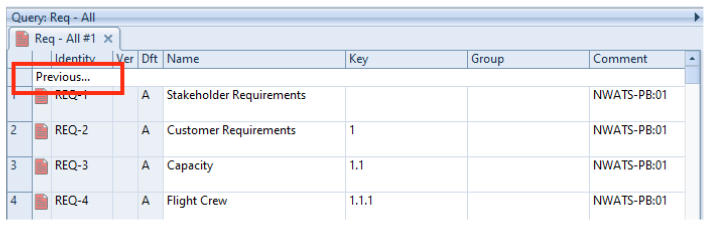
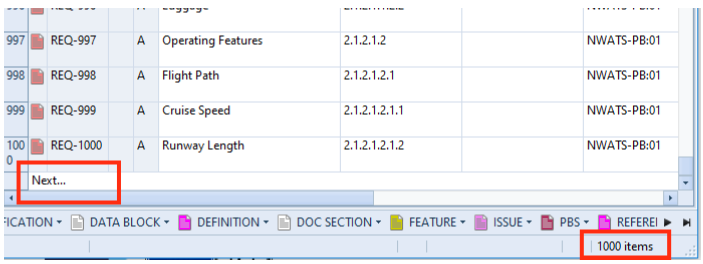
When the block is shown in the WorkBench UI, it is preceded by Previous… and followed by Next….
If you select these, then the query is re-run to find the next block or the previous block of items.
Query showing Previous optionQuery showing Next option
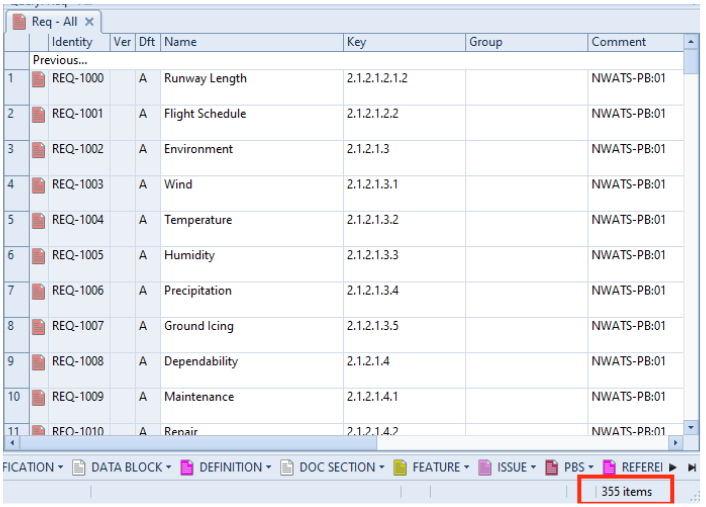
In this example, clicking the Next… option will retrieve the next set of items in the query:
Query showing items
Selecting Previous… again will return you to the previous block of items.
Reporting Items
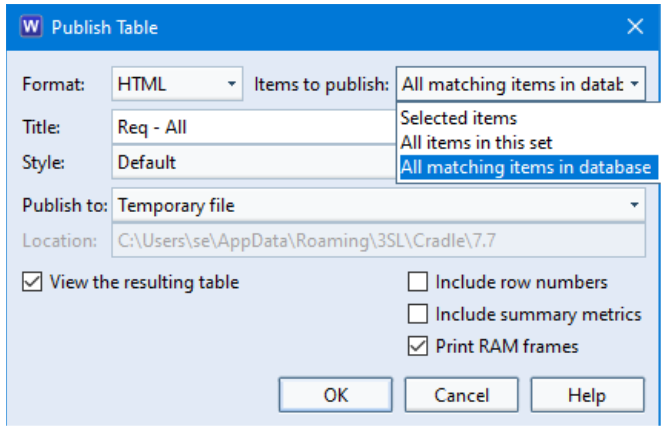
If you are creating a report or publishing a document using a query, it is likely that you would NOT wish to be restricted by blocks of items.
Reports allow you to specify:
Selected items – items highlighted in the query
All items in this set – the block of N items
All matching items in database – the totality of items matching the query criteria
This newsletter contains a mixture of news and technical information about us, and our requirements management and systems engineering tool “Cradle”. We would especially like to welcome everyone who has purchased Cradle in the past month and those who are currently evaluating Cradle for their projects and processes.
We hope that 3SL and Cradle can deliver real and measurable benefits that help you to improve the information flow within, the quality and timeliness of, and the traceability, compliance and governance for, all of your current and future projects.
If you have any questions about your use of Cradle, please do not hesitate to contact 3SL Support.
Cyber Essentials Assessment
Certified for Cyber Essentials
We, Structured Software Systems Limited (3SL), have been successful in our re-assessment under the Cyber Essentials scheme for another year.
As a Government-backed, industry-supported scheme, Cyber Essentials aims to help organisations protect themselves against common online threats.
By being certified compliant with Cyber Essentials, you can be assured that 3SL’s IT systems have, at the very least, a secure Information Security Management System (ISMS) and a robust set of operating principles and controls to safeguard our, and our customers’ information.
ISO9001
3SL Certificate Number 16926 ISO 9001
3SL are proud to announce their fourth year recertification for ISO9001. The team working with the audit said we passed with flying colours and there were no non-conformances. This is a testimony to all who have helped throughout the year improving and recording our processes.
The ISO says of the scheme
“ISO 9001 sets out the criteria for a quality management system and is the only standard in the family that can be certified to (although this is not a requirement). It can be used by any organization, large or small, regardless of its field of activity. In fact, there are over one million companies and organizations in over 170 countries certified to ISO 9001. This standard is based on a number of quality management principles including a strong customer focus, the motivation and implication of top management, the process approach and continual improvement. These principles are explained in more detail in ISO’s quality management principles. Using ISO 9001 helps ensure that customers get consistent, good-quality products and services, which in turn brings many business benefits.”
INCOSE
3SL are pleased to be advertising in the latest INCOSE members newsletter. You can find our latest publication here.
INCOSE Logo
3SL Inc SAM Registration
Our US partner, 3SL Inc, have successfully renewed their System for Award Management (SAM) registration for another year. This allows them to provide our products and services to the US government.
Happy Mothers Day
Mothers Day 2023 was on Sunday 19th March in the UK and Sunday 14th May in the USA. In other countries like Italy, Spain and Portugal, Sunday 19th March 2023 was Fathers Day where as the rest of the world, will celebrate it on June 18th 2023.
“Happy Mothers Day”
Happy Mothers Day
St Patricks Day
17th March marked St Patricks Day. St Patrick is the patron saint of Ireland and St Patricks Day is a national holiday in the Republic of Ireland although the day is celebrated all over the world.
3SL hope you all had a wonderful St Patricks Day.
Spring Time is Here!
On 20th March it was the first day of spring in the northern hemisphere and the first day of autumn in the southern hemisphere. This date marks the Astronomical spring equinox where as the Meterological spring started on the 1st of March.
Spring Time is Here
British Summer Time
Daylight savings begins on 26th March so remember the clocks go forward 1 hour at 1am here in the UK and throughout the EU. Let’s hope for a beautiful summer.